corey

Common User Experience Mistakes NZ Websites Make (and How to Fix Them)

By Tips and Guides, Web Design

When visitors come to your website, they expect a seamless, intuitive experience. But many New Zealand businesses unintentionally make mistakes that frustrate users, cause them to leave, or lose trust. Below, we walk through five common UX (user experience) mistakes NZ websites make — illustrated with local relevance — and simple fixes you can apply or ask your web team to address.

1. Asking for Too Much Too Soon (“UX Fatigue”)

One of the modern web design traps is UX fatigue — when a site overwhelms users with pop-ups, modals, sign-up prompts, cookie banners, onboarding tutorials, or notification requests before letting people see content.

Why NZ sites fall into this: Some local small businesses try to push newsletter signups, account creation, or tracking consents right at the start, hoping to build leads fast, but many users simply bounce before reading anything.

Fixes Sky Media team can implement on your website:

  • Delay non-essential pop-ups until after the user has consumed some content.
  • Use subtle banners instead of full-screen modals.
  • Bundle cookie consent and tracking prompts in a simple, unobtrusive bar.
  • Let users opt-in later rather than forcing actions immediately.
  • By giving users breathing room, you decrease bounce rates and increase the chance they’ll stick around.
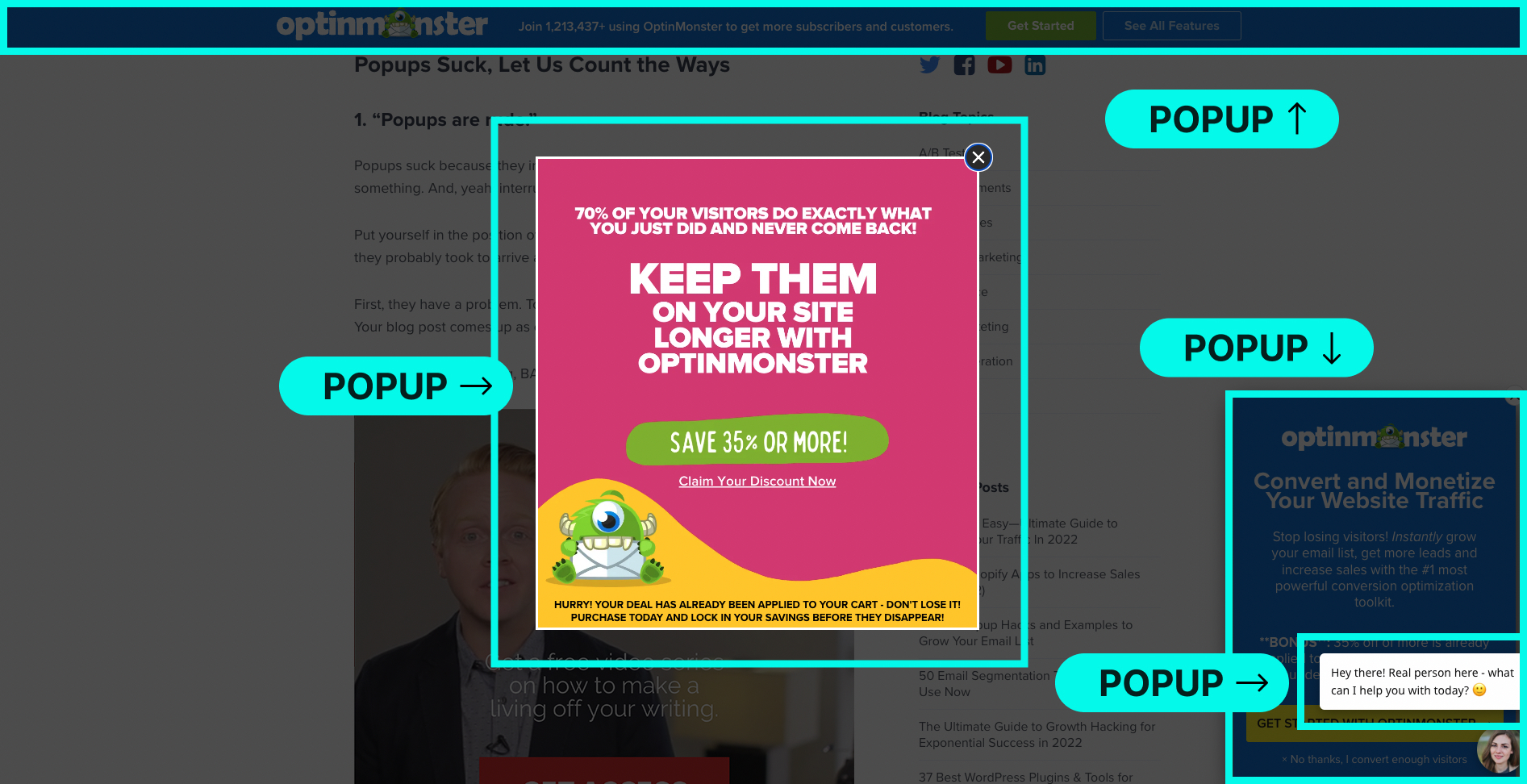
Website example showing misuse of popups overwhelming users

Misuse of popups creating poor user experience.

2. Confusing Navigation & Cluttered Menus

If people arriving at your site can’t find what they’re looking for within seconds, frustration sets in. Cluttered menus, too many options, vague labels or hidden pages all contribute.

Example: Imagine a Wellington café website that labels its menu tab as “Our Story / Eat / Gather” — that’s vague. A more descriptive “Menu | About Us | Book a Table | Contact” works better.

How to improve navigation:

  • Limit primary menu items to 5–7 max.
  • Use clear, descriptive labels (e.g. “Services,” “Pricing,” “Contact”) instead of creative jargon.
  • Use breadcrumbs on deeper pages so users always know where they are.
  • Group related items under parent categories to reduce clutter.
  • Test navigation with real users — ask a friend unfamiliar with your business to “find the contact page” and observe where they click.
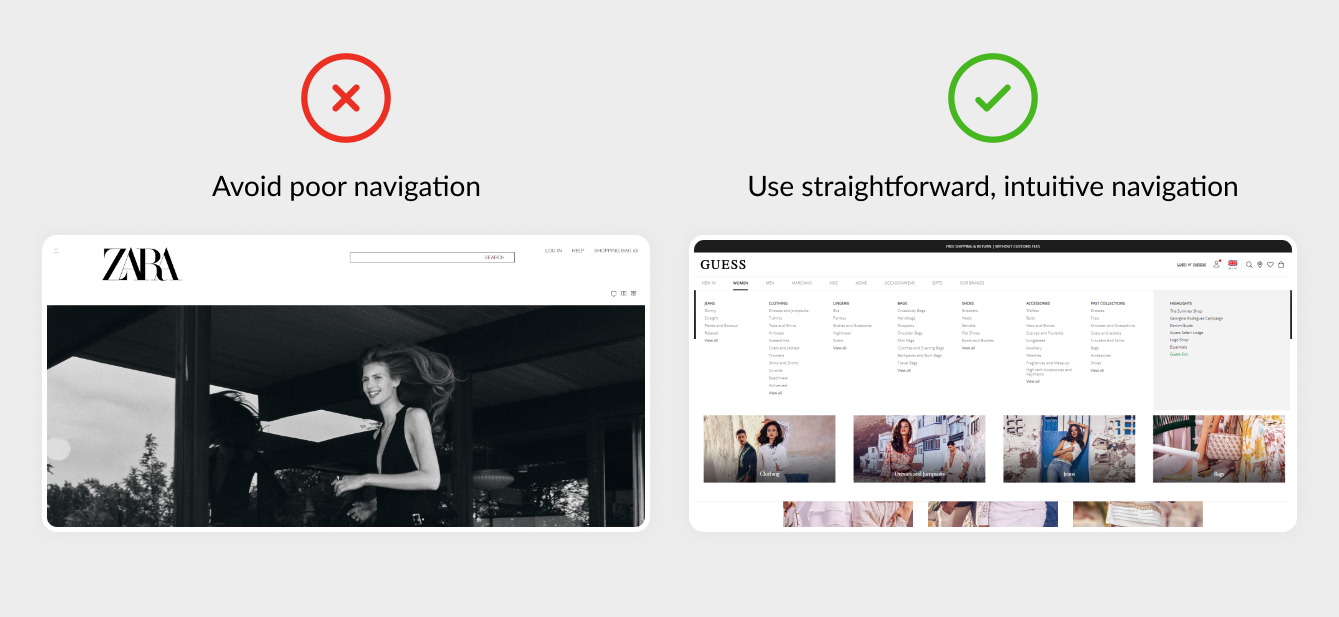
Website example showing confusing navigation menu vs clean navigation

Poor navigation and menus hurt user experience.

3. Poor Mobile Optimisation

In New Zealand, many people browse websites on mobile devices (phones or tablets). If your site isn’t mobile-friendly, buttons are too small, images don’t scale, or layout breaks, users will leave quickly.

Common mobile UX issues to watch for:

  • Tap targets (buttons, links) too small or too close together.
  • Text that requires zooming to read.
  • Overlapping elements or images that don’t scale properly.
  • Menus that become hidden or difficult to use.

Simple fixes:

  • Design mobile-first — start layout and style thinking from small screens, then scale up.
  • Make buttons well noticeable with ample spacing.
  • Use responsive design so images and containers adapt fluidly.
  • Test on multiple real devices (iPhone, Samsung Galaxy, etc.) to catch quirks.
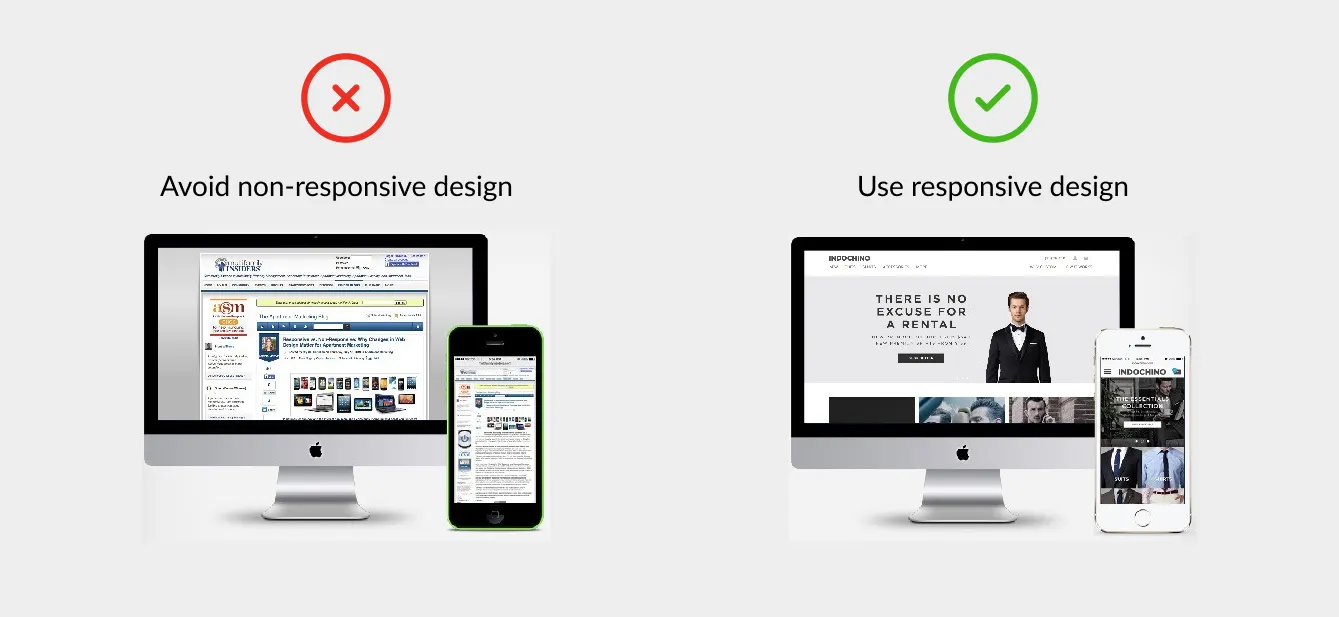
Website example showing poor responsive design

Website example showing non-responsive design vs clean responsive design.

4. Long, Overwhelming Forms & Requests for Data

Nothing kills momentum faster than a long registration or contact form that asks for too much information. If your form looks like a chore, most users won’t bother completing it.

Typical overreach in NZ business sites:

  • Asking for full address, phone, business registration number, custom preferences just to get a quote.
  • Long multiple-step forms without progress indicators.
  • No inline feedback (i.e. telling users immediately when there’s an error).

Better approach:

  • Only ask for essential fields first (name, email, message) and expand later if needed.
  • Use multi-step forms or progressive disclosure (show additional fields after initial information).
  • Provide live validation (e.g. “That email looks invalid”) to reduce submission errors.
  • Show a success message or confirmation immediately after submission — reassure users.
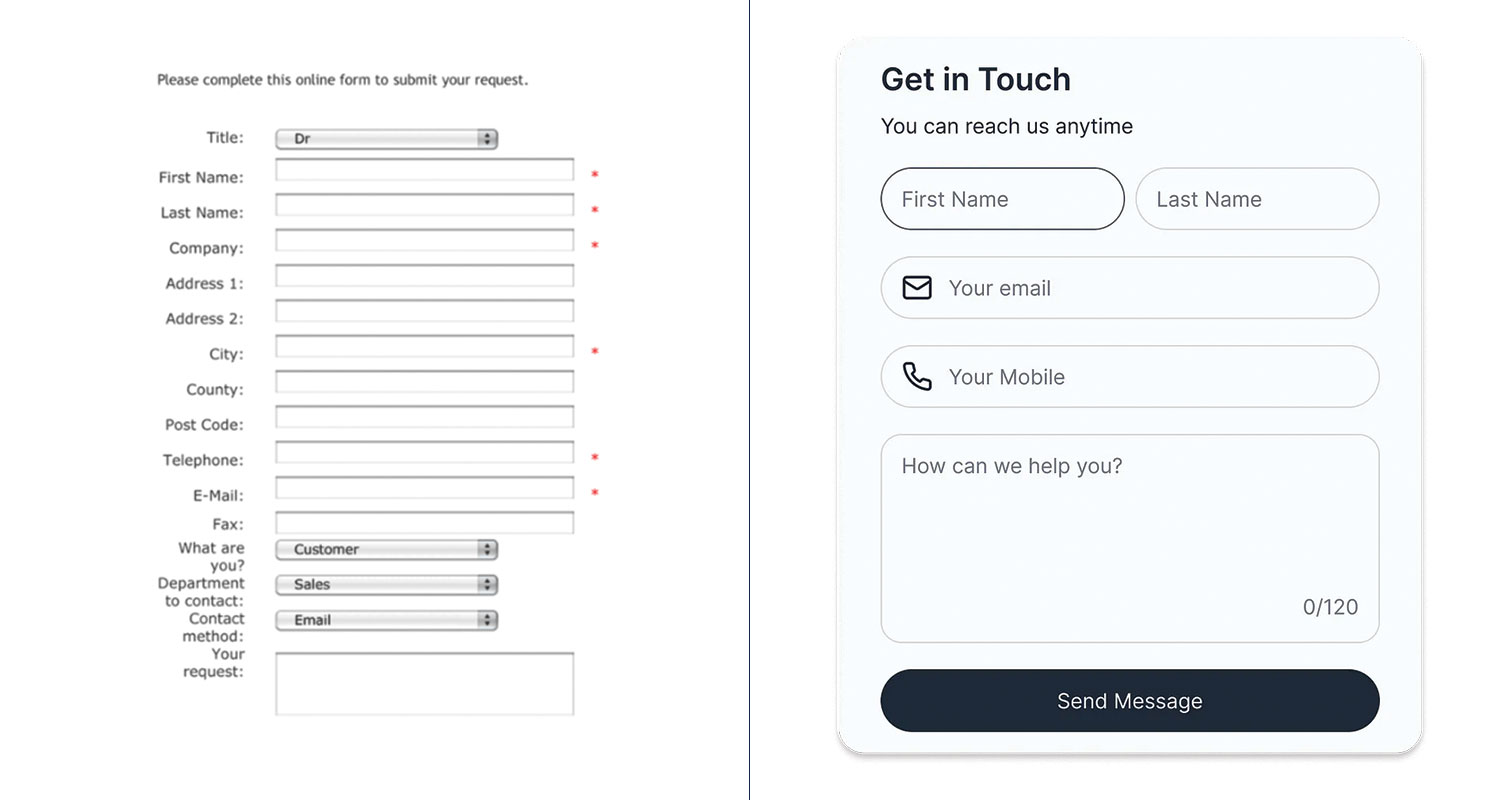
Before and after: simplified form design for better user experience.

Before and after: simplified form design for better user experience.

5. Ignoring Accessibility & Readability

A website may look beautiful, but if users with visual impairments, screen readers, or slower connections can’t use it, you lose a portion of your audience — and credibility.

Examples of accessibility and readability oversights:

  • Insufficient contrast between text and background (e.g. light grey text on white).
  • No alt text for images (so screen readers can’t describe them).
  • Tiny font sizes that are unreadable on some devices.
  • Interface elements (buttons, menus) not navigable via keyboard.
  • Relying on colour alone to communicate meaning (e.g. error messages in red without icons).

What to do:

  • Use a contrast checker (there are free tools online) to ensure text is legible against its background.
  • Always include descriptive alt attributes for images (even decorative ones should have an alternative description).
  • Choose a base font size (e.g. 16px or equivalent) and allow users’ browsers to scale.
  • Test navigation using only keyboard (Tab, Enter) to ensure the site is usable without a mouse.
  • Use icons or labels in addition to colour cues (so red = error, but also show an “X” icon or text).
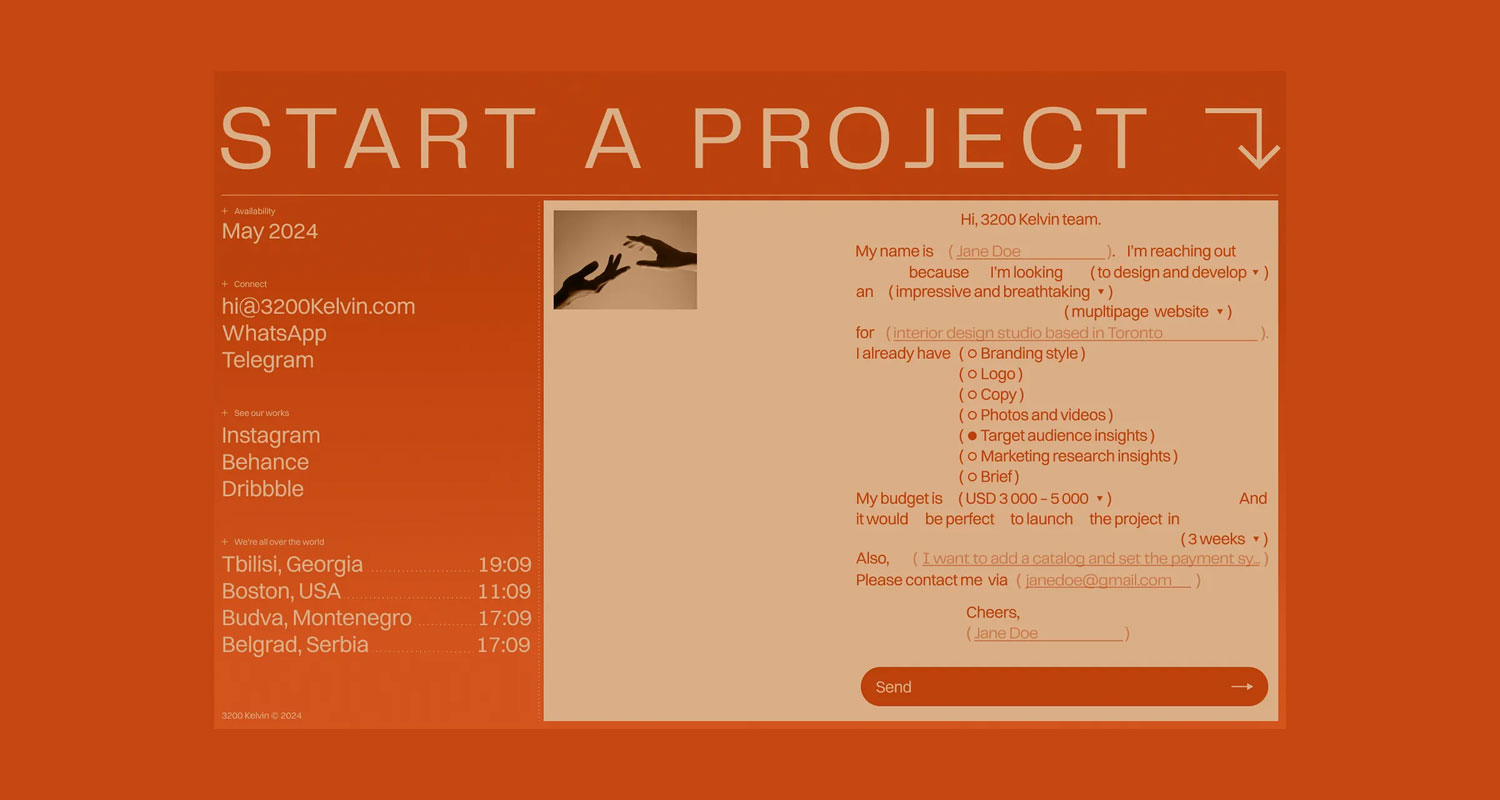
Website text with poor contrast making it hard to read

Example of poor readability and low contrast text on websites.

How These Mistakes Hurt Your Bottom Line

  • Higher bounce rates — frustrated users leave before exploring.
  • Lower conversions — potential clients never get to your call to action.
  • Brand trust damage — a clunky user experience makes your business seem less professional.
  • Wasted marketing spend — driving traffic is expensive; if UX is bad, that investment is wasted.

In a competitive environment like Auckland, Wellington, Christchurch or even in smaller NZ towns, people have many alternatives. A website that is user-friendly gives you an edge.

At Sky Media, we build websites that don’t just look good — they’re designed to perform. Our team specialises in affordable web design in NZ with SEO baked in from day one, so your business can attract more customers and grow online.

Whether you need a fresh build or want to upgrade your current site, our Web Design packages give you flexible options to suit your goals.

Let’s turn your website into a lead-generating machine. Get a free website and SEO quote today.

SEO-friendly website design with fast loading speed and mobile optimisation

The Cost of Cheap Web Design: Why Investing in SEO-Friendly Websites Pays Off

By SEO, Web Design

Every business owner loves a bargain. When searching for affordable web design in NZ, you’ll quickly find countless freelancers and overseas agencies promising a complete website for just a few hundred dollars. At first glance, this sounds like a smart way to save money — after all, your business just needs a website online, right?

SEO-friendly website design with fast loading speed and mobile optimisation

Why “Affordable” Doesn’t Always Mean Cost-Effective

The problem is that cheap websites often cut corners. They rely on generic templates, bloated code, and outdated practices. While you may save upfront, you’ll likely face slow loading speeds, limited flexibility, poor mobile performance, and expensive fixes later on.

In the digital space, “cheap” almost always ends up being expensive.

The Role of SEO in Modern Web Design

Web design is no longer just about how a site looks — it’s about how it performs. A modern website needs to be built with SEO in mind from day one. Why? Because search engines like Google are the gatekeepers to your customers.

Google ranks websites based on technical quality, mobile responsiveness, Core Web Vitals, and how well a site is structured. If your website isn’t SEO-friendly, you’ll struggle to appear in search results, no matter how nice your site looks.

This is why at Sky Media, we design websites that are not only visually appealing but also search engine optimised. It’s a long-term investment that ensures your website works for your business, not against it.

Hidden Costs of Cheap Web Design

A cheap website may seem like a quick win, but the hidden costs add up fast. Some of the most common pitfalls include:

  • Poor User Experience: Visitors land on your site only to find it slow, hard to navigate, or not mobile-friendly. This leads to high bounce rates and lost customers.
  • Lack of SEO Optimisation: Most budget sites don’t come with SEO best practices built in. Without proper on-page optimisation, you’ll struggle to rank on Google.
  • Security Issues: Many cheap providers use outdated plugins and free themes, making your site vulnerable to hackers. Fixing security breaches is far more expensive than prevention.
  • Constant Redesigns: If your site doesn’t scale with your business, you’ll need a complete rebuild every couple of years, multiplying costs.

In short, that “affordable” web design could cost your business thousands in lost leads, reduced trust, and ongoing maintenance.

Why Investing in SEO-Friendly Web Design Pays Off

Unlike a template website that’s designed just to look good, an SEO-friendly website is built to generate business results. Here’s why the investment pays off:

  • Better Google Rankings. Higher visibility means more people find you organically, without paying for ads.
  • More Organic Traffic. With strong SEO foundations, your website becomes a steady stream of new leads.
  • Higher Conversions. Clean design, fast load times, and good UX make visitors more likely to contact you.
  • Long-Term ROI. While you may pay more upfront, a properly optimised website works for years and reduces the need for constant redesigns.

For example, many businesses that invest in our SEO packages in Auckland find that within months, their new website begins paying for itself by delivering consistent leads.

What to Look for in an SEO-Friendly Website

Not sure how to tell if a website is SEO-friendly? Here are the key features to look out for:

  • Clean Site Architecture: Organised menus and internal linking that help users (and Google) navigate your site.
  • Fast Load Times: Speed is critical — both for users and search rankings.
  • Mobile-First Design: With most NZ users browsing on mobile, your site must perform flawlessly on smaller screens.
  • Core Web Vitals: Meeting Google’s standards for speed, responsiveness, and visual stability.
  • On-Page SEO: Optimised meta titles, descriptions, headers, and image alt text.
  • WordPress SEO-Friendly Platform: Flexible, scalable, and easy to optimise as your business grows.

When you choose a provider, ask them to show examples of SEO-friendly builds. If they can’t explain how their designs support search engine rankings, that’s a red flag.

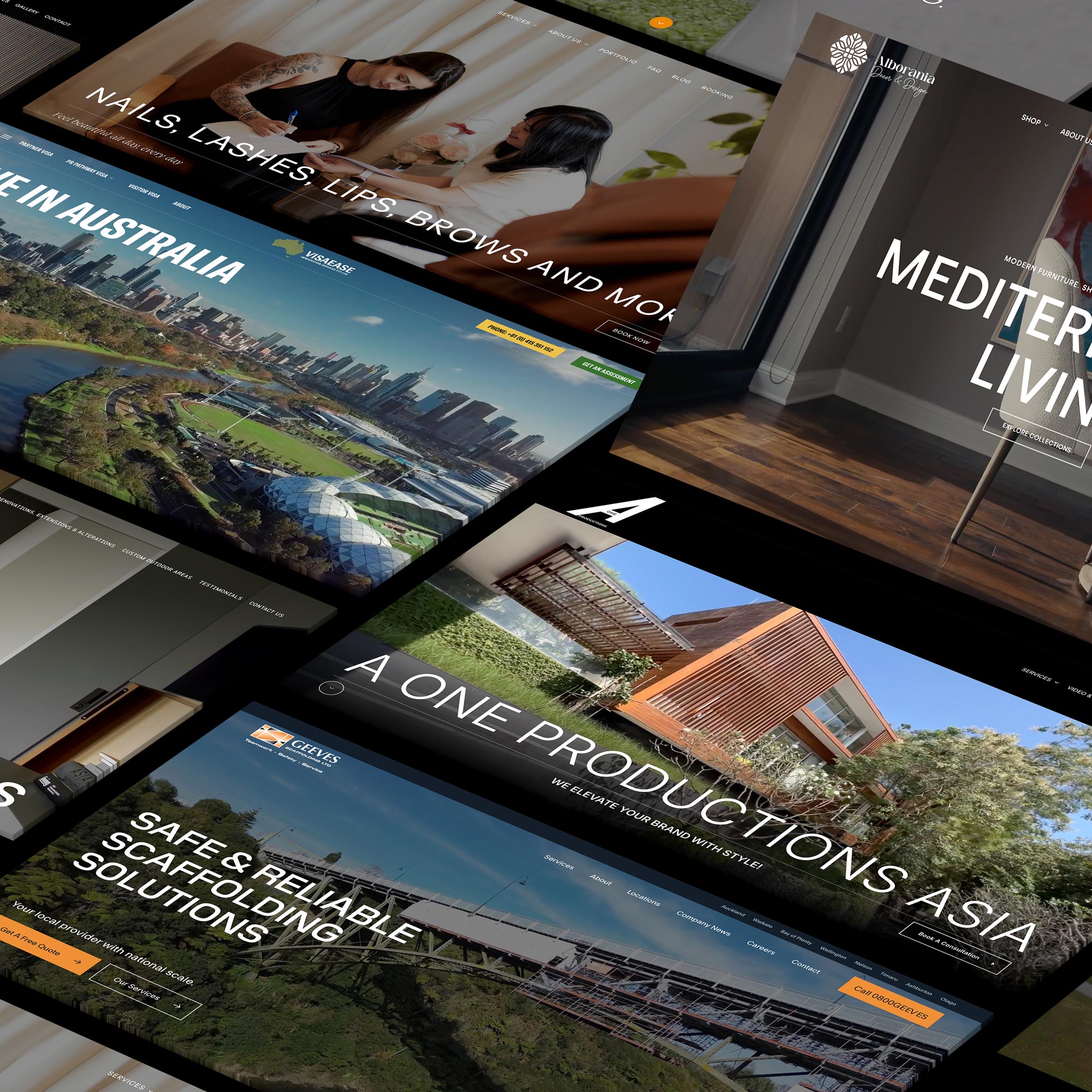
Modern SEO-friendly WordPress website for Geeves New Zealand

Modern SEO-friendly WordPress website for Geeves Scaffolding New Zealand.

Affordable Doesn’t Mean Cheap – The Sky Media Approach

At Sky Media, we understand that businesses want affordable web design in New Zealand without sacrificing quality. That’s why our approach is simple: deliver value, not shortcuts.

  • Transparent Pricing: We provide clear quotes so you know exactly what you’re paying for.
  • SEO Built-In: Every website we design comes optimised for search, ready to rank.
  • Flexible SEO Packages: From Auckland to Wellington and Christchurch, we tailor SEO packages that fit your budget and goals.

Affordable doesn’t have to mean cheap. It means getting a website that’s fairly priced, performs well, and grows with your business.

Final Thoughts – Invest Smart, Not Cheap

When it comes to your website, the cheapest option rarely pays off. A low-cost build may look fine at launch, but without SEO it won’t bring in traffic, leads, or sales. Over time, the hidden costs of cheap design — poor rankings, low conversions, constant fixes — can far outweigh the initial savings.

An SEO-friendly website is a smart investment. It’s the foundation of your online presence and a tool that drives long-term business growth.

If you’re serious about building a website that performs, don’t settle for the cheapest option. Invest in a partner who understands both web design and SEO packages in Auckland — and your website will pay for itself many times over.

SEO Costs in New Zealand: What You Should Pay in 2025

By SEO

Search Engine Optimisation (SEO) is one of the most powerful long-term growth strategies for Kiwi businesses. Whether you’re a start-up café in Ponsonby, a professional service in Wellington, or a construction company in Christchurch, SEO ensures your business is visible when people search online.

But one of the first questions most businesses ask is: “How much should I pay for SEO services?”

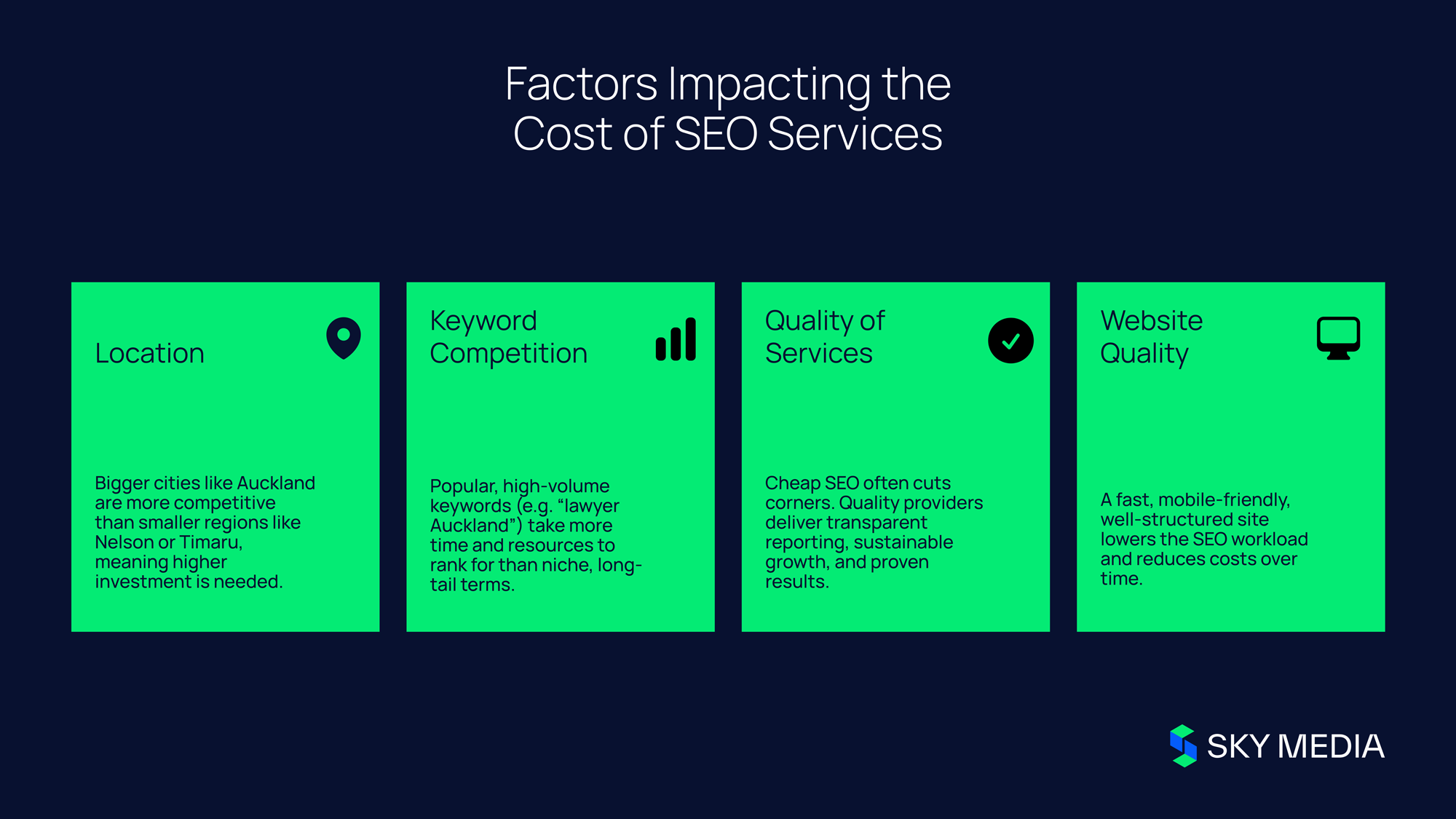
The answer depends on a mix of factors—your target location, the competitiveness of your keywords, the quality of service you’re choosing, and even how well your website has been designed. In this guide, we’ll unpack the key elements that influence SEO pricing in New Zealand, weaving in local examples (SEO Auckland, SEO Wellington, SEO Christchurch) and why pairing SEO with a trusted web design agency makes such a big difference.

1. The Scope of Your Target Market: Why Location Drives Cost

Not all locations are created equal when it comes to SEO competition.

  • SEO Auckland: New Zealand’s largest city is home to thousands of businesses across industries, all vying for visibility. Ranking for keywords like “construction company Auckland” or “Auckland plumber” is highly competitive and usually requires more content, stronger backlinks, and higher monthly investment.
  • SEO Wellington & SEO Christchurch: These cities are smaller but still competitive. Businesses in Lower Hutt, Petone, or Riccarton often face less competition than those in the CBD, meaning SEO budgets stretch further.
  • Regional SEO (Nelson, Timaru, Tauranga, Dunedin): In smaller markets, SEO is often more affordable. With fewer competitors targeting local keywords, smaller campaigns can achieve strong visibility with less investment.

NZ Stat Snapshot: 96% of Kiwis use the internet, and over 90% use Google as their preferred search engine. With nearly 88.5% of users browsing on mobile, local search visibility is no longer optional—it’s essential.

2. Keyword Difficulty & Competition: Understanding the Playing Field

Keywords are the foundation of SEO, but some are harder—and more expensive—to rank for.

  • High-competition keywords: Terms like “renovations Auckland” or “Christchurch lawyer” have hundreds of businesses competing for visibility. To win, you’ll need consistent blogging, link building, and advanced technical SEO.
  • Moderate competition: Keywords like “Wellington property management agency” or “Hamilton builders” may be easier to target, though still competitive in their industries.
  • Low-competition opportunities: Long-tail keywords such as “affordable plumbing company in Nelson” can deliver quick wins with less cost, while still driving valuable leads.

Smart SEO strategies combine short-term quick wins with long-term high-value goals.

3. The Quality of SEO Services: You Get What You Pay For

SEO services vary widely in quality, and that directly impacts cost.

  • Cheap SEO ($500–$1,200/month): Often limited to basic on-page fixes, minimal link building, and maybe a blog or two. This can work for very small businesses in low-competition areas, but results are limited.
  • Mid-tier SEO ($1,500–$6,000/month): Includes keyword strategy, on-page SEO for multiple pages, Google Business Profile optimisation, ongoing content creation, and consistent link building. Ideal for SMEs in larger NZ cities.
  • Enterprise SEO ($7,000–$10,000+/month): Comprehensive campaigns covering multiple locations nationwide, advanced content marketing, CRO testing, and high-authority backlinks. Necessary for nationwide brands and industries like law, finance, or real estate.

Sky Media’s packages reflect these tiers:

  • Sky Lift ($499+GST/month): Great for small local businesses with 5 keywords.
  • Sky Climb ($899+GST/month): Adds 10 keywords, local citations, and monthly blogs.
  • Sky Orbit ($2,900+GST/month): Expands to 50 national keywords, advanced link building, and monthly strategy calls.
  • Sky Galaxy ($4,500+GST/month): A full-scale national SEO campaign, custom content, and high-authority link outreach.

Tip: Always ask for transparent reporting, clear deliverables, and case studies. With Sky Media, 96% of clients stay with us because we prioritise results and accountability.

SEO services cost New Zealand Summary Inforagraphic

4. The Role of Web Design in SEO: Building on the Right Foundation

Even the best SEO strategy can’t succeed if your website isn’t built properly. Google rewards websites that are fast, mobile-friendly, and user-focused.

  • Mobile-first: Nearly 90% of NZ internet users browse on mobile. If your site isn’t responsive, you’ll lose rankings and customers.
  • Speed & Core Web Vitals: With NZ mobile internet averaging 91 Mbps and fixed broadband at 180 Mbps, users expect sites to load quickly. A slow site increases bounce rates and decreases conversions.
  • Clean structure: Search engines need a clear, logical hierarchy to crawl. Websites with messy coding, missing headings, or no internal linking require extra SEO work (and cost more to optimise).

That’s why many businesses choose a web design agency in Auckland, Wellington, or Christchurch that also offers SEO. A properly designed site reduces SEO costs in the long run and makes optimisation much easier.

Pro tip: If your website is outdated, consider a redesign before committing to a full SEO campaign. It may increase upfront costs but will save significantly on wasted SEO spend later.

5. Content & Link Building: The Fuel of SEO

SEO success hinges on two things: content and links.

  • Content: High-quality blog posts, guides, and service pages demonstrate expertise and keep your site fresh. Local content like “Top Cafés in Te Aro” or “Building Regulations in Christchurch” helps capture regional traffic.
  • Links: Backlinks are still one of Google’s strongest ranking signals. Getting high-authority links from NZ media outlets, directories, and partner businesses shows Google your site is trustworthy.

Example:

  • Sky Climb ($899+GST) includes monthly blogs and local citations.
  • Sky Orbit ($2,900+GST) scales to 4 blogs per month and advanced link building.

The more content and authority links you produce, the higher the costs—but the payoff is exponential in rankings and leads.

6. Why Cheap SEO Usually Costs More

Cheap SEO might seem appealing, but it often leads to:

  • Spammy backlinks that harm your domain authority
  • Minimal reporting with no clear ROI
  • Short-lived rankings that collapse with Google algorithm updates
  • Penalties that can tank your website visibility for months

On the other hand, investing in ethical, white-hat SEO pays off like compounding interest. The longer you run high-quality SEO, the stronger your authority, traffic, and lead flow become.

Final Thoughts: How Much Should You Pay?

There’s no universal price tag for SEO—it depends on your:

  • Location (SEO Auckland vs SEO Timaru)
  • Industry (finance vs hospitality)
  • Website quality (modern vs outdated)
  • Ambition (local presence vs nationwide dominance)

For some, $500–$900/month may be enough to establish a local foothold. For others targeting Auckland, Wellington, and Christchurch simultaneously, a realistic budget is $2,900–$4,500/month.

The key is choosing a partner who understands your goals and market. With proven success across SEO Auckland, SEO Wellington, and SEO Christchurch, and integrated web design services nationwide, Sky Media delivers SEO that builds businesses—not just rankings.

Local Wellington business benefiting from SEO visibility

How Local Wellington Businesses Can Win with SEO

By SEO

Running a business in Wellington is rewarding but competitive. From bustling cafés on Cuba Street to creative agencies in Te Aro and service providers across the Hutt Valley, standing out online is critical. Customers aren’t flipping through phone books anymore — they’re searching Google for everything from “best plumber in Wellington” to “digital marketing support near me.”

Local Wellington business benefiting from SEO visibility

This is where SEO Wellington comes in. Local search optimisation ensures your business is visible to the people who matter most: Wellingtonians ready to buy. Whether you run a boutique in the CBD or a professional service firm in Lower Hutt, working with a trusted Wellington SEO agency helps you attract more local customers, build credibility, and grow revenue.

Why SEO Matters for Wellington Businesses

Local businesses often rely on word-of-mouth and repeat clients, but in today’s digital world, those alone aren’t enough. Wellington customers expect to find answers online instantly, and if your business doesn’t appear on the first page, you risk losing them to a competitor who does.

For example, if someone searches for “accountant Wellington” or “wedding florist near me,” SEO ensures your business shows up in those local search results. Good SEO means more than rankings — it’s about being present at the exact moment your customer is looking for you.

A tailored Wellington SEO strategy can help cafés attract new patrons, tradies get more job bookings, and professional services secure higher-value clients. In a city with a strong mix of government, tech startups, and hospitality, visibility equals opportunity.

Wellington café owner using SEO strategy to attract customers

The Building Blocks of Local SEO

a) Optimising Google Business Profile

For Wellington businesses, your Google Business Profile is often the first impression customers see. Accurate opening hours, updated photos, and positive reviews can drive foot traffic just as much as your website.

b) Location-Focused Website Content

If your website speaks directly to Wellington customers, they’re more likely to engage. (Read more about: 4 Common Mistakes When Building a New Website or contact Sky Media web design team for a free website audit). A local builder might highlight projects in Johnsonville or Karori. A hair salon might showcase its presence in central Wellington. This builds trust and shows customers you’re part of their community.

c) Local Backlinks and Mentions

Being featured in Wellington Chamber of Commerce listings, local directories, or even news sites like Stuff Wellington signals to Google that you’re relevant to the city. These local “votes of confidence” strengthen your authority online.

d) Customer Reviews and Reputation

Encourage your customers to leave Google reviews mentioning your business and location. A review like “Best electrician in Wellington — fast and reliable” is both powerful social proof and a local SEO boost.

Benefits of Working with a Wellington SEO Agency

You could try managing SEO on your own, but a Wellington SEO agency brings experience and focus. Local agencies know the city, the competition, and how Wellingtonians search.

For example, a nationwide campaign might overlook the quirks of Wellington search trends — such as people in Petone searching differently from those in Thorndon. A dedicated SEO agency Wellington partner like Sky Media takes the time to understand your audience and tailor a strategy around it.

Most importantly, you’ll have ongoing support: monthly reports showing where you’re gaining traction, what keywords you’re ranking for, and how much new traffic you’re earning.

How Sky Media Helps Local Businesses Thrive

Sky Media has worked with businesses across New Zealand — from trades to retail and professional services — helping them grow through smart SEO. For Wellington clients, here’s what that looks like:

  • Custom Local SEO Audits – Identifying opportunities specific to the Wellington market.
  • Content That Speaks Local – Blogs, landing pages, and service descriptions that reflect how Wellingtonians actually search.
  • Website Optimisation – Fast, mobile-friendly websites that deliver a smooth user experience.
  • Local Backlink Building – Connections with Wellington-based organisations and websites.
  • Transparent Reporting – You’ll know how your rankings, leads, and calls are improving month by month.

Whether you’re running a café in Courtenay Place, a law firm in Lambton Quay, or a tradie business covering the wider region, Sky Media’s Wellington SEO solutions are built to grow with you.

SEO isn’t just about ranking — it’s about connecting with your community. Wellington businesses that invest in search optimisation build stronger visibility, attract loyal customers, and compete on more than just price.

When people search for services, you want your business to be the first they find. That’s where partnering with a Wellington SEO agency like Sky Media makes the difference. With a proven track record, deep local knowledge, and a commitment to measurable results, we’re here to help your business thrive in Wellington’s competitive market.

SEO agency team in New Zealand planning digital strategy

SEO vs Google Ads: Which Is Better for New Zealand Businesses?

By Google Ads, SEO

In today’s fast-changing digital landscape, New Zealand businesses are investing more than ever in online visibility. Whether you’re a Christchurch builder, an Auckland law firm, or a nationwide eCommerce retailer, you’ve probably asked yourself: Should we invest in SEO or Google Ads?

SEO agency team in New Zealand planning digital strategy

Both strategies can generate new leads, customers, and growth — but they work in very different ways. As a trusted SEO agency in Auckland and Christchurch, Sky Media has seen countless Kiwi businesses succeed with the right balance of organic and paid campaigns.

This article unpacks the pros and cons of each approach, so you can make an informed choice for your business.

What Is SEO?

Search Engine Optimisation (SEO) is the process of improving your website so it ranks higher in Google’s unpaid, organic results. Instead of paying for each visitor, you invest in making your site easier to find, more relevant, and more trustworthy.

For example, if a homeowner searches for “roof repair Christchurch” or a traveller looks for “boutique hotels Auckland,” businesses with strong SEO strategies show up naturally in the search results — without spending on ads.

Key Benefits of SEO

  • Long-Term Growth: Once rankings are established, you can generate leads consistently.
  • Cost Efficiency: No ongoing cost per click — SEO builds equity over time.
  • Credibility & Trust: Users are more likely to trust businesses that appear at the top of organic results.
  • Local Reach: Optimisation can be tailored to regions and suburbs, making it easier for local clients to find you.

What Is Google Ads?

Google Ads is a paid advertising platform where businesses bid on keywords to appear at the very top of search results. Unlike SEO, you pay for every single click, whether that person becomes a customer or not.

Think of a Christchurch dentist promoting “emergency dental care” or an Auckland retailer advertising “same-day flower delivery.” With Google Ads, they can immediately appear in front of customers searching for those exact services.

Key Benefits of Google Ads

  • Immediate Visibility: Ads can put you at the top of Google within 24 hours.
  • Precise Targeting: Reach people based on location, demographics, or even the device they’re using.
  • Flexible Budgets: Increase spend for more leads, or scale down when things are quiet.
  • Perfect for Campaigns: Great for short-term promotions, new product launches, or seasonal offers.
New Zealand business owner comparing SEO and Google Ads results

SEO vs Google Ads: Cost Considerations

For Kiwi businesses, cost is often the deal-breaker.

  • SEO Costs: SEO requires upfront investment in strategy, technical fixes, and ongoing optimisation. But once you’re ranking well, the long-term cost is significantly lower. For example, a Christchurch plumbing company may rank organically for “blocked drain repairs” and continue receiving calls month after month, even without spending extra.
  • Google Ads Costs: With Ads, you’re always paying. Highly competitive terms like “lawyer Auckland” or “wedding venues Christchurch” can cost tens of dollars per click. The leads can be immediate, but budgets get drained quickly without smart campaign management.

Which Delivers Better Results?

SEO Works Best When:

  • You want sustainable growth and ongoing visibility.
  • Your industry relies on consistent inquiries (law firms, trades, healthcare, or local services).
  • Building brand authority is part of your long-term goal.

Google Ads Works Best When:

  • You need instant traffic and can’t wait months for results.
  • Your business runs seasonal or time-sensitive campaigns (tourism operators, retail sales, event promotions).
  • You’re testing new services or products and need quick market feedback.

SEO and Google Ads Together: The Hybrid Strategy

It’s not always a choice of one or the other. Many New Zealand businesses get the strongest results by combining both.

For instance:

  • A Christchurch physiotherapy clinic could use Google Ads to target “sports injury treatment” immediately, while their SEO builds long-term rankings for broader terms like “physiotherapy Christchurch.”
  • An Auckland eCommerce store might run Ads for “gift hampers NZ” during the holiday season, while SEO secures organic traffic for year-round keywords like “online gift delivery.”

Together, SEO and Google Ads can cover short-term needs and long-term growth — giving you both immediate visibility and sustainable results.

How to Decide for Your Business

When weighing SEO against Google Ads, ask yourself:

  1. Do I need results tomorrow, or am I building for the long haul?
  2. How much can I realistically budget for ongoing campaigns?
  3. Is my goal brand authority, short-term sales, or both?

If your business is service-based, like a Christchurch tradie or an Auckland law firm, SEO often provides the best return on investment over time. But if you’re launching a new product or need leads fast, Google Ads can be the smarter first step.

Why Partner With a Local SEO Agency?

The New Zealand market is unique — what works for a business in Sydney or New York won’t always work here. Sky Media is a local agency that understands Kiwi industries and customer behaviour.

We help:

  • Auckland service providers dominate search results for their local market.
  • Christchurch businesses attract new clients with Google-compliant SEO.
  • Nationwide eCommerce stores blend SEO and Ads to maximise revenue.

Most importantly, we provide transparent reporting and clear deliverables so you always know what’s working and where your investment is going.

Final Thoughts

The truth is, there’s no one-size-fits-all answer to SEO vs Google Ads.

  • Google Ads is brilliant for instant visibility and short-term campaigns.
  • SEO builds sustainable growth and long-term authority.
  • The smartest approach for many New Zealand businesses is a hybrid strategy, leveraging both at different stages of growth.

Our SEO results highlight how businesses across New Zealand — from Christchurch trades to Auckland retailers and nationwide eCommerce brands — have grown their traffic, leads, and revenue through tailored SEO strategies.

At Sky Media, we specialise in helping Kiwi businesses choose the right mix of SEO and Google Ads to maximise their ROI. Whether you’re in Christchurch, Auckland, or anywhere in between, we’ll create a digital strategy designed to get results.

Top Web Design Trends in New Zealand for 2025

Top Web Design Trends in New Zealand for 2025

By Web Design

The digital world is moving faster than ever, and New Zealand businesses can no longer afford to treat their websites as simple online brochures. In 2025, web design is about strategic digital experiences —designing websites that connect emotionally, drive conversions, and reflect Kiwi values of inclusivity and sustainability.

For businesses, keeping up with the latest design practices is critical. Whether you’re a small local business in Dunedin or a large eCommerce brand in Auckland, the same truth applies: your website is the front door to your business. When it’s outdated, confusing, or poorly optimised, you risk losing customers to competitors.

This blog explores the top web design trends in New Zealand for 2025, with a focus on Web Design NZ and how Kiwi businesses can implement these trends effectively.

Top Web Design Trends in New Zealand for 2025

1. Mobile-First Design

In 2025, mobile-first design isn’t just a best practice—it’s the default. With more than 70% of New Zealand internet traffic now coming from smartphones, websites that don’t prioritise mobile users are immediately at a disadvantage.

Why It Matters

  • Google’s mobile-first indexing: Google ranks websites based on their mobile versions first. If your site doesn’t perform well on mobile, your SEO rankings will drop.
  • Better engagement: Mobile users expect quick loading times, simple navigation, and content that fits their screen without endless zooming.
  • Local relevance: Many Kiwis search for services “near me” while on mobile. A responsive, mobile-friendly site ensures your business appears credible when people are on the go.

Best Practices

  • Use responsive frameworks like Bootstrap or Tailwind CSS.
  • Prioritise fast-loading images and compressed video.
  • Design tap-friendly buttons and larger fonts for easy reading.
  • Eliminate clutter—keep navigation clean and intuitive.

Local Example

New Zealand retailers such as Kathmandu and Farmers NZ have redesigned their sites with mobile-first layouts, ensuring smooth browsing experiences that boost online sales.

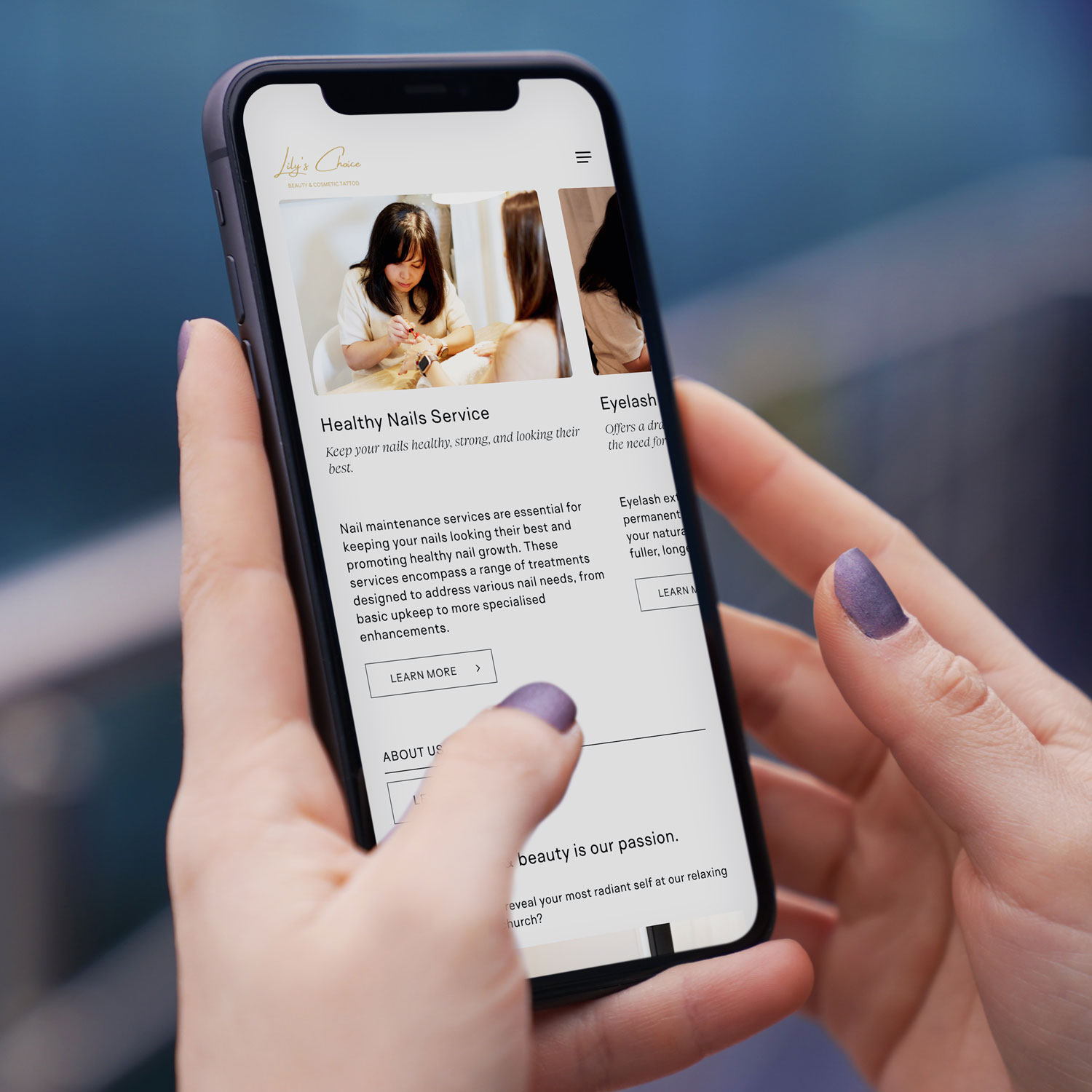
Mobile-first web design NZ example on smartphone for Christchurch based beauty & cosmetic tattoo business
Mobile-first web design NZ example on smartphone

2. Ethical, Sustainable, and Accessible Website Design

Kiwi consumers are increasingly valuing businesses that align with social and environmental responsibility. This has fuelled the rise of ethical, sustainable, and accessible design as a cornerstone of Web Design New Zealand.

Accessibility

An accessible website ensures everyone—including those with visual, auditory, or physical impairments—can use it effectively. Features include:

  • Screen reader compatibility for the visually impaired
  • Colour contrast testing for readability
  • Keyboard navigation support for users unable to use a mouse
  • Alt text for all images so search engines and screen readers can interpret visuals

Sustainability

Many New Zealand businesses are also reducing their website’s carbon footprint by:

  • Using efficient hosting providers powered by renewable energy
  • Optimising code to lower server demand
  • Limiting auto-playing videos and heavy animations that drain energy

Local Example

NZ’s Department of Conservation has a website optimised for accessibility and sustainability, reflecting the organisation’s environmental ethos while making content widely usable.

Why It Matters

Not only do sustainable and accessible designs align with Kiwi values, but Google also prioritises fast, efficient, and inclusive websites in search rankings. Investing in this area benefits both users and SEO performance.

Accessible web design New Zealand with inclusive layout

3. Meaningful Interactions

In 2025, visitors expect more than static pages—they want to engage with your brand through meaningful digital interactions. This trend is about using interactive design to improve customer journeys, not just add visual flair.

Examples of Meaningful Interactions

  • Micro-interactions: Subtle animations when a button is pressed or when a form is completed successfully. These give users instant feedback and reduce frustration.
  • Interactive content: Calculators, quizzes, or configurators that let users customise services or products before purchase.
  • AI-powered chatbots: Offering instant answers, personalised suggestions, and 24/7 customer support.
  • Dynamic product filters: Allowing users to refine searches in real time, enhancing eCommerce experiences.

Local Example

Tourism websites like 100% Pure New Zealand and airline portals such as Air New Zealand are leveraging interactive maps, booking tools, and AI chat assistants to keep users engaged and improve satisfaction.

Why It Matters

These meaningful interactions boost time on site, customer trust, and conversion rates. Instead of gimmicks, interactions are now designed to add clarity, reduce friction, and make navigation intuitive.

Interactive website design NZ with chatbot feature

4. Complex and Awe-Inspiring Hero Areas

Your hero section—the large banner or introduction area at the top of a homepage—has become more than a welcome mat. In 2025, hero areas are complex digital storytelling tools that instantly communicate your brand identity.

Key Features of Modern Hero Areas

  • Cinematic video backgrounds: Immersive visuals that capture attention instantly.
  • Oversized typography: Bold headlines that state your value proposition clearly.
  • Immersive motion graphics: Smooth, subtle animations that draw the eye to key messaging.
  • 3D visuals and AR elements: Giving websites a futuristic, cutting-edge feel.

Local Example

Businesses in Auckland and Wellington are blending Māori design motifs and storytelling elements into hero sections, reflecting New Zealand’s culture in a modern way. This creates a unique brand identity that resonates both locally and internationally.

Why It Matters

Your hero area is often where users decide whether to stay or leave. By making it visually compelling, culturally relevant, and strategically designed, you increase trust, professionalism, and engagement from the first second.

5. Smart CTA Placements to Improve Conversions

Your Call-to-Action (CTA) buttons are the most important conversion points on your site. In 2025, Web Design NZ is shifting to smarter placements that align with the customer journey.

Best Practices for Smart CTAs

  • Above the fold: A visible CTA (like “Book Now” or “Get a Free Quote”) should appear before the user scrolls.
  • Contextual placement: CTAs appear at the right moment—after a product description, service list, or testimonial.
  • Sticky CTAs: Floating action buttons that stay on-screen as users scroll.
  • Personalised CTAs: AI-driven buttons tailored to user behaviour (e.g., showing “Get 20% Off” to repeat visitors).
  • A/B testing: Continuously refining colour, text, and placement for maximum impact.

Local Example

E-commerce platforms like Trade Me have perfected CTA placements, ensuring that “Buy Now” and “Place Bid” buttons are always prominent, leading to higher sales.

Why It Matters

A website can look stunning but still fail if it doesn’t convert. Smart CTA strategies ensure design isn’t just attractive—it’s profitable. Businesses that test and refine CTA placements see significant jumps in lead generation and revenue.

Smart CTA placement in NZ website design for higher conversions

As we step into 2025, Web Design New Zealand is about more than just aesthetics—it’s about creating purpose-driven digital experiences. Mobile-first designs meet the demands of today’s browsing habits, ethical and sustainable websites align with Kiwi values, meaningful interactions improve usability, awe-inspiring hero sections capture attention, and smart CTAs drive real conversions.

For businesses across the country, adopting these trends means building not just a website, but a digital growth engine. Whether you’re in Auckland, Wellington, Christchurch, or a smaller town, staying ahead of these web design trends ensures your business remains competitive in an increasingly digital-first world.

If you’re looking to future-proof your online presence, investing in professional Web Design NZ services, Sky Media team will help you deliver websites that are modern, inclusive, and high-performing. Get in touch with us for a free consultation.

WordPress SEO specialist in New Zealand – Sky Media digital marketing agency

Why WordPress is the Best CMS Platform for SEO

By SEO, Web Design

When it comes to building a website that ranks well on Google and grows with your business, choosing the right Content Management System (CMS) is one of the most important decisions you can make. At Sky Media, we work with businesses across Auckland, Christchurch, and Wellington to create SEO-friendly websites — and we’ve tested nearly every CMS out there.

WordPress SEO specialist in New Zealand – Sky Media digital marketing agency

Our verdict? WordPress is hands-down the best platform for SEO.
And not just by a little — the difference in ranking potential, flexibility, and long-term growth between WordPress and platforms like Wix and Squarespace is enormous.

  • In this article, we’ll break down:
  • Why WordPress dominates SEO rankings
  • The key limitations of Wix and Squarespace for SEO
  • How WordPress supports long-term scalability, management, and functionality
  • Why businesses in SEO Auckland, SEO Christchurch, and SEO Wellington markets benefit most from WordPress websites
  • How Sky Media, a certified WordPress specialist in New Zealand, can help you dominate your local search results

WordPress Is Built for SEO From the Ground Up

One of the biggest reasons WordPress outperforms Wix and Squarespace is that it’s an open-source platform designed for complete SEO control.

Unlike “drag-and-drop” builders, WordPress allows you to optimise every single element of your website for search engines:

  • SEO-Friendly URLs – You can set clean, keyword-rich URLs like www.yoursite.co.nz/seo-auckland instead of random strings of characters.
  • Meta Title & Description Control – WordPress integrates with powerful SEO plugins like Yoast SEO and Rank Math, making it easy to create optimised page titles and descriptions.
  • Image SEO – Easily add alt tags, captions, and compression to improve both rankings and site speed.
  • Heading Structure – You can fully control H1, H2, H3 tags for keyword targeting.
  • Schema Markup – Add structured data to improve click-through rates in search results.

Example: If you’re a SEO Agency in Auckland targeting “SEO Auckland” as a keyword, WordPress makes it easy to place that keyword in page titles, headings, meta descriptions, and image alt text — without fighting against a restrictive page builder.

Wix & Squarespace’s SEO Limitations

While Wix and Squarespace have made progress in recent years, they still lag behind WordPress in critical SEO areas.

Limited Control Over Technical SEO

  • URL Structures – Wix and Squarespace often force certain URL patterns (e.g., /blog/post-name) instead of letting you customise slugs completely.
  • Canonical Tags – Setting custom canonical URLs can be tricky or impossible without third-party workarounds.
  • Sitemap Control – You can’t easily edit or customise your XML sitemap, which is crucial for large sites.

Slower Site Speeds

Google has made page speed a major ranking factor. While you can optimise images and caching on WordPress, Wix and Squarespace’s all-in-one hosting limits server optimisation. Their websites often load slower, especially for image-heavy or e-commerce sites.

Less Mobile Optimisation Flexibility

Mobile responsiveness is essential, especially for local search in SEO Christchurch or SEO Wellington markets. With Wix and Squarespace, you’re limited to the responsiveness of their templates — while WordPress lets you build truly mobile-first designs.

Less Mobile Optimisation Flexibility

Mobile responsiveness is essential, especially for local search in SEO Christchurch or SEO Wellington markets. With Wix and Squarespace, you’re limited to the responsiveness of their templates — while WordPress lets you build truly mobile-first designs.

Weaker Plugin Ecosystems

Wix and Squarespace have a small library of extensions. WordPress has over 60,000 plugins for SEO, marketing, analytics, and performance — giving you endless optimisation opportunities.

Why WordPress Websites Rank Better

When we work with clients in Auckland, Christchurch, and Wellington, we consistently see WordPress sites outrank Wix and Squarespace sites. This is because Google rewards websites that:

  • Have faster loading speeds
  • Follow clean code structures
  • Use optimised metadata and schema
  • Provide a better user experience
  • Are easier to crawl and index

WordPress makes all of these achievable without hitting platform limitations. Wix and Squarespace may work for a simple brochure site, but as soon as you need serious SEO growth, you’ll hit a wall.

Scalability: The Long-Term SEO Advantage

If your business is investing in SEO Auckland, SEO Christchurch, or SEO Wellington campaigns, you need a CMS that can grow with you.

With WordPress:

  • You can start small and expand to thousands of pages.
  • Add e-commerce, booking systems, membership portals, and custom applications without rebuilding your site.
  • Keep full ownership of your content — you’re not locked into a proprietary platform.

With Wix/Squarespace:

  • You’re stuck within their ecosystem.
  • Limited design flexibility and SEO control make scaling difficult.
  • Adding advanced features often requires switching platforms entirely.

Management, Support & Functionality: WordPress Wins Again

Easier Management

With a well-built WordPress site (like those designed by Sky Media), content management is straightforward. You can add blog posts, update service pages, and upload media without touching code.

Wix and Squarespace may appear simpler at first, but as your site grows, managing large amounts of content becomes cumbersome due to their rigid backend structures.

Better Support

    • WordPress: Millions of developers, agencies, and forums provide free and paid support. You’re never locked into one provider.
    • Wix/Squarespace: Support is limited to their internal help teams and documentation — and you have to wait on their timelines.

More Functionality

Need to integrate with a CRM, run advanced A/B testing, or add a complex booking system? WordPress can do it. Wix and Squarespace have far fewer integrations and often require expensive workarounds.

Local SEO Superiority for NZ Businesses

If you’re competing in Auckland, Christchurch, or Wellington, SEO Auckland is everything. WordPress offers:

  • Customisable location landing pages for each city you target (e.g., /[your service]-auckland, /[your service]-christchurch).
  • Full control over Google Business Profile optimisation through plugins and schema markup.
  • Faster site performance for better rankings in location-based searches.

For example, a building company in Christchurch targeting “Renovations Christchurch” can create optimised service pages, publish regular blog posts, and run content marketing campaigns directly from WordPress — all while tracking results with built-in analytics integrations.

Real-World Example: How Sky Media Gets Results

At Sky Media, we’re a certified WordPress specialist in New Zealand. We’ve helped dozens of businesses switch from Wix or Squarespace to WordPress — and every single one has seen an improvement in search rankings, website traffic, and conversions.

For example, Lily’s Choice, a Christchurch based business came to us with a slow Wix website that wasn’t ranking for any of their target terms. After moving to WordPress and optimising for SEO Christchurch:

  • Their organic traffic doubled in six months.
  • They ranked on page one for their main keywords.
  • Their leads increased by 70%.

See our SEO results.

The SEO Auckland, Christchurch & Wellington SEO Advantage

Here’s how WordPress gives you the edge in your local NZ market:

FeatureWordPressWixSquarespace
Full SEO Control
Fast Page Speeds
Scalable & FlexibleLimitedLimited
Plugin Library60,000+ free apps and extensions800 apps with most being paid apps31 paid extensions
Custom IntegrationsLimitedLimited
Ownership & Portability
Local SEO Ready

Why You Should Choose WordPress for Your Next Website

If you’re serious about SEO, scalability, and owning your digital presence, WordPress is the only real choice. Platforms like Wix and Squarespace may seem attractive for quick DIY sites, but they fall short when it comes to:

  • Competing in high-demand SEO markets like Auckland or Wellington
  • Managing large, growing websites
  • Implementing advanced SEO strategies

With WordPress, you get full control, endless flexibility, and the backing of a global community. And with Sky Media, you get a local, certified WordPress specialist who knows how to get results in New Zealand’s competitive digital landscape.

Ready to Rank Higher? Let’s Talk.

Whether you’re based in Auckland, Christchurch, Wellington, or any other region of New Zealand, our team at Sky Media can help you build an SEO-optimised WordPress website that actually delivers results.

  • Local expertise – We understand the NZ market.
  • Proven SEO results – Our clients dominate Google rankings.
  • Certified WordPress specialists – We build for performance and growth.

Call us on 0800 113 772 or contact our SEO experts online to find out how we can transform your website into a lead-generating, search-dominating powerhouse.

Final Word: If you’re choosing between WordPress, Wix, and Squarespace, and your goal is to grow your business with SEO — the winner is clear. WordPress isn’t just the best choice for now — it’s the only choice for the future.

Unlocking Online Success with Auckland SEO

By SEO

Are you aware of the potential power a strategic search engine optimisation (SEO) campaign holds for businesses in Auckland? If you’re wondering about the advantages of SEO but find yourself unsure, don’t worry. Sky Media, a time-tested digital marketing company in New Zealand, is here to tell you straight.

Our well-established reputation in Auckland’s SEO market is built around the fact we’ve supported hundreds of Kiwi businesses to tap into a steady stream of potential customers online. While SEO may seem complex, what truly matters is that people just like you are using Google every single day to find offers like yours. At Sky Media, we have the proven ability to get your website seen locally and New Zealand-wide.

Cracking the Code to Auckland SEO

Auckland’s SEO market revolves around refining your website to secure a prime position on Google’s search engine results page (SERP). Achieving higher rankings on super-popular search engines like Google leads to heightened visibility, a wider market, more people to your website, and a chance to gain new customers. Drawing insights from up-to-the-minute data, our team of SEO pros craft a selection of SEO Keywords tailored to your Auckland-based business. With Sky Media, your SEO campaign is built to match daily searches from local Kiwis actively searching for products and services like yours.

The Pros of Auckland SEO for Kiwi Business Owners

Attract New Website Visitors: Strategically optimising your website using data-driven SEO Keywords, paired with a range of cutting-edge SEO strategies, results in an increase of visitors to your web address. Greater traffic to your site translates to a larger pool of potential customers, expanding your market for business both locally and nationally.

Elevate the Experience: Our advanced SEO approach considers your website’s functionality for the people who use it. This includes optimising its loading speed, ensuring mobile compatibility, and enhancing user-friendly navigation. As Google Partners, we know Google wants its users to have a modern user-friendly experience, so the engine only prioritises websites that are fast and easy to use on a mobile phone. We’ll make sure your website is all that and more to give your site the competitive edge.

Targeting the Right Audience: The strength of Auckland SEO is that businesses like yours get to home in on select SEO Keywords and phrases that match with your business’s offerings and location/s of operation. Pinpoint precision like this ensures that your site becomes a magnet for Aucklanders actively seeking what you’ve got to offer. This highly targeted approach is the reason why SEO is our #1 marketing strategy.

Long-Term Return on Investment: Unlike on-again, off-again pay-per-click advertising, SEO is a strategic, steady, long-term investment that offers greater benefits over time. While it might take a few months to ascend to Page 1 of Google’s search results, once you’re there, the rewards are endless. Auckland SEO is a business asset designed to fuel your business’s growth non-stop.

Sky Media – Your SEO Ally in Auckland

Partnering with Sky Media for your Auckland SEO goals means partnering with a tried and tested digital marketing team that’s been looking after Kiwi business owners for more than 5 years. Here’s why Kiwi businesses from Invercargill to Auckland choose Sky Media’s team for SEO:

Experience and Expertise: We know New Zealand’s digital marketing world like the back of our hands. Our experienced team have sharpened their skills and crafted effective SEO strategies based on local, national, and global data. By staying at the forefront of SEO trends and best practices, our experts get top results for our Kiwi clients daily.

Real Results, Visible Progress: Our well-designed SEO campaigns are engineered to yield measurable results within defined timeframes. In full transparency, we provide regular updates, reports, and analytics, affording you the ability to track your campaign’s progress every month. Remarkably, we’ve succeeded in getting 84% of Keywords to Page 1 of Google within just 6 months! Ask us about our Page 1 guarantees for select Keywords.

Tailored Strategies for Business: We know every business is unique, so we offer a personalised approach, not a one-size-fits-all throw together. This commitment drives us to design custom SEO strategies that align with your business’s goals, target audience, and slice of the market. This tailored approach ensures your Auckland SEO campaign is primed for success on your terms.

In a world of smartphones, a strong online presence is essential for modern business success. By harnessing the power of Auckland SEO, you position your website for greater online visibility, more potential clients, and increased market share. As Certified Google Partners, we’re set to guide you through the SEO journey, consistently getting results for your Kiwi business month after month. Speak to us today, and together, we’ll take your business to new heights online and offline.

How to Get Your New Website Live with Sky Media

By Tips and Guides, Web Design

If you’ve been in business a while, likely, you’ll already have a domain name for an existing website. If that’s the case, we can connect your new website to your existing domain in one of two ways:

  • Transfer your domain URL to Sky Media – Provide your unique domain authentication identifier (UDAI) code and a screenshot of your DNS records.
  • Update your A record with your current host – Give the A record details to your webmaster or hosting company.

How to Transfer Your Website URL/Domain Name to Sky Media

By hosting with us, you’ll have Sky Media as your single point of contact for all things website-related. If you want to transfer your website URL/domain name to us, you’ll need to contact your current domain provider and ask for your unique domain authentication identifier (UDAI) and a screenshot of all DNS Records.

How to Get Your DNS Settings and UDAI Code for Your Website’s Domain Name

Your domain name system (DNS) settings are crucial for directing traffic to your website and email services, so we must get the correct information installed before we launch your new website. Here’s how to get yours:

Check with Your Current Webmaster

Who set up your existing website and purchased your domain? Who’s running your current site? They’ll likely have the information you require.

If you have a webmaster to manage your website and domain, simply ask them to provide your UDAI code and DNS settings. Sometimes, domain name companies (registrars like Crazy Domains and GoDaddy) automatically send the UDAI code to the email address associated with your account, after you initiate the request. Check your email inbox, including spam or junk folders, as you may find your UDAI code there. You can simply forward this email to us.

Check Your Domain Registrar Portal/Dashboard

Did you or someone you know purchase the domain? Who’s running your current site? They’ll likely have the logins for your domain registrar where you can access what you need.

  • Log in to the website where you purchased the domain e.g. godaddy.com or crazydomains.co.nz
  • Go to your domain management or settings section.
  • Look for DNS settings, often called “DNS Management,” “DNS Configuration” or similar.
  • Look for an option like “Request UDAI,” “Get Auth Code” or “Retrieve Authorization Code.”
  • Follow the prompts or instructions to generate and obtain your DNS settings and UDAI code.
  • If this is too much, just send your logins to us and we’ll do the rest on your behalf. Easy.

Still Stuck?

Check Your Domain Details on the Domain Name Commission NZ Website

If you’ve lost touch with your webmaster, can’t find a UDAI email, and cannot access logins to your domain registration site, then you can take a look online. DNC offers a tool to search publicly available information relating to DNS nameservers.

  • Go to https://dnc.org.nz/
  • Enter your domain name in the provided search bar at the top right e.g. https://skymedia.nz/
  • Look for the DNS information under name server (NS records).
  • Look for the UDAI code or Auth Code information in the results.

How to Point Your New Website to Your Existing Domain and Host via A Record

If you’d prefer to leave your domain and website with your current host (not recommended), that’s possible. You’ll just need to switch your domain’s A record to:

106.0.62.70 in their domain provider DNS settings.

An “A record” (address record) is a type of DNS record used to point a domain name/website URL to the corresponding IPv4 address of your website’s current hosting site (parking space on the web). The A record allows the internet to connect to the right server where your website’s files are stored. Without that, we’d all need to remember numbers for websites instead of names!

Bear in mind, if you opt for A record pointing and something happens with your website in the future, you’ll need to contact the domain registrar, not Sky Media. We can only take full responsibility for your website when we build the site and host the site and its domain. Unlike many domain registrars, at Sky Media, we provide swift replies from our NZ-based team via text, email and phone. We typically resolve website issues in a few hours.

How to Link Your Emails to Your New Website with Sky Media

At Sky Media, we recommend Microsoft 365 Outlook or Google Workspace for all business emails. We understand you may have your own personal preferences. We’re able to connect your existing emails to your new website, all you need to do is let us know your email. Importantly, we don’t host emails, we only connect them, so any email issues would always be resolved with Microsoft 365 Outlook or Google Workspace.

Finally, we know website details can seem complicated, so if you’d like our team to manage it, we can do so on your behalf for a small charge. Just speak to us, give us any details you have like logins and we’ll get it all done for you.

Benefits of Long-tail Keywords for Google SEO

By SEO

At Sky Media we make SEO (search engine optimisation) easy to understand. You may not know all about SEO, but you’re probably using it everyday. If you’ve ever typed, ‘Restaurant near me,’ ‘Best builder in Christchurch,’ or ‘Makeup artist Auckland,’ into Google, then you’ve used SEO.

Our team sees the benefits of SEO in business everyday and we know that Long-tail SEO Keywords can provide powerful results for anyone selling products, or services people want, or need.

Are you wanting to see heaps of people visiting your website? Are you looking for ways to increase revenue for your business? Are you wanting enquiries, bookings and purchases from people who want what you’ve got? Well, your website needs Long-tail SEO.

A Quick Overview of SEO

Search Engine Optimisation (SEO) is the most cost-effective way to ensure your business’s website makes its way to Google’s 1st Page, where everyone’s shopping nowadays. Everyone? Well, 75% of all Google users only shop on the 1st Page, while the other 25% stop at the 2nd Page. That means, if you’re Page 3, or beyond, you’re not getting found by anyone.

Our Google SEO ensures your business is front and centre on Page 1 where it belongs. One of the fastest and most effective ways to do this is Long-tail SEO Keywords, and that just means the Keywords are longer than Short-Tail SEO, for example:

  • Short-tail SEO – Builder Auckland
  • Long-tail SEO – Bathroom Renovations in the North Shore

Typically, it’s easier to get on Google’s 1st Page and get traffic coming your way, when you use Long‐tail SEO Keywords. They’re much more specific and therefore highly targeted to your ideal audience. It means that when people land on your website (and many will, when you’re on Page 1), it’s much more likely that they’ll want what you’ve got.

Long-Tail SEO – One of Two Ways, or Both?

Long-tail SEO can be done one of two ways (or both), depending on your business goals. You can go niche and specific, or take the large-scale big blast approach. In many cases, the businesses that can afford to do so, do both.

For many businesses niche specific Long-tail SEO Keywords like – ‘Custom kitchen installations in Christchurch,’ can actually be quite valuable. These SEO Keywords are worth going after, even though they may have a small volume of Keyword searches each month, because it’s highly likely these people want exactly what you’ve got. If only 12 people search that term in Christchurch each month, but 3 of them end up purchasing from you, that’s a big conversion, that’s a win.

Benefits of Niche and Specific Long-Tail SEO:

  • High Conversions – These searchers will probably convert into buyers.
  • Low Competition – These niche Keywords aren’t used by a lot of sites, yet.

The Key to Niche Search Terms for Your Business

  • Choose Long-tail SEO Keywords specific to your business or industry e.g “Back waxing for men in Merivale, CHCH.”
  • Choose Long-Tail SEO Keywords that will convert into sales e.g the terms match exactly what you have for sale in the location you expect to sell it, for the people you plan to sell it to e.g back waxing (service) for men (target audience) in Merivale, CHCH (location).
  • Choose very low-competition Long-Tail SEO Keywords, because that means you can get your site to Page 1 of Google quickly and easily.

You don’t need to be targeting all the Long-tail SEO Keywords you can think of, but simply speak to us to brainstorm the ones that are likely to be beneficial. Our SEO Experts will conduct research to confirm the top-performing SEO Keywords for your market, then we’ll look at targeting the services you’d prefer to target.

With Sky Media’s approach to SEO, it’s highly likely your website will see results in less than 90 days, especially for Keywords with long tails. Speak to our team to get your free Google WOF Report, where you’ll find exactly where your site’s positioned for SEO Keywords that are specific to your industry.