corey

Google Ads vs SEO: Which Should Your NZ Business Invest in First?

By Digital Marketing

It’s one of the most common questions we get asked — and there’s a good reason for that. Both Google Ads and SEO promise the same outcome: more visibility on Google, more traffic, more enquiries. But they work in completely different ways, on completely different timelines, and they’re suited to different situations.

If you’ve got a limited budget and you’re trying to decide where to put it first, this is a genuinely important decision, not just a technical one.

This post breaks down how each one actually works, what the real trade-offs are, and how to figure out which one makes sense for your business right now. In a lot of cases, the answer ends up being both but not necessarily at the same time, or in the same proportions.

The Core Difference, in Plain Terms

Google Ads is rented visibility. You pay for a position at the top of the search results, and the moment you stop paying, that visibility disappears. It’s fast, predictable, and you can turn it on or off whenever you like.

SEO (Search Engine Optimisation) is earned visibility. You invest in your website, content, and authority over time so that Google ranks you organically without paying for each click. It takes longer to build, but once you’re ranking well, that traffic tends to keep coming with far less ongoing cost.

Google Ads is like renting a billboard. SEO is like buying the land it’s standing on.

Neither is better in an absolute sense. They’re suited to different goals, different timelines, and different stages of a business.

Google Ads vs SEO: A Side-by-Side Comparison

Here’s how the two stack up across the factors that matter most when deciding where to invest first:

FactorGoogle AdsSEO
Speed to resultsFast, can generate leads within days of launchingSlow, typically 3 to 6+ months to see meaningful traction
Cost structureOngoing, you pay for every click, every monthUpfront effort, then increasingly free traffic over time
When you stop payingTraffic stops almost immediatelyRankings and traffic persist, with maintenance
Best forImmediate leads, new offers, testing demand, seasonal pushesLong-term, compounding visibility and brand authority
Budget controlVery precise, set and adjust daily budgets directlyHarder to predict ROI early on, but lower cost per lead long-term
Trust & credibilityLower, some searchers actively skip paid adsHigher, organic results are seen as more credible
Risk if you stopHigh, leads dry up the moment you pauseLow, rankings tend to hold for a period after you pause

When Google Ads Should Come First

Google Ads is usually the right starting point when speed matters more than long-term cost efficiency. A few specific situations where Ads makes sense as the first investment:

  • You’re a brand new business with no online presence yet. SEO takes time to build because Google needs to learn to trust your website. If you need leads now, Ads can fill that gap while your SEO foundation is being built in the background.
  • You’re launching a new product, service, or location. If you’ve just added a new service line or opened in a new area, you don’t have existing rankings or reviews to lean on yet. Ads let you generate visibility immediately while your organic presence catches up.
  • You want to test demand before committing further. Not sure if a particular service or offer will actually generate enquiries? Ads let you test quickly. You can have data within days, rather than waiting months to see if an SEO strategy is working.
  • You have seasonal or time-sensitive demand. If you sell something with a short, predictable peak (Christmas, summer outdoor products, tax season for accountants) Ads let you show up exactly when demand spikes, without waiting for SEO to catch up to a narrow seasonal window.
  • Your industry is highly competitive and slow to rank for organically. Some categories are dominated by large, well-established competitors with years of SEO investment. Ads offer a way to compete for visibility immediately, while organic rankings build more gradually in the background.

The common thread: Ads make sense when you need results now, and you’re willing to pay an ongoing cost per lead in exchange for that speed.

When SEO Should Come First

SEO tends to be the smarter first investment in different circumstances — generally when you can afford to play a longer game in exchange for a better long-term return.

  • You’re a local business relying on consistent, ongoing enquiries. If your customers are searching “plumber Hamilton” or “café near me” regularly, ranking organically in the local map pack and search results delivers a steady stream of leads without an ongoing per-click cost.
  • You have a longer runway and want to build a durable asset. SEO compounds. A well-optimised website with strong rankings keeps generating traffic month after month, long after the initial investment. It becomes a genuine business asset rather than an ongoing expense.
  • Your margins don’t comfortably support a high cost-per-click. In some industries, competitive Ads costs can eat heavily into margins. If that’s the case for you, building organic visibility avoids that ongoing tax on every lead.
  • Trust and credibility matter to your customers. Some research shows users are more likely to trust and click organic results over paid ones, particularly for higher-consideration purchases like legal services, healthcare, or large home improvement projects.
  • You’re already established but invisible online. If you’ve got a great reputation and word-of-mouth business but minimal online visibility, SEO often delivers the best return — you’re not starting from zero, you’re catching your digital presence up to your real-world reputation.

The common thread: SEO makes sense when you can invest patiently for a return

A Simple Way to Decide

If you’re still unsure, ask yourself these three questions:

1. How urgently do you need leads?

If the answer is “now” or “within the next few weeks”, Ads should be part of your starting strategy. If you can comfortably wait three to six months for results to build, SEO can lead.

2. What does your budget actually allow?

Ads require an ongoing monthly spend that scales with how much traffic you want. SEO requires upfront investment in your website and content, with a lower (but not zero) ongoing cost to maintain and build on it. If cash flow is tight month to month, SEO’s lower ongoing cost may suit you better once the initial work is done.

3. Is your website actually ready for either?

This is the one most businesses overlook. If your website is slow, outdated, or doesn’t clearly communicate what you do, both Ads and SEO will underperform — you’ll be sending traffic (paid or organic) to a page that doesn’t convert it. In many cases, the real first investment should be your website itself, before either channel.

Why “Both, But Sequenced” Is Often the Smartest Answer

For a lot of NZ businesses, the most effective approach isn’t choosing one over the other — it’s sequencing them deliberately.

A common and effective pattern looks like this:

  • Start with Ads to generate leads immediately while your SEO foundation — your website, your content, your Google Business Profile — is being built and optimised in the background.
  • Let SEO build over months as your organic rankings start to gain traction, your reliance on paid traffic for the same keywords gradually decreases.
  • Shift Ads budget toward gaps SEO doesn’t cover once your organic presence is solid for your core services, reallocate Ads spend toward new services, new locations, or competitive terms that are harder to rank for organically.

This way, you’re never waiting in a gap with no traffic, and you’re not paying indefinitely for visibility that you could eventually earn for free.

What Most NZ Businesses Get Wrong

The most common mistake isn’t choosing the wrong channel, it’s underinvesting in whichever one they choose.

A Google Ads campaign with a budget too small to gather meaningful data, or an SEO strategy treated as a one-off blog post rather than an ongoing programme, will underdeliver regardless of which channel it is. Both Ads and SEO reward sustained, properly resourced effort. Half-measures in either tend to produce disappointing results that lead businesses to wrongly conclude “that channel doesn’t work for us”, when the real issue was the level of investment.

The second most common mistake is sending good traffic either paid or organic to a website that isn’t built to convert it. This is worth repeating: no amount of traffic fixes a website that doesn’t clearly communicate what you do, doesn’t build trust, and doesn’t make it easy to get in touch.

Not Sure Where to Start? We Can Help You Figure It Out

Sky Media manages both Google Ads campaigns and SEO strategy for NZ businesses which means our advice isn’t shaped by only being able to offer one of them. We look at your situation, your budget, your timeline, and your industry, and recommend the approach (or sequence) that actually makes sense for you.

If you’d like an honest assessment of where to start, we offer a free audit covering your website, your current visibility, and where the biggest opportunities are.

How NZ Retailers Can Compete With Big Chains Online

How NZ Retailers Can Compete With the Big Chains Online

By SEO, Tips and Guides, Web Design

Bunnings. Harvey Norman. Mitre 10. The Warehouse. Farmers. These are businesses with enormous marketing budgets, national brand recognition, and hundreds of thousands of dollars invested in their digital presence.

How NZ Retailers Can Compete With Big Chains Online

Competing with them online can feel impossible, especially for an independent NZ retailer managing everything from one store or a small group of them. But here’s what those big names can’t do: they can’t have your local knowledge, your specialist expertise, your relationships with the community you serve, or your ability to pivot quickly and serve customers in ways a national chain simply isn’t built for.

The businesses that thrive alongside the big chains aren’t trying to beat them at their own game. They’re playing a different game entirely, one that independent retailers are actually set up to win.

The Playing Field Is More Level Than It Looks

It’s easy to assume that a bigger budget means better Google rankings. For some things, that’s true. But local search doesn’t work that way, and local search is where independent NZ retailers have a genuine structural advantage.

When someone in Napier searches “outdoor furniture store Napier” or “running shoes near me”, Google isn’t necessarily showing the biggest national retailer. It’s surfacing the most relevant local option. A well-optimised independent retailer with a strong Google Business Profile, local reviews, and a website that clearly signals its location and speciality can consistently outrank national chains for those high-intent local searches.

Harvey Norman’s national SEO budget doesn’t help them win a local search in your city if your profile and website are better tuned to that specific geography. That’s the fundamental opportunity.

Where Independent NZ Retailers Have the Edge

Before getting into the practical digital strategy, it’s worth naming the real advantages you have because your online strategy should be built around them, not in spite of them.

AdvantageBig chainIndependent NZ retailer
Local knowledgeGeneric, national-level contentKnows the local market, customers, and community
Personal serviceCall centres, chatbots, long wait timesReal people, fast responses, genuine relationships
Niche expertiseBroad product ranges, shallow knowledgeDeep expertise in a specific category
FlexibilityRigid pricing, slow to respond to trendsCan pivot fast, offer custom solutions
Community trustSeen as a corporate chainEmbedded in local community
Google local searchHard to rank locally as a national chainLocal stores naturally rank for nearby searches

Strategy 1: Win Local Search Before Anything Else

Local SEO is your highest-leverage starting point. Most independent retailers are significantly underinvesting here which means there’s low-hanging fruit available right now.

Your Google Business Profile

This is non-negotiable. Your GBP is what determines whether you appear in the local map pack, the three businesses shown at the top of local search results, above everything else.
For a local retailer, a well-maintained GBP should include:

Your correct business category — be specific (“Outdoor Furniture Store”, not just “Furniture Store”)

  • Every product category and service you offer listed individually
  • Real photos of your shopfront, interior, products, and team updated regularly
  • Opening hours kept accurate, including public holidays
  • A steady flow of Google reviews from real customers
  • Posts announcing new stock, promotions, or seasonal ranges

The big chains have GBPs too but they’re often managed centrally and inconsistently at the local level. An owner-operated store that actively maintains its profile has a real advantage here.

Location-specific pages on your website

Your website needs to clearly and repeatedly signal where you are and what you sell. This sounds obvious, but most small retailer websites are vague about both.

A page that says “quality homewares at great prices” tells Google almost nothing. A page that says “homeware store in Tauranga including kitchenware, linen, and décor for Tauranga homes” gives Google the signals it needs to rank you for local searches in that market.

Strategy 2: Use Google Shopping to Get Your Products in Front of Buyers

Google Shopping is the row of product images with prices that appears at the top of search results when someone searches for something to buy “cordless drill”, “queen duvet”, “kids mountain bike”.

This is a channel where independent retailers can genuinely compete with the big chains and in some cases, beat them, because Google Shopping surfaces products, not brands. A shopper searching for a specific product doesn’t necessarily see the biggest retailer first. They see the most relevant listing, at a competitive price, from a store Google trusts.

Getting set up

Google Shopping runs through Google Merchant Center, which connects your product catalogue to Google’s ad ecosystem. If your website is on Shopify, WooCommerce, or most major e-commerce platforms, the integration is straightforward and your products sync automatically and appear in Shopping results.

There are two ways to appear in Shopping results:

  • Free product listings.  Google introduced free Shopping listings in 2020, meaning your products can appear in the Shopping tab and sometimes in the main results without paying for ads. Getting your Merchant Center feed set up correctly and keeping it healthy is the foundation.
  • Google Shopping Ads. Paid listings that appear more prominently and more consistently. For retailers with products that have good margins and clear demand, Shopping Ads can deliver an excellent return because you only pay when someone clicks through to your product.

Where smaller retailers can win

Big chains often have messy, poorly optimised product feeds: thousands of products managed at scale, with generic titles and minimal detail. An independent retailer with 50-200 products who takes the time to write clear, specific product titles, accurate descriptions, and high-quality images will often outperform larger competitors in Shopping results.

An example of product title optimisation

The second title matches far more specific searches, signals local availability, and gives a buyer the information they need to click with confidence.

Generic title (big chain approach)

Garden Chair
Model GC44

Optimised title (independent retailer)

Outdoor Folding Garden Chair
Weatherproof Aluminium
NZ Stock.
Seat Height 45cm

Strategy 3: Build a Website That Converts Local Shoppers

A lot of independent retailer websites are effectively digital brochures. They show what the store sells, but they don’t actively work to turn browsers into buyers or visitors into in-store customers.

Your website needs to do three things well for local retail:

1. Make it easy to find and visit you

This sounds basic but it’s frequently done poorly. Your address, phone number, and opening hours should be immediately visible, not buried in a footer. Adding Google Map directions links helps as well. If you have a car park or are open during the weekends, say so.

2. Show your stock and specialisation clearly

Independent retailers often have a depth of range in their niche that chains can’t match. Lead with that. If you’re a hardware store that specialises in trade-quality tools, say so explicitly. If you’re a baby goods store that carries brands the big chains don’t stock, name them.

Specificity builds confidence and differentiates you from generic competitors.
Even if you don’t sell online, a well-organised product catalogue on your website with photos, descriptions, and pricing where possible lets customers research before they visit. And customers who research before visiting are far more likely to buy.

A real example: Donco Services, Christchurch

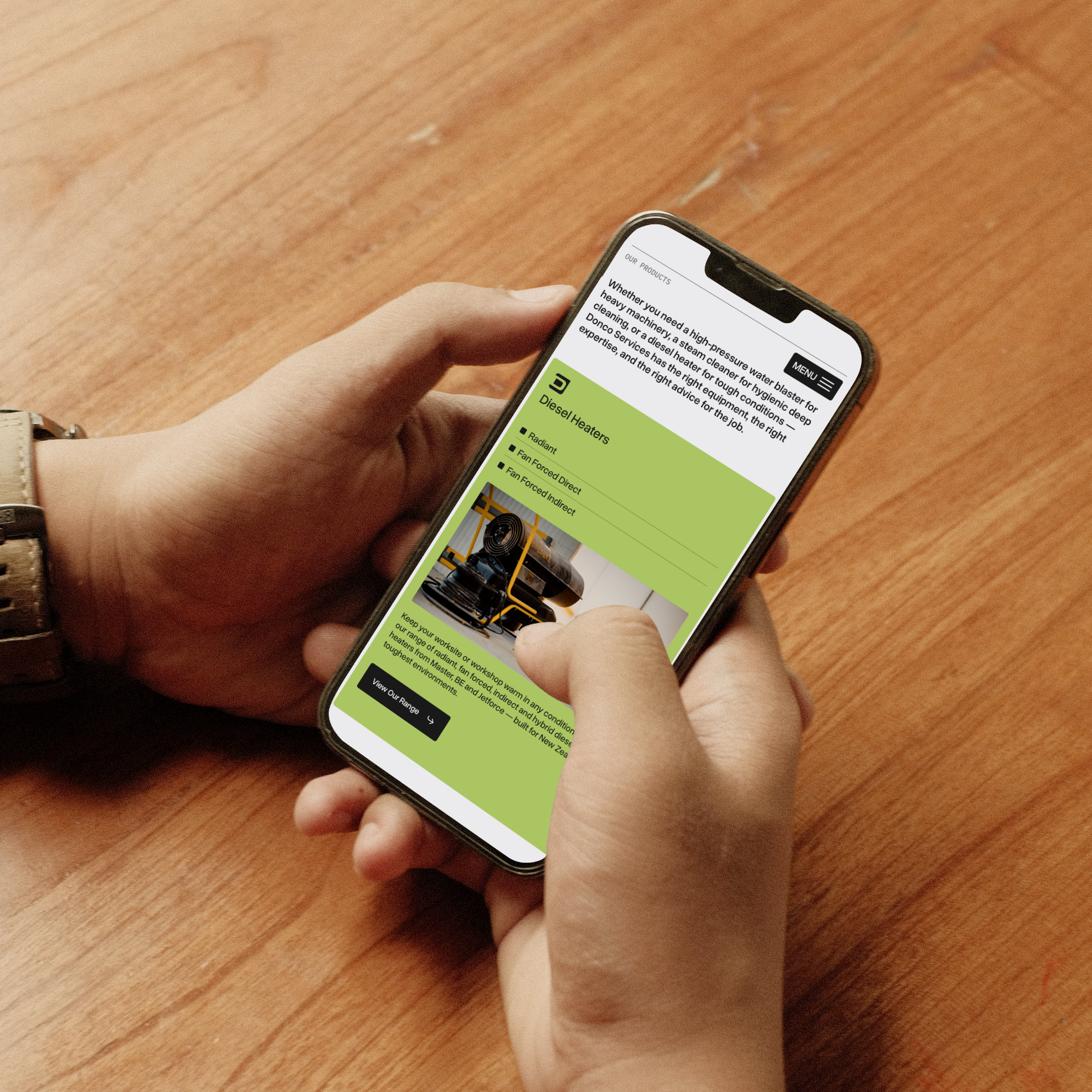
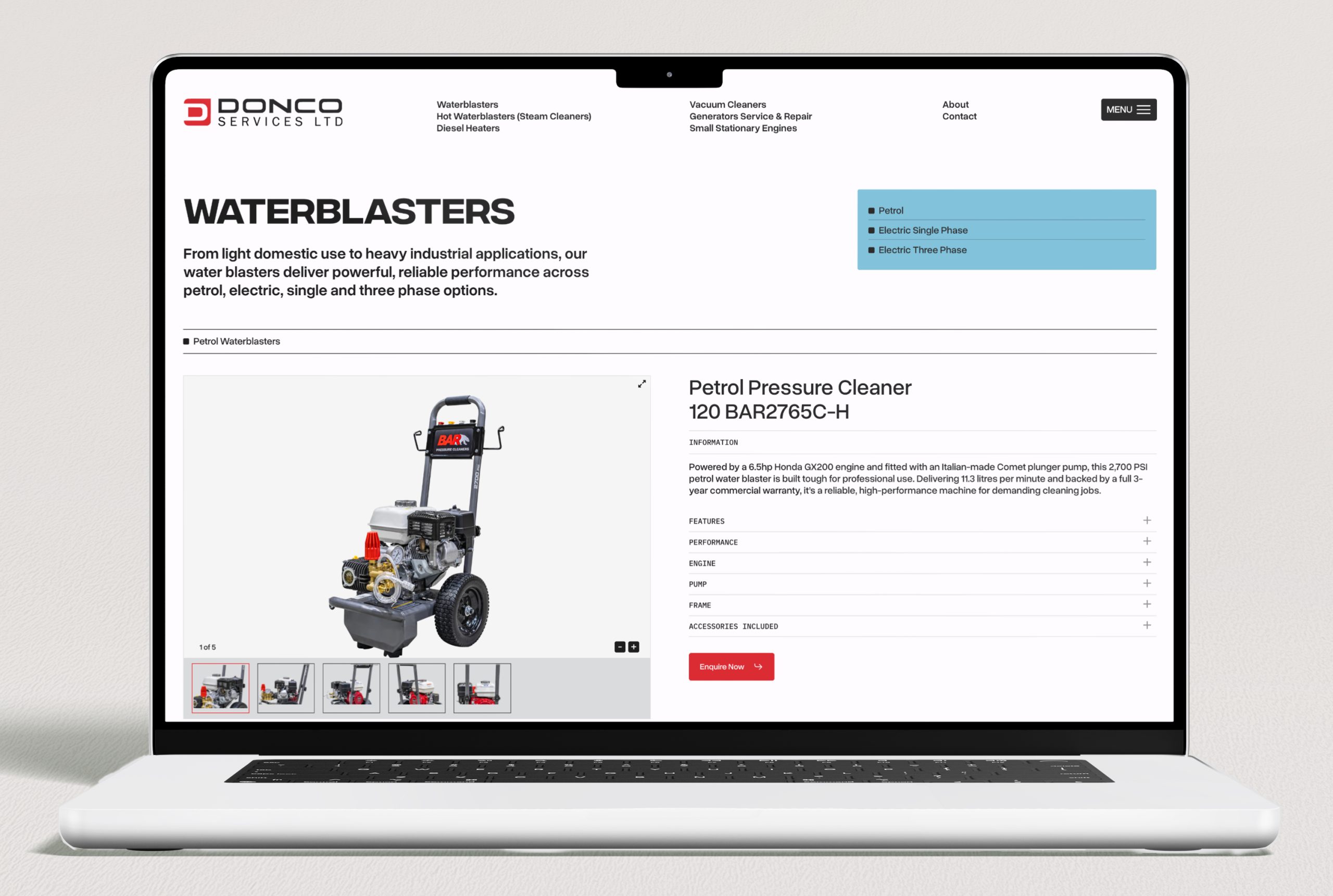
Donco Services is a Christchurch-based supplier and servicer of industrial equipment — water blasters, steam cleaners, diesel heaters, vacuum cleaners, generators, and small stationary engines — with over 30 years in the industry.

They don’t sell online. But their website does the pre-visit research job exceptionally well. Each product category is broken down in detail — waterblasters split into petrol, electric single phase, and electric three phase; diesel heaters separated into radiant, fan forced direct, and fan forced indirect — with clear descriptions, specifications, and guidance on what each option is suited for. A customer trying to figure out which water blaster is right for their operation can get most of the way to a decision before they’ve spoken to anyone.

That level of detail does several things at once: it builds confidence in Donco’s expertise, it saves time for both the customer and the sales team, and it signals to Google exactly what the business stocks and who it serves — helping Donco rank for specific, high-intent searches that a generic product page never would.

Sky Media built the Donco website on WordPress, designed around their product range and the way their customers actually research and buy. You can see it at donco.co.nz.

Donco Services WordPress website built by Sky Media, showing categorised industrial equipment catalogue with detailed product descriptions and specifications.

The Donco Services website built by Sky Media, a detailed product catalogue that helps customers research and self-qualify before visiting the Christchurch showroom.

3. Make it fast and easy on mobile

Most local shopping searches happen on a phone, often while someone is already out and about. If your website loads slowly, is hard to navigate on a small screen, or makes it difficult to find your phone number or address, you’re losing customers at the moment of highest intent.

A customer who searches “outdoor furniture store open now near me”, clicks your website, and immediately finds your address and phone number in a tap-to-call format will call you. The same customer who clicks your website and has to wait four seconds for it to load, then scroll through a full-screen homepage banner to find your contact details, will click back and try the next result.

Strategy 4: Use Reviews as a Competitive Weapon

Here’s something the big chains genuinely can’t replicate: authentic, personal, relationship-driven reviews from real local customers.

Bunnings has thousands of reviews but they’re national, generic, and largely about parking and wait times. An independent outdoor furniture store in Hamilton with 85 reviews that mention specific staff members by name, comment on the quality of advice they received, and describe what they bought and why. That review profile tells a completely different story, one that no chain can manufacture.

Reviews matter for three reasons in this context:

  • Local SEO rankings. Google’s local algorithm weights review volume and recency as a significant ranking signal and having more good reviews means better map pack placement.
  • Click-through rate. In a row of local search results, a business with 95 reviews and 4.8 stars will get more clicks than one with 12 reviews and 4.1 stars, even if both appear in the same position.
  • Conversion. Reviews that describe specific products, specific advice, and specific staff members are extraordinarily persuasive. They do the sales job before the customer has even walked in the door.

Build a system for collecting reviews consistently: ask every happy customer, send a direct link, and make it a part of the post-sale or post-visit routine. A steady stream of fresh reviews is one of the biggest advantages a local retailer has over a national chain.

Strategy 5: Create the Content Your Competitors Ignore

Large chains produce generic content at scale. They don’t have time to go deep on local topics, niche product knowledge, or the specific questions that your particular customers ask. That’s a gap you can fill and it builds SEO value over time.

A few examples of content that works well for independent NZ retailers:

  • Buying guides for your niche. “How to choose the right outdoor furniture for a NZ coastal property”, “The difference between entry-level and trade-grade power tools”, “What to look for when buying a kids bike for NZ terrain”. These attract research-phase buyers and position you as the expert.
  • Local-angle content. “Best plants for Canterbury gardens”, “Outdoor furniture built for NZ summers”, “Why NZ homes need [specific product]”. This content ranks for searches big chains simply won’t write about.
  • New arrivals and brand spotlights. Regular posts about new stock, new brands, or seasonal ranges keep your site fresh, give Google new content to index, and give customers a reason to come back.

You don’t need to publish constantly. Four to six well-written, genuinely useful posts per year will compound in value over time far more than a dozen thin pieces.

Strategy 6: Be Findable for “Near Me” and Same-Day Searches

One of the clearest advantages local retailers have over online-only big chains is physical presence, and Google increasingly rewards this for shoppers who want something now.

Searches like “outdoor chairs near me open now”, “power tools Christchurch same day”, and “baby clothes store open Saturday” are high-intent queries that independent retailers are uniquely positioned to win. The person searching isn’t looking for the cheapest price or the biggest range instead they want it today, locally.

To capture these searches:

  • Keep your Google Business Profile hours scrupulously accurate, including public holidays
  • Enable the “In-store pickup” and “Visit in store” attributes on your GBP if applicable
  • Use the Products section of your GBP to show what you carry as this feeds into Google’s local inventory-style results
  • If you have real-time inventory, platforms like Shopify can sync stock to Google Merchant Center, letting Google show whether a product is in-store right now

This last point is genuinely powerful. A local customer who can see that the specific item they want is in stock at a store two kilometres away will drive there before they’ll wait for delivery from an online retailer.

Putting It Together: Where to Start

If you’re an independent NZ retailer and this all feels like a lot, the priority order is straightforward:

  1. Get your Google Business Profile complete and actively maintained. This is your highest-leverage, lowest-cost starting point.
  2. Make sure your website loads fast on mobile, shows your location and hours immediately, and clearly describes your specialisation.
  3. Build a system for collecting Google reviews consistently.
  4. If you sell online or want to, set up Google Merchant Center and get your products into free Shopping listings.
  5. Consider Google Shopping Ads for your best-margin products once your feed is clean and optimised.
  6. Start producing local, niche content that the chains won’t write.

None of these require a massive budget but they require consistency and attention which independent retailers, by their nature, are better positioned to deliver than a national chain managing hundreds of locations.

Ready to Compete More Effectively Online?

Sky Media works with NZ retailers on the full picture: website design and development, local SEO, Google Shopping setup, and digital marketing strategy. Whether you’re starting from scratch or want to get more from what you’ve already built, we can help you figure out where the biggest opportunities are.

If you’d like a straight-talking assessment of where your current online presence is leaving opportunities on the table, get in touch.

How to deal with bad Google reviews

What to Do When Someone Leaves Your Business a Bad Google Review

By Digital Marketing, Tips and Guides

You’re checking your Google Business Profile and there it is — a one-star review. Maybe it’s detailed and angry. Maybe it’s vague and unfair. Maybe it’s from someone you genuinely can’t place.

Whatever the circumstances, the first thought is either fire back or pretend it isn’t there. Neither of those is the right move.

A bad review is not the end of the world, and in many cases, how you respond to a negative review actually matters more to prospective customers than the review itself. This guide walks through exactly what to do, step by step, including when you can get a review removed and when you can’t.

How to deal with bad Google reviews

First: Don’t React Immediately

The worst responses to negative reviews are written in the first five minutes when the sting is fresh and the temptation to defend yourself is strongest.

Before you write a single word, give yourself time to cool down. Read the review again the next morning with fresh eyes. Ask a trusted colleague to read it too.

This matters because your response isn’t just for the person who left the review. It’s for every future customer who reads it, and they will read it. Research consistently shows that prospective customers pay close attention to how businesses handle negative feedback. A calm, professional response to a bad review can actually increase trust. A defensive or aggressive one does the opposite.

Step 1: Understand What You’re Actually Dealing With

Not all negative reviews are the same, and your approach should depend on what kind you’re dealing with. There are broadly three types:

A genuine complaint from a real customer
The experience they describe happened. They felt let down. Whether the situation was entirely in your control or not, their frustration is real. This is the most common kind, and the most important to handle well.

An exaggerated or unfair review from a real customer
Something did happen, but the review significantly overstates it, leaves out important context, or characterises the situation in a way that feels unfair. These are frustrating because there’s a kernel of truth buried in something that reads as far worse than it was.

A fake or mistaken review
The reviewer describes an experience that never happened, names the wrong business, or appears to be left by a competitor. These are less common but they do happen, and Google has a process for flagging them.

Step 2: Respond Publicly and The Right Way

For genuine complaints and unfair reviews alike, a public response is almost always the right move. Silence reads as indifference. A good response demonstrates accountability, professionalism, and that there’s a real human behind the business.

Here’s what a strong response looks like:

  1. Acknowledge. Start by recognising the customer’s experience. Don’t argue about the facts in your opening line. “We’re sorry to hear your experience didn’t meet expectations” costs nothing and immediately sets a constructive tone.
  2. Take responsibility where it’s warranted.  If something genuinely went wrong on your end, own it. Customers respect honesty far more than deflection. You don’t need to air every detail publicly, but acknowledging fault where it exists disarms the review.
  3. Provide context, briefly. If there’s something important a reader wouldn’t know from the review alone such as an unusual circumstance, a policy that applies here, a miscommunication, you can mention it. Keep it short and non-confrontational.
  4. Offer to resolve it offline.  Invite the customer to continue the conversation directly. Include a name and contact method. This shows you’re serious about fixing things and moves the difficult conversation out of the public eye.
  5. Keep it short. Three to five sentences is usually enough. Long responses can feel defensive. Short ones feel confident.

Here’s an example of how that plays out in practice:

Hi [Name], thank you for taking the time to share your feedback. We’re sorry to hear the project didn’t meet the standard you expected — that’s not the experience we aim to deliver. We’d genuinely like to understand what happened and make it right. Please feel free to contact us directly at [email/phone] and we’ll prioritise getting this resolved.
— [Your name], [Business name]

Notice what that response does: it’s calm, it acknowledges the complaint without admitting specific fault, it offers a path forward, and it’s signed personally. It reads as trustworthy which is the goal.

What NOT to do

  • Don’t argue the facts point-by-point in your response. It looks defensive to everyone reading.
  • Don’t apologise excessively. One genuine acknowledgement is enough.
  • Don’t copy-paste the same generic response to every review. It reads as automated and impersonal.
  • Don’t name-call, challenge the reviewer’s honesty, or suggest they’re lying, even if they are.
  • Don’t offer refunds or compensation publicly. You can do that in a private conversation.

Step 3: Try to Resolve It Privately

Once you’ve posted your public response, reach out to the customer directly if you have their contact details. A genuine attempt to fix the problem, not just a token gesture, often leads to one of two outcomes: either the customer updates or removes their review, or the situation gets resolved and they feel heard, even if the review stays.

A personal phone call goes much further than an email. It signals that you take the situation seriously enough to have a real conversation, not just fire off a template.

What you’re not trying to do is pressure someone into removing a review. That’s both ineffective and counterproductive. What you are doing is giving a real customer a genuine chance to feel heard and have their problem solved. That’s just good business, and the review outcome is a side effect, not the goal.

Step 4: Know When (and How) to Flag a Review for Removal

Google will remove reviews but only in specific circumstances, and it’s not a quick process.
You can flag a review for removal if:

  • It is clearly fake. It describes an experience that never happened, from someone who was never a customer.
  • It is from a competitor or someone with a clear conflict of interest.
  • It contains hate speech, explicit threats, or discriminatory language.
  • It includes personal information (phone numbers, addresses).
  • It is spam or was posted multiple times.
  • It is for the wrong business. Sometimes people confuse similar business names.

To flag a review, go to your Google Business Profile, find the review, click the three dots next to it, and select “Report review”. You’ll be asked to select a violation category.

Important: Google does not remove reviews simply because they are negative, unfair, or even factually incorrect. A one-star review from a real customer who had a genuinely bad experience, even one you disagree with, will not be removed on those grounds alone.

If your flag is rejected and you believe the review violates Google’s policies, you can appeal through the Google Business Profile support team. This takes longer and isn’t always successful, but it’s available as an option.

Step 5: Bury It With Better Reviews

Here’s the honest truth: if you have 60 reviews averaging 4.7 stars and one angry one-star review, most people will barely notice it. In fact, a small number of negative reviews within an otherwise strong profile can actually increase credibility. They signal that your reviews are real, not manufactured.

The best long-term response to a bad review isn’t a clever reply. It’s an ongoing system for collecting positive ones.

A few simple things that work for NZ businesses:

  • Ask every happy customer directly the moment after a job well done, or the end of a positive service interaction.
  • Send a follow-up text or email with a direct link to your Google review page and make it one click.
    Ask customers to mention the specific service or location in their review. It helps your SEO and makes the review more useful to future readers.
  • Respond to positive reviews too. It shows you’re engaged and grateful, not just reactive when things go wrong.

A steady flow of genuine, recent reviews does more to protect your reputation than anything else. A bad review from three months ago looks very different when it’s surrounded by many positive ones from the last few weeks.

What If the Review Is Genuinely Unfair?

This is the hardest scenario, when you know the review is exaggerated, out of context, or simply not accurate, but it doesn’t meet Google’s removal criteria. The temptation is to say so publicly. Resist it.

A response that effectively says “this reviewer is wrong” rarely lands well, even when it’s true. Other readers don’t have the context to judge who’s right, and a business that publicly disputes customer accounts tends to look worse, not better.

Instead, use your public response to tell your side of the story without arguing. Something like:

We take all feedback seriously and we’re sorry this was your experience. Our standard process is [X], and we’d welcome the opportunity to discuss this further at [contact].
— [Your name], [Business name]

That response tells the next reader: this business has good processes, they’re open to conversation, and there may be more to this story than one person’s account. That’s the best you can do, and it’s often enough.

The Bigger Picture: Your Review Profile Is Part of Your Business

Your Google reviews are public-facing and permanent. They show up on your Google Business Profile, in Google Maps, in search results, and, increasingly, in AI-generated summaries that Google surfaces when people search for businesses like yours.

How you handle criticism is part of your brand. A business that responds professionally to a bad review tells potential customers: these people are accountable. They take their work seriously. If something goes wrong, they’ll deal with it like adults.

That’s a far more powerful signal than any marketing copy you write about yourself.
The businesses that manage their review profiles well, actively collecting positive reviews, responding promptly to every review good or bad, and handling complaints with professionalism consistently outperform those that don’t, both in Google rankings and in customer trust.

Quick Reference: Bad Review Response Checklist

  1. Wait before responding. Don’t write your reply in the heat of the moment.
  2. Identify the type: genuine complaint, unfair/exaggerated, or fake.
  3. Write a calm, brief public response: acknowledge, contextualise, offer to resolve offline.
  4. Don’t argue, don’t over-apologise, don’t copy-paste generic responses.
  5. Follow up privately to genuinely resolve the issue if possible.
  6. Flag for removal only if it violates Google’s policies, not just because it’s negative.
  7. Double down on collecting positive reviews to shift the overall picture.

Need Help Managing Your Google Reviews and Local SEO?

Your Google Business Profile, including how your reviews look and how consistently you respond to them, is one of the strongest signals Google uses for local search rankings. It’s also one of the first things a prospective customer sees.

Sky Media helps NZ businesses build and maintain the kind of online presence that earns trust before the first call. If you’d like a second set of eyes on your GBP, your review profile, or your overall local SEO, we offer a free audit.

AI search influence on local businesses

Google AI Overviews Are Changing Search But Local NZ Businesses Have an Advantage

By AI, SEO

If you’ve searched on Google lately, you’ve probably noticed something different at the top of the results page — a block of AI-generated text that summarises an answer before you’ve clicked anything. That’s Google’s AI Overview, and it’s one of the biggest changes to search in over a decade.

The headlines around it have been alarming. Traffic is down. Clicks are disappearing. Organic search is dying. For businesses that rely on Google to bring in customers, it sounds like bad news.

But here’s what those headlines tend to miss: the impact of AI Overviews is not the same for every kind of business. And for local NZ businesses: tradies, retailers, professional services, and hospitality the picture is considerably more encouraging than the general panic suggests.

AI search influence on local businesses

This post explains what AI Overviews actually are, what the data shows and, most importantly, why local businesses in New Zealand are in a stronger position than most.

What Is a Google AI Overview?

When someone searches Google for information, they now often see an AI-generated summary sitting above all other results. Google calls this an AI Overview (previously known as Search Generative Experience, or SGE).

Instead of a list of links to websites, the searcher gets a direct answer synthesised from multiple sources with links to those sources on the side or at the bottom. For many queries, users can get what they need without clicking through to any website at all.

This is what’s known as a zero-click search, and it’s grown significantly. Research from SparkToro found that 58% of all Google searches now end without a click to any website. For searches where an AI Overview appears, that figure jumps even higher.

For businesses that built their traffic on informational content such as blog posts answering general questions, how-to guides, and educational articles, this is a genuine challenge. Google is now answering those questions directly, without sending users anywhere.

The Data: How Often Do AI Overviews Actually Appear?

The statistics vary depending on who you ask and how they measure it, but a few things are consistent across multiple large studies in 2025 and early 2026:

~48%

of all tracked Google searches trigger an AI Overview as of early 2026

7.9%

of local searches trigger an AI Overview

99%

of AI Overviews appear on informational queries

+35%

more clicks for sites cited inside an AI Overview

  • ~48% of all tracked Google searches trigger an AI Overview as of early 2026 — up from 31% a year earlier. (BrightEdge, Feb 2026)
  • Only 7.9% of local searches trigger an AI Overview. (Ahrefs, Nov 2025)
  • 99% of AI Overviews appear for informational queries — ‘what’, ‘how’, and ‘why’ questions. (SeoProfy, 2026)

These last two points are the most important for local NZ businesses. AI Overviews are overwhelmingly a phenomenon affecting informational content: research, definitions, explanations, comparisons. They are rarely triggered by the kinds of searches that drive local business enquiries.

Why Local Searches Are Different

Here’s the key distinction: there are two very different types of Google searches, and AI Overviews affect them very differently.

Informational searches are questions with general answers — “how does underfloor heating work”, “what’s the best material for a deck”, “what does an electrician charge per hour”. These are research queries. The searcher isn’t necessarily ready to hire someone; they’re learning. These are the searches AI Overviews dominate.

Local intent searches are queries where someone wants to hire, visit, or buy and they want to do it nearby. “Electrician Auckland”, “plumber Wellington urgent”, “builder Christchurch quote”, “café near me”. These are high-intent searches that drive real business. And AI Overviews almost never appear for them.

According to Ahrefs’ data, only 7.9% of local searches trigger an AI Overview. The local map pack — the three businesses that appear with a map at the top of results — still dominates local intent searches. It works the way it always has, and it’s not going anywhere.

This is very good news for any NZ business whose customers find them by searching for a local service. Your Google Business Profile, your local SEO, your reviews — these still work. The rules haven’t changed for you the way they have for national publishers or information websites.

What Kind of Businesses Are Most Affected?

To understand who needs to be most concerned about AI Overviews, it helps to look at which query types are most affected:

Most affected: Blogs and media sites, educational content, health and how-to guides, financial explainers, recipe sites, general Q&A content, anything built around answering research questions.

Moderately affected: E-commerce sites (Google is beginning to expand AI Overviews into commercial queries, though more slowly), national service providers targeting broad non-local terms.

Least affected: Local businesses with location-specific search intent: trades, hospitality, retail, professional services, healthcare, real estate.

If your business gets most of its enquiries from people searching for a specific local service, and that’s the case for the majority of Sky Media’s clients, you’re in the least affected category.

What Should Local NZ Businesses Actually Do?

The short answer: keep doing what works, and double down on it.
The fundamentals of local SEO haven’t changed. In fact, some of them have become more important:

1. Your Google Business Profile is more valuable than ever

The local map pack is one of the most AI-Overview-resistant parts of Google search. A well-maintained GBP, with accurate details, regular photos, consistent reviews, and active posts, is your strongest asset. If you haven’t invested time here, now is the moment.

2. Reviews remain your most powerful trust signal

Google’s local rankings are heavily influenced by review volume and recency. But there’s a new dimension: AI-generated answers increasingly draw from and reference businesses with strong review profiles. A business with 80 current, detailed reviews is more likely to be surfaced and mentioned in local pack results and, increasingly, in AI-generated responses to relevant queries.

3. Location-specific content on your website still matters

Service pages that clearly name the areas you work in, the specific services you offer, and the kinds of customers you help, this content gives Google the signals it needs to match you to local searches. It also gives AI systems the structured, authoritative information they need to reference you correctly.

4. Your website needs to be technically solid

Page speed, mobile experience, and structured data (schema markup) are all becoming more important, not less. Structured data in particular, the code that tells Google exactly what your business is, what services you offer, and where you operate, helps AI systems understand and reference your site accurately. It’s moved from a nice-to-have to a meaningful ranking signal.

5. Don’t abandon informational content, just be strategic about it

If your website has blog posts or guides answering questions your customers ask, these are still worth having. The approach shifts slightly: rather than writing purely to attract informational traffic, write content that demonstrates your expertise and builds trust with people who are already considering hiring you. Content that’s specific, authoritative, and locally relevant will still perform, and may even be cited by AI systems if it’s structured well.

The Bigger Picture: What’s Actually Changing

It’s worth stepping back from the day-to-day statistics and considering what AI Overviews represent at a bigger level.

Google is moving from being a directory of links to being an answer engine. For queries where the answer is general and informational, it increasingly provides that answer itself. For queries where the answer depends on location, personal preference, or real-world availability: who’s available, who’s nearby, who’s trusted in this area, it still needs to point people to real businesses.

Local businesses are, in many ways, the part of the internet that AI can’t replace. An AI can tell you how roof painting works. It cannot paint your roof. It can explain what a conveyancing lawyer does. It cannot handle your property transaction. The searches that lead to actual local business happen in the part of Google that’s proven the most resistant to AI disruption, and that’s where local businesses live.

A Note on What’s Still Changing

It would be misleading to suggest AI Overviews have zero impact on local businesses or that the landscape is completely stable. A few things worth watching:

  • AI Overviews are expanding into commercial queries. They currently appear in only around 10–18% of commercial searches, but that share is growing. This is worth monitoring, particularly for e-commerce businesses and national service providers.
  • Zero-click behaviour is increasing across all search types. Even without an AI Overview present, users are clicking through to websites slightly less often than they used to. This makes your Google Business Profile which answers many questions (hours, phone, reviews, location) without requiring a click even more important as a standalone conversion tool.
  • AI Mode is a new surface to understand. Google launched AI Mode in 2025 as a dedicated AI search tab with 75 million daily users globally. It’s still a small channel relative to traditional search, but it’s growing and will become more relevant to track over time.

None of these developments are cause for alarm for local NZ businesses right now. But they are worth being aware of and they’re exactly the kind of thing a good SEO partner should be monitoring and acting on for you.

Local SEO Is Still One of the Best Investments a NZ Business Can Make

While the global SEO landscape is shifting in meaningful ways, the fundamentals of local search remain intact, and for NZ businesses that serve a geographic area, the opportunity is as strong as it’s ever been.

The businesses that will come out ahead are the ones that stay consistent with local SEO fundamentals: a well-maintained Google Business Profile, a steady flow of reviews, a fast and mobile-friendly website, and location-specific content that clearly communicates who they serve and where.

If you’d like to understand how your current SEO is performing in this changing environment, or what you should be prioritising, Sky Media offers a free audit that looks at exactly these signals. Request a free SEO audit.

If You Want to Charge More, You Need to Look Like You're Worth It

If You Want to Charge More, You Need to Look Like You’re Worth It

By Tips and Guides, Web Design

Here’s a question worth sitting with: if someone landed on your website right now with no referral, no prior knowledge of your business, would they be willing to pay your prices?

Not “would they find the information they need” or “would they know what you do”. Would the experience of your website, your branding, your online presence make them feel like you’re worth what you charge?

If You Want to Charge More, You Need to Look Like You're Worth It

For a lot of NZ businesses, the honest answer is: probably not. The gap between what you actually deliver and what you appear to deliver online is costing you more than you realise, not just in lost enquiries but in the price you’re able to charge too.

People Decide Before They Think

We like to believe purchasing decisions are rational. We research, we compare, we weigh up the options, and we make a logical choice. That’s the story we tell ourselves. But the reality is closer to the opposite. Studies in consumer behaviour consistently show that people form an emotional impression first, often within seconds, and then use logic to justify the decision they’ve already made emotionally.

This isn’t a flaw. It’s how human beings are wired. We use visual and contextual cues to assess trustworthiness, quality, and value almost instantaneously. It’s a mental shortcut that helps us make thousands of micro-decisions every day without burning out.

For businesses, this has a very practical implication: the first impression your brand and website creates carries enormous weight. Before a potential customer reads a single word of your copy, before they’ve seen your pricing, before they’ve contacted you, they’ve already formed a view of what kind of business you are and what you’re probably worth.

Your online presence isn’t just telling people what you do. It’s telling them what you’re worth.

The Gap Between What You Do and What You Look Like

We work with a lot of NZ businesses that are genuinely excellent at what they do. Real expertise, strong results, loyal clients, fair pricing. But their website, their branding, or their overall online presence doesn’t reflect any of that.

It might be a website built five years ago that hasn’t been touched since. A logo designed on Canva that doesn’t hold up at larger sizes. Inconsistent fonts and colours across different pages. Blurry photos taken on a phone. A contact form that looks like it was borrowed from 2012.

None of these things reflect the quality of the actual work. But they all shape how a prospective customer feels about the business before they’ve experienced it firsthand. The result is a trust deficit, and trust deficits show up in your bottom line.

They show up as price resistance, or customers choosing a competitor who looks more polished, even if your service is better, or enquiries that go cold because the website didn’t do enough to earn confidence but also as the constant need to justify your pricing rather than having your positioning do that work for you.

What “Looking the Part” Actually Means

Looking premium doesn’t mean looking flashy. It doesn’t mean an elaborate website with animations on everything and a costly full brand refresh. Some of the most effective, high-converting websites we’ve built for NZ businesses are clean, straightforward, and fast.
What it does mean is consistency, intention, and professionalism across every touchpoint a prospective customer encounters.

In practice, that looks like:

  • A website that loads quickly and works properly on mobile. Nothing signals “we haven’t invested in this” faster than a slow, broken mobile experience. Most of your potential customers are on their phones.
  • Visual consistency. The same fonts, the same colours, the same general aesthetic across your website, your social media, your email signature, your Google Business Profile. Inconsistency creates subconscious doubt.
  • Professional photography. Real images of your work, your team, or your products. Real photos signal confidence.
  • Copy that sounds like you. Not corporate filler, not AI boilerplate, not vague promises. Writing that’s clear, specific, and speaks directly to the person reading it.
  • A clear value proposition. Within the first few seconds on your website, a visitor should understand what you do, who you do it for, and why you’re the right choice. If they have to work to figure that out, you’ve already lost ground.
  • Social proof in the right places. Reviews, testimonials, case studies, logos of clients or certifications, positioned where they do the most work, not buried at the bottom of your website sub-page.

These aren’t cosmetic considerations. Each one is a signal. These signals compound positively or negatively.

The Behaviour Side: How You Act Online Matters Too

Your business perception isn’t built by design alone. It’s also built (or quietly eroded) by how a business behaves across its digital touchpoints.

Think about the experience of visiting a website that ticks all the visual boxes: clean design, good photography, clear messaging, and then immediately triggers a discount pop-up, a chat bot that won’t go away, a countdown timer trying to manufacture urgency, and a cookie banner that takes up half the screen.

In an instant, the carefully constructed impression of quality collapses. The signals are now all pointing in a different direction: this business is desperate for the sale. That’s not a premium experience. That’s the opposite.

The same principle applies in other ways. A slow response to enquiries. An automated reply that doesn’t sound like a human wrote it. Social media posts that look like they were thrown together in five minutes. A Google Business Profile with photos from 2019 and no responses to reviews.

Every interaction (or lack of one) is data that a potential customer is subconsciously processing. The businesses that command premium pricing are the ones that are intentional about all of it, not just the logo.

Why Inconsistency Is the Thing That Quietly Kills Enquiries

There’s a particular kind of brand damage that happens slowly, almost invisibly, and is difficult to reverse once it sets in: inconsistency.

It often starts innocuously. Someone on the team creates a flyer using a slightly different font because it looked better. A social media post goes out in a different tone because a new person is running the account. The website gets updated in one section but not another. A new promotional graphic is made in a hurry with colours that are close but not quite right.

None of these feel like a big deal in isolation. But over time, the accumulated effect is a business image that feels undefined, and undefined busineses feel less trustworthy, which makes premium pricing harder to sustain.

Our brains are pattern-recognition machines. When a brand shows up consistently, it registers as reliable. When it doesn’t, something feels slightly off, even if a person couldn’t articulate exactly why. That feeling of “something’s not quite right” is enough to lose a sale.

Consistency isn’t about being rigid. It’s about being recognisable, and recognisable businesses are trusted brands.

The Real Cost of Looking Like Less Than You Are

Let’s put a number shape on this, even if it’s hypothetical. Say your service is priced at $3,000. A competitor with a better-looking website and more polished brand is charging $4,500 for something comparable. If your online presence is creating a perception gap, meaning customers see you as the budget option before they’ve even spoken to you, you’re not just losing on price. You’re attracting a different kind of customer: one who shops on price, who negotiates harder, and who is more likely to be disappointed because their expectations were shaped by the lower price point.

Meanwhile, the business with the better presentation is attracting customers who have already self-selected into a higher-value relationship. They’re less price-sensitive. They’re easier to work with. They’re more likely to refer.

The investment in looking the part pays for itself, not immediately, but consistently, over time. And the cost of not doing it compounds in the other direction.

Where to Start if Your Online Presence Doesn’t Match Your Ambitions

If you’re reading this and recognising a gap between what your business actually delivers and how it presents online, the good news is that it’s fixable, and it doesn’t necessarily require a complete overhaul to see meaningful improvement.

A few places to start:

  • Audit your website honestly. Load it on your phone. Time how long it takes. Read the homepage with fresh eyes. Would you trust this business if you’d never heard of them? If not, that’s where to start.
  • Check your visual consistency. Compare your website, your social profiles, your Google Business Profile, your email signature. Do they feel like they belong to the same business?
  • Look at your photography. Are the images on your website and social media genuinely representative of the quality of your work? Or are they placeholders you’ve been meaning to update for two years?
  • Read your copy out loud. Does it sound like a real person talking? Does it clearly answer the questions your customers actually have? Or is it vague, generic, or written for no one in particular?
  • Google yourself. What does someone find when they search your business name? Your Google Business Profile, your reviews, your social media. Do they all reinforce the same message?

You don’t need to fix everything at once. But you do need to be honest about where the gaps are, because your potential customers are noticing them, even if they can’t name them.

Your Website Is Your Most Hardworking Sales Tool

For most NZ businesses, the website is where the buying decision gets made or lost. It’s the thing people check before they call. The thing they compare against your competitors at 10pm on a Sunday. The thing that either earns trust or quietly creates doubt.

A website that looks the part, that is fast, clear, consistent, and professional, isn’t just a better reflection of your business. It’s a commercial asset that actively works to convert interest into enquiries, and enquiries into customers willing to pay what you’re worth.

And a website that doesn’t look the part? It’s doing the opposite thing every day.

The businesses that win at premium pricing aren’t always the ones doing the best work. They’re the ones making the strongest case online that their work is worth the investment. The presentation is part of your product or service.

Bramwell Scaffolding's previous website — functional, but not reflecting the company's experience or reputation.

Bramwell Scaffolding’s previous website: functional, but not reflecting the company’s experience or reputation.

The new Bramwell Scaffolding website designed by Sky Media — professional, fast, and mobile-friendly, matching the standard of work they deliver on-site.

The new Bramwell Scaffolding website designed by Sky Media: professional, fast, and mobile-friendly, matching the standard of work they deliver.

Does Your Online Presence Reflect What Your Business Is Actually Worth?

Sky Media works with NZ businesses to close the gap between what they deliver and how they show up online through web design, branding, and digital marketing that positions you as the premium choice in your market.

If you’re not sure whether your website and online presence are helping or hurting your pricing power, we’re happy to take a look and give you an honest free assessment. Talk to Sky Media.

Shopify stores design, development and migration

Why Growing NZ E-Commerce Businesses Are Moving to Shopify

By E-Commerce

There’s a point in the life of most online stores where the platform you started on stops feeling like a foundation and starts feeling like a ceiling.

The store is growing. The product catalogue is expanding. More people are involved in running it. And suddenly, what used to work fine is now generating technical headaches, slow load times, plugin conflicts, and too much time spent on maintenance instead of selling.

Shopify stores design, development and migration

For a growing number of NZ e-commerce businesses, that’s the moment they start looking seriously at Shopify.

This post looks at why Shopify has become the platform of choice for larger, team-managed online stores in New Zealand — and what’s actually involved in making the switch. We’ll also share a recent example: our migration of Maree Hynes Interiors from WooCommerce to Shopify, including a transfer of over 1,000 products, categories, shipping rules, and payment setup.

What Changes When Your Store Starts to Scale

A small online store with 20 products and one person managing it has very different needs from a store with 1,000 products, multiple staff, and hundreds of orders a month.

At the smaller end, almost any platform works. But as stores grow, a few things become critical:

  • Reliability. High-traffic periods (sales, Christmas, launching a new product) can expose platform weaknesses fast. Downtime or slow load speeds during peak periods cost real money.
  • Team management. When multiple people are updating products, processing orders, and managing inventory, you need proper user roles and permissions, not everyone sharing a single login.
  • Low maintenance overhead. The more time your team spends managing the platform: updates, backups, plugin conflicts, security patches, the less time they spend on the business.
  • Clean, fast product management. With hundreds or thousands of SKUs, the backend needs to be fast, organised, and easy to use without technical knowledge.
  • Trustworthy integrations. Accounting software, inventory systems, email marketing, shipping providers – these all need to connect reliably.
    This is where the difference between WooCommerce and Shopify becomes most pronounced.

WooCommerce vs Shopify: An Honest Comparison

WooCommerce is a WordPress plugin which means it runs on top of WordPress, which runs on a server you manage. For developers and technically confident users, that flexibility is genuinely useful. You can customise almost anything.

But that flexibility comes with a cost: you own the technical responsibility. Hosting, security, updates, plugin compatibility, backups — all of that sits with you (or your developer).

Shopify is a fully hosted platform. The infrastructure, security, and platform maintenance are Shopify’s responsibility. You focus on running your store.

Here’s how they compare across the areas that matter most for growing NZ stores:

FeatureWooCommerceShopify
Hosting & maintenanceSelf-hosted — you manage updates, security, backupsFully hosted and managed by Shopify
ScalabilityCan slow down or break under high traffic without expensive hosting upgradesBuilt to scale — handles traffic spikes without extra setup
Team user accountsBasic roles, limited controls without pluginsBuilt-in staff accounts with granular permission levels
Product managementFunctional but can become slow with large cataloguesFast, clean interface — handles large catalogues well
Payment processingRequires third-party setup and pluginsShopify Payments built in — simple, reliable, low friction
Security & SSLRequires manual managementHandled by Shopify automatically
App ecosystemLarge but inconsistent — plugin conflicts are commonTightly managed app store — integrations are reliable
Ongoing technical overheadHigh — updates, plugin conflicts, security patchesLow — Shopify manages the platform so you can run the business
Best suited forSmaller stores, developers who want full controlGrowing stores, teams, businesses focused on selling

The summary: WooCommerce gives you more control. Shopify gives you more reliability and less friction at scale. For businesses whose priority is growth rather than custom development, Shopify consistently wins.

Why Shopify Works So Well for Larger Teams

One of the most underappreciated features of Shopify for growing businesses is its staff management system.

In WooCommerce, user roles are basic by default: you need plugins to extend them, and even then, the controls are limited. In a team environment, this creates risk: people with more access than they need, no audit trail, and no way to limit what different team members can see or do.

Shopify’s built-in staff accounts let you:

  • Create individual logins for every team member
  • Assign specific permissions (e.g. one person can process orders but can’t edit products or see financial reports)
  • See exactly who made changes and when
  • Remove access instantly when someone leaves the business

For a store with a retail team, a warehouse team, and management all needing different levels of access, this isn’t a nice-to-have, it’s essential.

Handling Large Product Catalogues

Managing hundreds or thousands of products is where platform choice really starts to matter day-to-day.

Shopify’s product management interface is clean, fast, and built for volume. Bulk editing, organised collections, variant management (sizes, colours, materials), and inventory tracking across locations all work smoothly without needing additional plugins.

In WooCommerce, large catalogues can cause the backend to slow down significantly. Product pages take longer to load, bulk edits become frustrating, and adding new products starts to feel like tedious work.

For businesses like Maree Hynes Interiors, with over 1,000 products spanning furniture, homewares, bedding, lighting, rugs, clothing, jewellery and more, having a backend that’s fast and easy to navigate isn’t optional. The team needs to be able to add new stock, update pricing, manage sold-out items, and keep collections current without it becoming a technical exercise.

Real Example: Maree Hynes Interiors — WooCommerce to Shopify

Maree Hynes Interiors is a Timaru-based award-winning interior design and luxury furniture business with both a physical showroom and an extensive online store. Their catalogue includes furniture, homewares, bedding, lighting, rugs, throws, clothing, jewellery and more.

They were running on WooCommerce and had reached a point where the platform was creating more friction than it was resolving. Managing a large and growing catalogue, keeping up with updates and maintenance, and ensuring a smooth, fast shopping experience had become increasingly demanding.

Sky Media migrated the entire store to Shopify. Here’s what was involved:

  • 1,000+ products transferred: all product data, descriptions, images, variants, and pricing migrated accurately
  • Collections and categories: all product organisation rebuilt and structured on Shopify
  • Shipping rules: NZ shipping zones, rates, and rules configured for their specific requirements
    Payment setup: Shopify Payments configured and tested
  • Customised Shopify theme: designed to reflect the premium, design-forward brand Maree Hynes Interiors has built

The result is a fast, visually polished store that’s far easier for the Maree Hynes team to manage day-to-day and presents their products in a way that matches the brand’s quality.

Maree Hynes Shopify Store Homepage
Maree Hynes Shopify Store product page

Maree Hynes Interiors, a Shopify e-commerce store designed and built by Sky Media, migrated from WooCommerce with 1,000+ products.

What’s Actually Involved in a WooCommerce to Shopify Migration?

One of the most common concerns we hear from businesses considering a move is: “What happens to everything we’ve built?”

It’s a fair question. A migration done poorly can lose product data and disrupt the customer experience. Done properly, a migration should be seamless: with nothing lost and everything improved.

Here’s what a smooth WooCommerce to Shopify migration typically involves:

Products and catalogue
All product data — names, descriptions, images, variants, pricing, tags, and inventory levels — is migrated accurately. Collections are rebuilt to match (or improve on) the original structure.

Customer data and order history
Existing customer accounts and order history can be migrated, maintaining continuity for returning customers and preserving business records.

Shipping and payments
All shipping zones, rates, and rules are rebuilt in Shopify. Payment gateways, including Shopify Payments, which simplifies the process considerably are set up and tested.

Design and theme
The migration is also an opportunity to upgrade the store’s design. Rather than replicating the old look exactly, a Shopify migration is typically paired with a new theme that’s built for performance, mobile experience, and conversion.

Testing
Before going live, the entire store is tested: product pages, checkout flow, payment processing, shipping calculations, mobile experience, and page speed.

Is Shopify Right for Every Business?

In the spirit of being useful rather than just promotional: no, Shopify isn’t the right choice for every online store.

If you’re running a very small store with a handful of products and no plans to grow, WooCommerce may be perfectly adequate and switching would be unnecessary cost and disruption.

Shopify makes the most sense when:

  • Your store has grown beyond a few dozen products
  • Multiple people are involved in managing the store
  • Technical maintenance is taking time away from the business
  • You’ve experienced reliability or performance issues
  • You want to grow and need a platform that won’t become a bottleneck
  • You want a checkout and payment experience that just works

If several of those apply to you, it’s worth having a conversation about whether a migration makes sense.

Thinking About Moving to Shopify?

Sky Media designs and builds Shopify stores for NZ businesses, from new builds to full migrations from WooCommerce and other platforms. We handle everything: design, product migration, shipping and payments setup, and ongoing support.

If your current platform is holding you back, we’d be happy to take a look at your store and talk through what a move to Shopify would involve for your specific situation. Talk to Sky Media about Shopify.

Digital Marketing for Tradies: How NZ Builders, Plumbers & Electricians Get More Leads Online

By Digital Marketing, Tips and Guides

Word of mouth used to be enough. For a long time, it was. But for most NZ tradies today, referrals alone don’t fill the calendar, especially if you’re growing, branching into new areas, or trying to reduce the slow periods that come every year.

The tradies consistently winning new work are the ones who’ve figured out how to be visible online when someone picks up their phone and searches “electrician near me” or “builder Wellington quote”. That search happens hundreds of times a day across New Zealand, and right now, someone is getting that job, and it might not be you.

This guide is a plain-language breakdown of what actually works for tradies online

Why Digital Marketing Works Differently for Tradies

Tradies have a natural advantage in digital marketing that a lot of industries don’t: you serve a specific local area, and Google is built to reward that.

When someone searches for a tradie, they’re not browsing, they have a problem right now, and they need it fixed. That’s called high-intent search, and it’s the best kind of traffic you can get. These are people who are actively looking to hire, often with urgency.

The challenge is making sure you show up, and making sure that when you do, your online presence is good enough to earn the call over the other options on the page.

The Four Things That Drive Tradie Leads Online

You don’t need to do everything. But there are four areas where most tradie businesses see the biggest return:

1. Your Google Business Profile

If you only do one thing from this entire article, make it this: set up and optimise your Google Business Profile (GBP).

Your GBP is what appears in Google Maps and the map pack. The three businesses that show up at the top of local search results. It’s free, it’s visible, and for trades work, it’s often the first thing a potential customer sees.

A well-optimised GBP for a tradie should have:

  • Your correct trade category (e.g. “Plumber”, “Electrician”, “Builder” — be specific)
  • Your service area clearly defined
  • At least 10 real photos, for example your van, your team, completed jobs
  • A steady flow of Google reviews from happy customers
  • Your services listed individually (e.g. “Hot water cylinder replacement”, “Bathroom rewiring”, “Deck building”)
  • Regular posts and a quick-response habit for reviews and questions

The trades businesses that dominate local search in NZ aren’t doing anything complicated. They’ve just taken the time to fill out and maintain their GBP properly.

2. A Website That Works as a Sales Tool

A lot of tradie websites look like they were built ten years ago and haven’t been touched since. They load slowly, they’re impossible to navigate on a phone, and they give a potential customer no real reason to choose you over anyone else.

Your website is your digital shopfront. If someone clicks through from Google, whether that’s from your GBP, an ad, or an organic result, your website is where they decide whether to call you or hit the back button.

For tradies, the most important things a website needs to do are:

  • Load fast on mobile. Most people searching for trades are on their phone. If your site takes more than a few seconds to load, they’ll leave before they see anything.
  • Show your phone number immediately. It should be at the top of the page, clickable, and visible without scrolling. Don’t make people hunt for it.
  • List your services clearly. Each main service you offer should have its own page or section. This helps customers, and it helps Google understand what you do.
  • Include real photos. Before and after shots, completed jobs, your team at work. Real photos build more trust than anything else on the page.
  • Show social proof. Your Google rating, a few short testimonials, or logos of organisations you’re certified with (e.g. Master Electricians, Licensed Building Practitioners).
  • Have a clear call to action. Whether it’s a quote form or a phone number, make it obvious what you want them to do next.

A good tradie website doesn’t need to be complicated. It needs to be clear, fast, and trustworthy.

3. Google Ads (When You Want Leads Now)

SEO and your Google Business Profile take time to build momentum. Google Ads can fill the gap.

For tradies, Google Ads work particularly well because you can target people who are actively searching for your specific service in your area right now. When someone searches “emergency plumber Auckland” at 8pm on a Tuesday, a well-set-up Google Ad puts you in front of that person at exactly the right moment.

A few things that matter for tradie Google Ads:

  • Search ads only. For most tradies, search ads (text ads that appear above organic results) are the right format. You’re reaching people with immediate intent.
  • Target your actual service area. Don’t pay for clicks from people outside the area you work in. Set your targeting to cover your real coverage zone.
  • Send traffic to a dedicated page. Not your homepage but a page that matches exactly what the ad promised. If your ad says “Registered Electrician Auckland — Free Quote”, the page should open with those words.
  • Track your calls. Google Ads can track which calls came from which ads. Without this, you’re flying blind on what’s working.

Done right, Google Ads can deliver a consistent flow of qualified leads with a measurable cost per enquiry. Done wrong, they burn through budget fast with nothing to show for it which is why getting the setup right matters.

4. Reviews Are Your Most Powerful Marketing Asset

Think about the last time you hired a tradie you’d never used before. Chances are you checked their reviews first.

Your potential customers do exactly the same thing. Reviews are the single most persuasive element of your online presence, more than your website copy, more than your ads, more than your social media.

For tradies, the goal is a steady, ongoing stream of genuine reviews — not a one-off burst.

Here’s what works:

  • After every completed job, ask the customer directly: “Would you mind leaving us a quick Google review? It really helps us out.”
  • Follow up with a text or email that includes a direct link to your Google review page, make it one tap, not a process.
  • Ask customers to mention the specific job and location in their review (e.g. “bathroom renovation in Papakura”); these details help your local SEO.
  • Respond to every review, good and bad. It shows professionalism and signals to Google that you’re active.

A builder with 60 solid reviews will consistently win more work than one with 5, even if the quality of work is identical. Reviews are trust at scale.

Here’s an example from one of our clients — Tasman Sparkies, a Nelson-based electrical business. Their website is built to convert visitors into calls.

A conversion-focused homepage Sky Media designed for Tasman Sparkies, showing clear services infomation, location, and a prominent call-to-action.

The social proof section of the Tasman Sparkies website, displaying Google reviews to build trust with potential customers.

What About Facebook and Instagram?

Social media comes up a lot in these conversations, so it’s worth addressing directly.

For tradies, social media can work, particularly for brand awareness and showcasing your work. Before and after photos on Facebook or Instagram can do well, especially in local community groups.

But for most trades businesses, social media is a secondary channel. The reason: people don’t usually scroll Facebook when their hot water is broken or they need a new circuit board. They go to Google.

If you have the time and enjoy it, posting your work on social is worthwhile. But if you’re choosing where to invest your energy first, Google (your GBP, your website, and Ads) will almost always deliver a better return for trades businesses.

A Realistic Starting Point

If you’re not sure where to begin, here’s a practical order:

  • Step 1: Claim and optimise your Google Business Profile. It’s free and often the fastest win.
  • Step 2: Make sure your website is up to date and has clear information, call to action and phone number.
  • Step 3: Start asking every happy customer for a Google review and make it a habit.
  • Step 4: Once your profile and website are solid, consider Google Ads to accelerate leads in specific services or areas.

You don’t need to do all of this overnight. Each step compounds on the next, for example: a better GBP leads to more calls, more calls lead to more reviews, more reviews improve your ranking, and a well-built website converts more of those visitors into jobs.

Quick-Reference: Tradie Digital Marketing Checklist

Google Business Profile claimed, complete, and active

  • Service area and categories set correctly
  • At least 10 real photos uploaded
  • Consistent flow of Google reviews being collected
  • All reviews replied to
  • Website is up to date
  • Phone number visible and tappable at the top of every page
  • Each main service has its own page or section
  • Real job photos on the website
  • Google Ads considered once foundation is in place
  • Website and GBP details consistent (name, address, phone)

The One Mistake Most Tradies Make Online

The most common mistake we see is treating online presence as a set-and-forget thing.

A website built three years ago that hasn’t been touched. A Google Business Profile claimed but never updated. A handful of reviews from 2022. No recent photos.

Google pays attention to freshness and activity and so do customers. A profile or website that looks dormant signals uncertainty — is this business still operating? Are they any good? Do they actually work in my area?

The tradies getting the most leads online are the ones treating their digital presence like a tool that needs to be maintained, not a box they ticked once.

Need Help Getting More Work Through Your Website and Google?

Sky Media works with NZ trade businesses on everything from website design to Google Ads management and local SEO, building the kind of online presence that consistently fills the calendar.

Whether you’re starting from scratch or want to improve what you’ve already got, we can help you figure out where the biggest opportunities are and what to do about them. Talk to Sky Media about Tradie Marketing.

Why Your Google Ads Are Getting Clicks But Not Calls

By Google Ads, Tips and Guides

You’re spending money on Google Ads. People are clicking. But the phone isn’t ringing, and the enquiry form is sitting empty.

It’s one of the most frustrating things a business owner can experience. You’re paying for traffic. The traffic is arriving. Something is going wrong in between.

The good news: this is a fixable problem. And once you understand why it’s happening, the solution is usually clearer than you’d expect.

In most cases, the culprit isn’t your ads. It’s what happens after the click.

First, Let’s Separate the Two Jobs

Google Ads and your landing page have two completely different jobs, and confusing them is where most businesses go wrong.

Your ad’s job is to get the right person to click. That’s it. It needs to show up for the right search, say something relevant, and earn the click from someone who could genuinely become a customer.

Your landing page’s job is to convert that click into an action: a call, a form fill, a booking.

If your ad is getting clicks, it’s probably doing its job reasonably well. The problem is almost certainly on the landing page side.

The Most Common Reason: Intent Mismatch

Here’s the core issue in plain language: the person clicked your ad expecting one thing, and your page gave them something different.

This is called an intent mismatch, and it’s the number one reason clicks don’t turn into customers.

A few real-world examples of how this plays out:

  • Someone searches “emergency plumber Wellington” and clicks your ad — but lands on your homepage, which talks generally about all your plumbing services. They wanted urgency and a phone number. They got a brochure. They left.
  • Someone searches “how much does a bathroom renovation cost” and clicks your ad — but your page has no pricing information at all. Their question isn’t answered. They go back and click a competitor.
  • Someone searches “builders Christchurch” and clicks your ad — but your page is slow to load, hard to read on mobile, and the contact form is buried at the bottom. Too much friction. They give up.
    In each case, the ad worked. The page didn’t.

The Homepage Problem

Sending Google Ads traffic to your homepage is one of the most common and costly mistakes in digital advertising.

Your homepage is designed for everyone: new visitors, existing customers, people who just want your phone number, people researching your industry. It tries to do too many things at once. But the person who clicked your ad? They have a very specific need. They searched for something specific. They clicked something specific. Sending them to a general page that doesn’t match what they were looking for is like a customer walking into a shop and asking for running shoes — and the staff point them towards a giant sign that says “We sell all kinds of footwear.”

Every ad campaign should send traffic to a page that’s built around exactly what the ad promised. This is called a dedicated landing page, and it’s one of the highest-leverage things you can do to improve your return on ad spend.

What a High-Converting Landing Page Actually Looks Like

You don’t need a complicated page. You need a focused one. Here’s what the best-performing landing pages for NZ service businesses tend to have:

A clear, specific headline
It should match (or closely mirror) the search term someone used and the promise in your ad. If your ad said “Fast Hot Water Cylinder Replacement — Auckland”, your headline should confirm that’s exactly what this page is about.

One clear call to action
What do you want the visitor to do? Call you? Fill in a quote form? Book online? Pick one and make it obvious. Pages that ask visitors to do five different things often result in them doing nothing.

A phone number that’s easy to find and tap
On mobile (where most local searches happen), your phone number should be visible without scrolling and clickable. A number buried in a footer, or displayed as an image that can’t be tapped, is a conversion killer.

Trust signals above the fold
“Above the fold” means what’s visible before someone scrolls. This prime real estate should include something that builds confidence fast: a Google rating, a short testimonial, a badge (“NZ Certified”, “10+ Years Experience” etc.), or a simple “We’ll call you back within the hour” promise.

A short, frictionless form (if you use one)
Every extra field you add to a form reduces the chance someone completes it. For most service businesses, name, phone number, and a one-line description of the job is enough to start a conversation. Don’t ask for information you don’t need yet.

Fast load speed and a clean mobile layout
Google’s own research shows that pages taking more than a few seconds to load see significantly higher bounce rates. On a phone with variable signal, slow pages feel broken. If your page loads slowly or looks cluttered on a small screen, you’re losing customers before they even read a word.

Example of conversion focused landing page Sky Media created for Visa Ease.

A conversion-focused landing page Sky Media designed for Visa Ease.

Speed and Mobile: The Silent Conversion Killers

It’s worth spending a moment on these two because they’re responsible for more lost conversions than most business owners realise.

1. Speed: If your page takes longer than 3 seconds to load on a phone, a large proportion of visitors will leave before seeing anything. This is money you’ve already paid for — gone. Page speed is affected by things like image file sizes, hosting quality, and how your website is built.

2. Mobile: Well over half of all Google searches happen on a phone. If your landing page isn’t designed with mobile as the priority, for example, text is too small, buttons are too close together, layout looks awkward on a small screen, you’re creating friction at exactly the wrong moment.

These aren’t nice-to-haves. In 2026, they’re the baseline.

The Message Match Principle

There’s a simple rule that the best-performing ad campaigns follow: the message in your ad should match the message on your landing page. This sounds obvious, but it’s surprising how often it breaks down in practice.

If your ad says:
“Free Quote — Commercial Cleaning Auckland — Same-Day Response”, then your landing page should immediately reinforce all three of those things: free quote, Auckland, same-day response. If the page talks about your residential services, doesn’t mention Auckland, and has a contact form that says “We’ll be in touch within 3–5 business days”, the message has broken down.

Every step from search to click to page should feel like a continuous, consistent experience. When it does, conversion rates improve significantly.

A Quick Self-Check: Is Your Landing Page Doing Its Job?

Ask yourself these questions about the page your ads are sending traffic to:

  • Does the headline match what my ad promised?
  • Is it immediately obvious what I want the visitor to do?
  • Is my phone number visible and tappable on a phone?
  • Is there at least one trust signal (reviews, rating, credential) above the fold?
  • Does my contact form have fewer than five fields?
  • Does the page load in under three seconds on a phone?
  • Does the page make sense to someone who has never heard of my business?

If you answered “no” or “not sure” to any of these, you’ve likely found where your conversions are leaking.

The Bigger Picture: Ads and Your Website Work Together

Here’s the thing: Google Ads can drive excellent results, but only when the website behind the ads is built to convert.

A well-managed ad campaign sending traffic to a weak landing page is like running a great promotional offer and then having the wrong address on the flyer. The interest is there. The follow-through isn’t.

This is why businesses that invest in both a well-run ads strategy and a properly built website consistently outperform those who only focus on one. The two amplify each other.

For NZ businesses running Google Ads, the fastest way to improve your cost per lead is usually not to spend more on ads, it’s to improve the page those ads send people to.

Not Sure Why Your Clicks Aren’t Converting?

Sky Media works with NZ businesses on both sides of this equation: building high-converting websites and landing pages, and managing Google Ads campaigns that are set up to actually deliver results.

If you’re spending money on ads and not seeing the returns you expected, it’s worth getting a second pair of eyes on both your campaigns and the pages they’re pointing to. Get a free audit of your website today.

Google My Business profile optimisation tips

How to Write a Google Business Profile That Actually Gets You Customers

By Tips and Guides

Your Google Business Profile (GBP) is often the very first thing a potential customer sees — before your website, before your ads, before your reviews, and although, it’s completely free, often businesses don’t make the most of it.

The difference between a profile that sits there doing nothing and one that consistently brings in calls, bookings, and walk-ins comes down to how well it’s set up — and how actively it’s maintained.

This guide walks you through exactly how to do that.

Google My Business profile optimisation tips

Why Your GBP Matters More Than You Think

When someone searches for a local service — “plumber Auckland”, “dentist Christchurch”, “café near me” — Google shows a map pack of three local businesses before any other organic results. That map pack is powered almost entirely by Google Business Profiles.

If your profile is incomplete, inaccurate, or thin on detail, you won’t appear there — or you’ll appear but fail to earn the click.

Google is explicit about what influences local rankings: relevance, distance, and prominence. Your GBP is your primary lever for relevance and prominence. You can’t change your location — but you can absolutely change how well your profile communicates who you are and why you’re the best choice.

Step 1: Claim and Verify Your Profile (If You Haven’t Already)

Before anything else: make sure you actually own your profile. Plenty of NZ businesses have an unclaimed GBP sitting out there — often with wrong information, no photos, and no one managing it.

Go to google.com/business and follow the prompts to claim and verify. Verification is typically done via postcard, phone, or email depending on your business type.

Once verified, you control what appears — and you can start optimising.

Step 2: Get the Basics Exactly Right

This sounds obvious, but you’d be surprised how often it goes wrong. Google cross-references your profile details against your website, local directories, and other sources. Inconsistencies — even small ones like “St” vs “Street” — create doubt.

Make sure these are accurate and consistent across every platform:

  • Business name (exactly as it appears on your signage and website)
  • Physical address or service area
  • Phone number (ideally a local NZ number)
  • Website URL
  • Opening hours — including public holidays if you’re open

If you’re a service-area business (you go to clients, not the other way around), you can hide your physical address and instead list the areas you serve. Don’t use a fake address or a P.O. box — Google can suspend profiles that don’t meet their guidelines.

Step 3: Choose Your Categories Carefully

Your primary category is one of the most important signals you send to Google. It tells the algorithm what kind of business you are — and which searches you should appear for.

Pick the most specific, accurate category available — not the one that sounds most impressive. “Plumber” beats “Trade Services”. “Family Law Attorney” beats “Lawyer”. “Café” beats “Food and Beverage”.

You can also add secondary categories for other services you offer — but be selective. Only add them if you genuinely provide those services. Irrelevant categories dilute your relevance signal.

Step 4: Write a Business Description That Actually Converts

Your description (up to 750 characters) is your pitch. Don’t waste it with vague fluff like “we’re passionate about delivering quality solutions for all your needs”.

Instead, use it to:

  • Describe what you do in plain language
  • Name the specific services or products you offer
  • Mention the areas you serve (e.g., “Serving Auckland’s North Shore and surrounding suburbs”)
  • Include one or two trust signals (years in business, certifications, or a specific customer promise)

Good example: “Auckland Electrical has been providing residential and commercial electrical services across Auckland since 2008. We specialise in EV charger installations, smart home wiring, and after-hours call-outs. All work is certified and guaranteed. Serving Auckland City, North Shore, Manukau, and West Auckland.”

That description tells Google exactly who you are, what you do, and where — and it tells a potential customer why they should call you.

Step 5: Add Your Services (Don’t Skip This)

The Services section is one of the most underused parts of a GBP — and one of the most valuable.

For each service you offer, you can add a name, a description, and a price (optional). This isn’t just good for users — it gives Google more signals about what you actually do, which can help you appear for more specific searches.

Write service names the way customers search, not the way your industry talks. “Blocked drain repair” instead of “drainage remediation”. “Kids haircuts” instead of “junior grooming services”.

For product-based businesses, the Products section works the same way — add your most important lines with clear names and descriptions.

Step 6: Use Real Photos (Not Stock Images)

Photos matter more than most businesses realise. Profiles with photos consistently outperform those without — in clicks, calls, and direction requests.

The key word is real. Stock images signal nothing. They don’t build trust, and savvy customers can spot them instantly.

What works instead:

  • Photos of your actual team at work
  • Before and after shots (great for tradies, landscapers, cleaners)
  • Your premises — exterior and interior
  • Your products or completed projects
  • The team (a friendly face goes a long way for service businesses)

Aim for at least 10 photos to start with, and keep adding. Fresh photos signal an active, legitimate business — which Google (and customers) respond well to.

Step 7: Build a Review Engine (Then Keep It Running)

Reviews are your most powerful conversion signal. A business with 80 genuine, detailed reviews will almost always outperform one with 10 — even if those 10 are all five-star.

The goal isn’t a one-off surge — it’s a steady flow. Google rewards recency as well as volume.

Here’s what works for NZ businesses:

  • Ask every happy customer — make it a habit, not an afterthought
  • Send a direct link (Google makes this easy via your GBP dashboard)
  • Ask for a review in the right time — right after a job is done, or following a positive interaction
  • Encourage specifics: ask them to mention the service, location, or problem you solved
  • Reply to every review — positive and negative

That last point is often overlooked. Responding to reviews shows Google and prospective customers that you’re active and accountable. A thoughtful response to a negative review can do more to build trust than five new five-star reviews.

Step 8: Use GBP Posts to Stay Active and Relevant

Most businesses set up their GBP and then forget about it. The ones that win treat it more like a social media profile — updated regularly, with things worth reading.

GBP Posts let you publish updates, offers, events, and news directly on your profile. They appear in your knowledge panel in search results.

You don’t need to post constantly. A few times a month with genuinely useful content is better than daily filler.

Good post ideas:

  • Seasonal promotions or service reminders
  • A recently completed project (with a photo)
  • New services or products you’ve added
  • A quick answer to a frequently asked question
  • Local events you’re part of or sponsoring

Each post has a call-to-action button — use it. Whether that’s “Call now”, “Learn more”, or “Book”, make it easy for a reader to take the next step.

Step 9: Seed and Answer the Q&A Section

Google Business Profiles have a Q&A section that anyone can contribute to — which means if you don’t manage it, someone else might answer questions about your business inaccurately.

Get ahead of it. Think about the questions you get asked all the time — pricing, parking, whether you do call-outs, payment types, turnaround times — and answer them yourself. This makes your profile more useful, reduces friction for potential customers, and gives Google more context about your business.

Step 10: Monitor Your Profile and Don’t Ignore the Insights

Once your profile is set up and active, check it regularly. Google allows anyone to suggest edits to your profile — including competitors — and sometimes those edits get applied automatically.

Log into your GBP dashboard at least once a week and check:

  • Are your hours still correct?
  • Have any suggested edits been applied?
  • Are there new reviews to respond to?
  • Are there new questions in the Q&A?

The Insights tab in your dashboard shows how many people found your profile, what searches triggered it, and what actions they took (calls, website visits, direction requests). This is useful data for understanding what’s working — and where there’s room to improve.

The GBP + SEO Connection: Why Your Website Matters Too

Your Google Business Profile doesn’t operate in isolation. It works best when it’s backed by a well-structured, locally optimised website.

Google uses your website to validate and expand what’s in your profile. If your GBP says you offer roof painting in Wellington, but your website has nothing about Wellington or roof painting — that creates a disconnect.

The businesses that consistently dominate local search aren’t just running a good GBP. They have:

  • Dedicated service pages that mirror what’s on their GBP
  • Location-specific content that shows up in local searches
  • Consistent NAP details across their site, their GBP, and directories
  • Reviews that mention real services and real locations

Think of your GBP as the front door and your website as the house behind it. Both need to be right.

Quick-Reference: GBP Checklist for NZ Businesses

  • Profile claimed and verified
  • NAP consistent with website and directories
  • Primary category chosen accurately
  • Business description: specific, local, and service-focused
  • Services (and products if applicable) added
  • Minimum 10 real photos uploaded
  • Review request process in place
  • All reviews replied to
  • GBP Posts going out at least 2–3x per month
  • Q&A seeded with common questions and answers
  • Profile checked weekly for edits and new activity

Your GBP Is Your Most Powerful Free Marketing Tool — Use It

Done properly, a Google Business Profile doesn’t just help people find you — it actively persuades them to choose you over a competitor. It builds trust before the first phone call. It answers questions before they’re even asked.

The businesses that treat their GBP as a living part of their marketing (not a box to tick and forget) are the ones that consistently appear at the top of local search — and convert that visibility into actual customers.

If you’d like help optimising your Google Business Profile as part of a broader local SEO strategy, Sky Media can take a look at what you’ve got and build a plan that compounds over time.

Is Your Website Quietly Killing Your Conversions

Is Your Website Quietly Killing Your Conversions?

By Tips and Guides, Web Design

Most businesses invest money getting people to their website — through SEO, Google Ads, social media, or word of mouth. But what happens when visitors arrive and leave without doing anything? No enquiry. No purchase. No sign-up.

That’s a conversion problem, and it’s more common than you’d think.

Is Your Website Quietly Killing Your Conversions

Before you spend another dollar driving traffic, it’s worth asking: is your website actually set up to convert the people already landing on it?
In this post, we’re breaking down the most common website mistakes that silently sabotage your results and what to do about them.

What Does a “Good” Conversion Rate Look Like?

A conversion is any action you want a visitor to take: filling out a contact form, making a purchase, booking a call, downloading a resource. Your conversion rate is simply the percentage of visitors who complete that action.

Most industry sources place a healthy website conversion rate somewhere between 2% and 5%. Businesses consistently sitting above 6% are genuinely performing well. If you’re below 2%, there’s almost certainly something on your site that’s getting in the way.

That said, what counts as “good” varies depending on your industry, your price point, and what you’re asking people to do. A law firm asking visitors to book a free consultation will convert differently than an e-commerce store selling $30 products. Context matters — but the principles below apply across the board.

15 Reasons Your Website Isn’t Converting

1. Poor Quality Images

Visuals shape first impressions faster than any headline can. Blurry photos, stretched images, or tired stock imagery that looks like it came from a 2010 corporate brochure all erode the trust you’re trying to build.

Every modern smartphone produces high-quality photos, and there are plenty of excellent free and paid image libraries available. There’s no reason to put substandard imagery on your site and visitors will notice.

2. Slow Page Load Times

People are impatient online. If your page takes more than a few seconds to load, a significant portion of your visitors will leave before they ever see your content. They’ll simply go back to Google and click the next result.

Page speed is also a ranking factor, so slow pages hurt your SEO too. Run your site through Google PageSpeed Insights and address whatever’s dragging it down — oversized images, too many plugins, and large video files are common culprits.

3. An Abandoned Blog

A blog that hasn’t been updated in six months (or longer) sends a quiet but damaging message: nobody’s home. If a potential customer lands on your insights page and the most recent post is from last year, it raises doubts about whether you’re still active and engaged.

Either commit to publishing consistently, even once a month makes a difference, or take the blog down entirely. A blank space is less damaging than a neglected one.

An example of a modern well-updated blog Sky Media created for Health Perfomance Club.

An example of a modern well-updated blog Sky Media created for Health Perfomance Club.

4. Spelling and Grammar Mistakes

The occasional typo is forgivable. Multiple errors across your website, however, undermine your credibility in a way that’s hard to recover from. Visitors reasonably wonder: if you don’t pay attention to detail here, how careful will you be with their project or money?

Proofread everything, use a grammar tool, and get a second set of eyes on your copy before it goes live. It’s a small effort with a meaningful payoff.

5. Accessibility Gaps

A website that’s difficult or impossible to use for people with disabilities isn’t just an ethical issue — it’s a conversion issue. If your site can’t be navigated by keyboard, uses low-contrast text that’s hard to read, has buttons that are too small to tap on mobile, or lacks alt text on images, you’re locking out potential customers.

Accessibility standards are also moving toward becoming a legal requirement in many markets. Getting ahead of this now protects your business and widens your audience.

6. Pushy, Pressure-Filled Copy

People can smell desperation online just as easily as they can in a shop. If every section of your website is screaming at visitors to buy now, act fast, or don’t miss out, before you’ve given them any reason to trust you, they’ll disengage quickly.

Good web copy earns conversions by demonstrating value, building credibility, and guiding people naturally toward a decision. Pressure tactics work in the short term for certain products, but for most service-based businesses and higher-value purchases, they actively repel customers.

7. Confusing Navigation

If a visitor can’t figure out where to go on your site, they’ll go somewhere else. Navigation problems are one of the most common and easily overlooked conversion killers.

Think about the journey a potential customer needs to take to enquire or buy. Is that path clear and logical? Are menu labels intuitive? Are there too many options competing for attention? Are your calls-to-action easy to find? Walk through your own site as a first-time visitor and pay attention to what feels unclear.

An example of an easy and structured navigation for Alborania Decor & Design E-Commerce website by Sky Media.

An example of an easy and structured navigation for Alborania Decor & Design E-Commerce website by Sky Media.

8. Brand Voice Inconsistency

Your website, ads, social media posts, and emails should feel like they all come from the same company. When the tone shifts dramatically between channels — formal on the website, casual on social, and oddly formal again in ads — visitors notice the disconnect, even if they can’t put their finger on why.

Beyond consistency between channels, make sure your brand voice is appropriate for your audience. A law firm that tries too hard to be casual can feel unprofessional. A business selling to stressed customers that uses overly chipper, breezy copy can feel tone-deaf. Get this right and your conversions will reflect it.

9. An Outdated Design

Your website is your most visible salesperson. It’s working 24 hours a day, seven days a week, representing your business to people who are deciding whether to trust you with their money.

A design that looks like it hasn’t been touched in five or more years signals stagnation. Broken image links, walls of text, old branding, and clunky layouts all undermine confidence. If your site no longer reflects the quality and professionalism of your business, a redesign isn’t a luxury — it’s a priority.

10. Unclear Value Proposition

Within the first few seconds of landing on your site, a visitor should know exactly what you do, who you do it for, and why they should choose you. If your hero section is vague, jargon-heavy, or tries to be too clever, people will simply leave.

Clarity beats creativity every time on a homepage. Explain what you offer in plain language, and make it immediately obvious why that matters to your ideal customer.

11. Poor Mobile Experience

In New Zealand, as elsewhere, the majority of web browsing now happens on smartphones. If your website isn’t properly optimised for mobile with readable text, easy-to-tap buttons, no horizontal scrolling, and menus that actually work on a small screen, you’re handing a large portion of your potential customers a frustrating experience.

Test your site on a real phone. Better yet, ask someone unfamiliar with your site to try to complete a task on their phone and watch what happens. Google Search Console will also flag mobile usability issues worth addressing.

12. Intrusive Pop-Ups

Used well, a pop-up can capture email subscribers or promote an offer. Used badly, they drive people off your site before they’ve had a chance to engage.

Pop-ups that appear immediately on page load, block the entire screen, are difficult to close, or appear multiple times in a single session are among the most annoying experiences a website can deliver. Keep them tasteful, well-timed, and easy to dismiss.

13. A Complicated Checkout or Enquiry Process

Every unnecessary step in your checkout or contact process is an opportunity for a potential customer to abandon the journey. Hidden fees that appear late, mandatory account creation, excessive form fields, or an unclear path to the checkout all contribute to drop-off.

If you have an E-Commerce store, use analytics tools to identify exactly where people are leaving your checkout flow — then work to remove that friction. For service businesses, make your contact form as short as it needs to be and no longer.

14. No Social Proof

People trust other people more than they trust businesses. Reviews, testimonials, case studies, client logos, and media mentions all do a lot of the heavy lifting when it comes to converting hesitant visitors.

If your website has no evidence of past success — no client feedback, no examples of work, no credentials — you’re asking people to take a leap of faith. The more reassurance you can provide, the easier it is for someone to say yes.

An example of an easy and structured navigation for Alborania Decor & Design E-Commerce website by Sky Media.

See how Sky Media team implemented a Customer Experience page into Kia Ora Campers website redesign.

15. Your Site Goes Down and You Don’t Notice

This one sounds obvious, but it happens more often than you’d expect. If your website is offline — due to a hosting issue, a plugin conflict, a server problem, or a cyber attack — every visitor during that period sees an error instead of your business.

If you’re not monitoring your site’s uptime, you could lose hours (or days) of potential leads before a frustrated customer contacts you to let you know. Set up uptime monitoring and make sure your hosting is reliable.

Start With the Fundamentals

If your conversion rate isn’t where you want it to be, the solution isn’t always a full rebuild. Often, targeted improvements to a handful of the issues above can make a measurable difference.

Start by auditing your site honestly — or have someone else do it for you. Identify the two or three issues most likely to be affecting your results, make changes, and give them time to show results before moving on.

If you’d like an expert set of eyes on your website’s performance, Sky Media offers free website audits for NZ businesses. Get in touch with our team — we’d love to help you get more from the traffic you’re already receiving.