corey

How to Write a Google Review Without a Gmail Email in 2025

By Tips and Guides

Google reviews are a great way to let others know about the quality of a business’s products, or services, while supporting the growth of Kiwi businesses. You may be surprised to find out you don’t even need a Gmail account to leave a review, you can use whatever email you like.

Step 1: Search for the Business

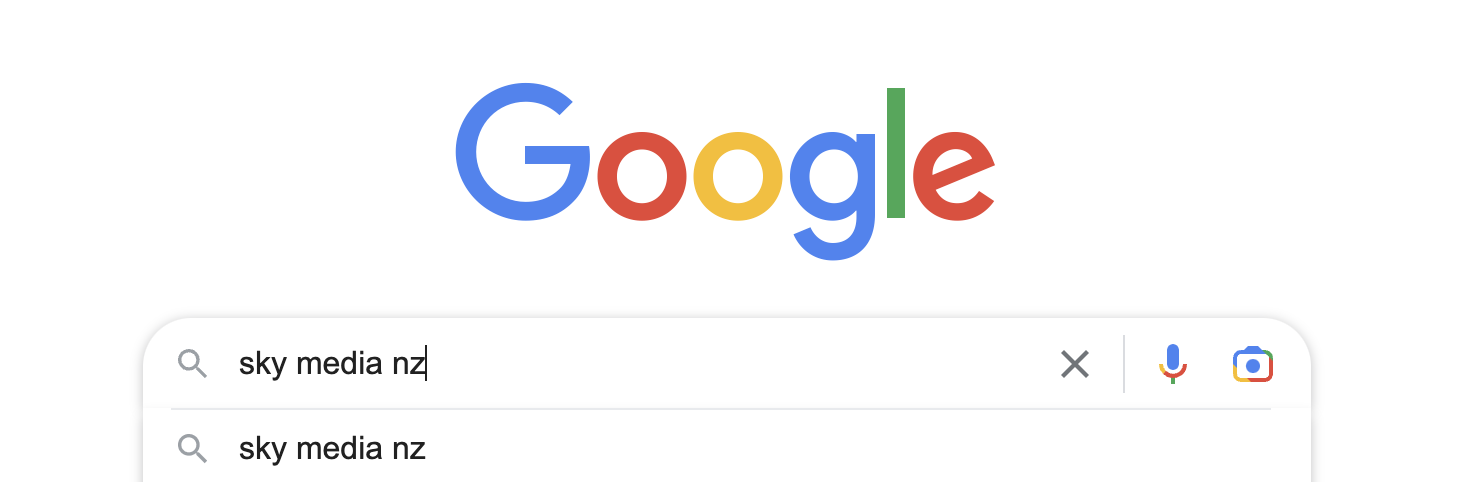
Find the business you want to review on Google using keywords e.g. ‘Sky Media Timaru’.
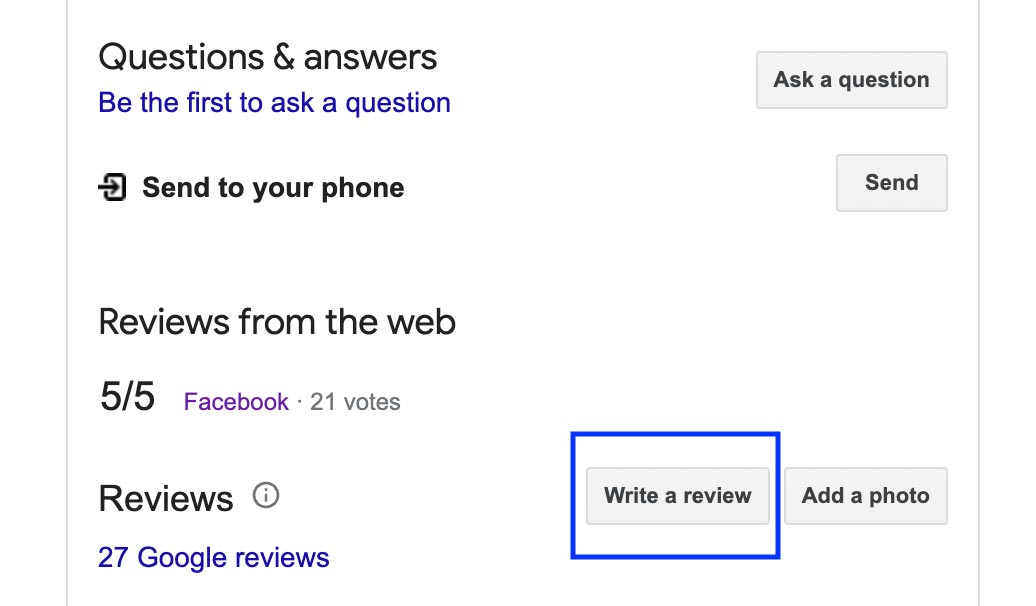
Step 2: Click the ‘Write a Review’ button

On the right of your screen, scroll down to the Google Reviews section and click on the ‘Write a Review’ button to open the review page.
Step 3: Sign In

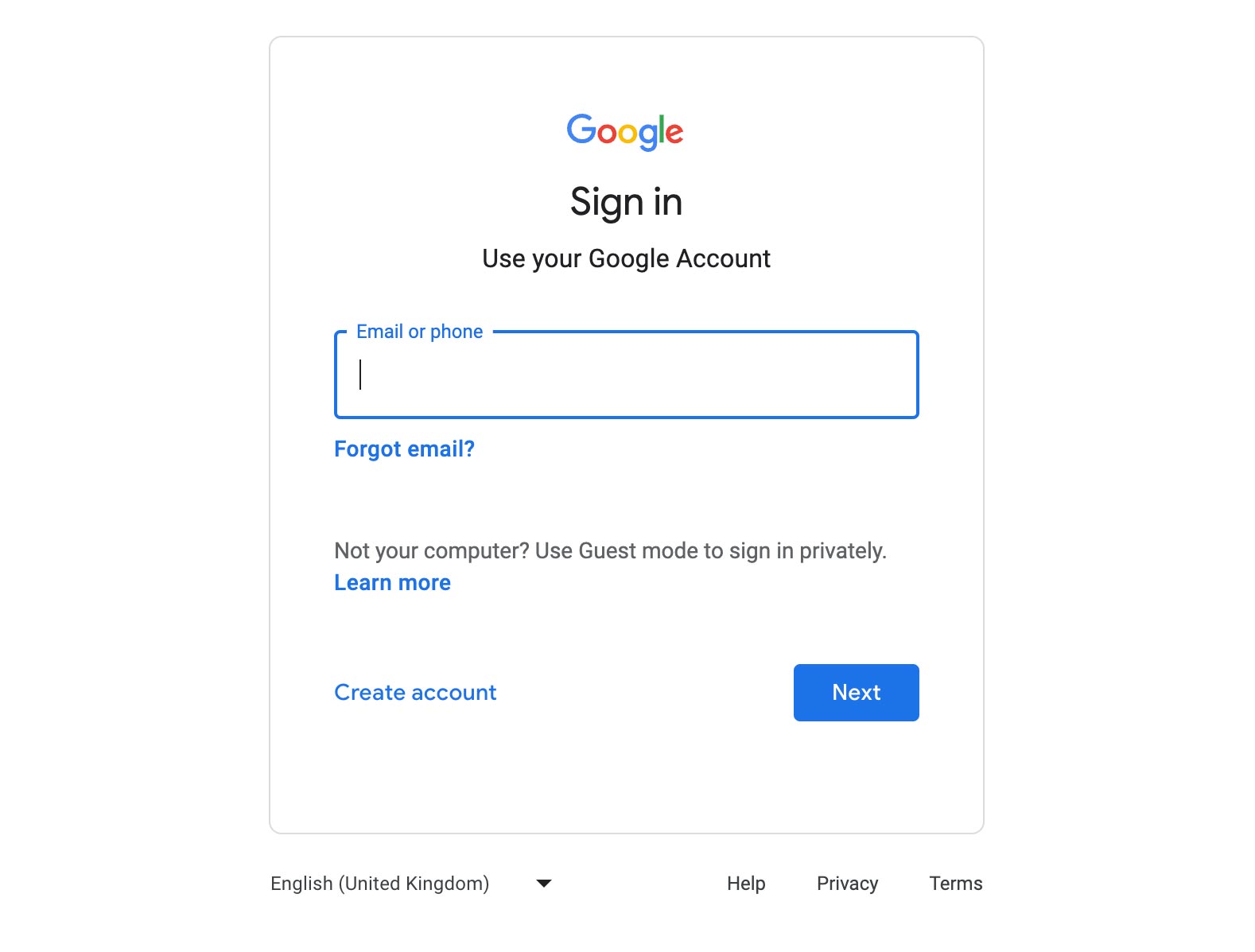
You may be prompted to sign in to your Google account, but, if you don’t have a Gmail account, you can still leave a review by clicking on the ‘Sign in’ button and selecting the ‘Create account’ option.
Step 4: Create a Google Account

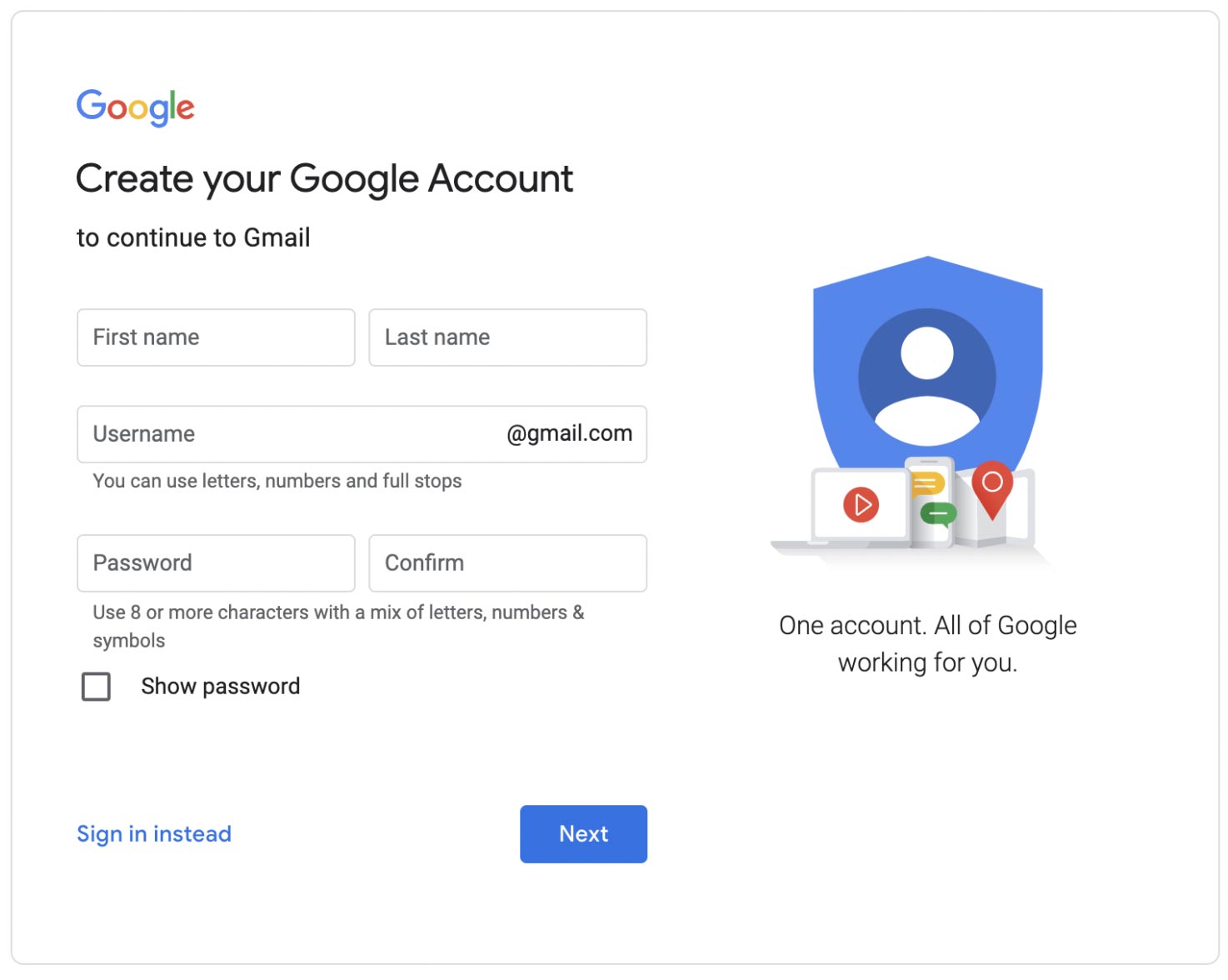
To leave a review, you’ll need to click ‘Create Account,’ then click ‘For My Personal Use,’ then click ‘Next.’
Step 5: Add Your Details

Simply provide your first name and date of birth, then click ‘Next.’ You’ll be offered to select Gmail emails, but instead select ‘Use Your Existing Email.’

Step 6: Google Verification

Google will send a verification code to your chosen email address. Simply enter the verification code and finally, enter your phone number so Google can send a verification to your phone number. If your phone number doesn’t work, it may already be attached to a Google account, so try an alternative number.

Step 7: Write Your Review

Once you’re verified, you can return to the business’s Google page to leave your review. Scroll down past the Google My Business Profile on the right of your screen and click on the ‘Write a Review’ button. Now it’s time to give the business your rating on a scale of 1 to 5 stars and write your review. Once you’ve finished, just click the ‘Post’ button to publish and your review will go live online.

Leaving a Google review without a Gmail account is doable. By following the simple steps above, you can share your experiences, help others, and support Kiwi businesses to grow.

How to Write a Google Review with a Gmail Email in 2025

By Tips and Guides

How to Write a Google Review with a Gmail Email in 2025

Google reviews are a great way to let people know about the quality of a business’s products, or services, while supporting the growth of Kiwi businesses. If you already have a Gmail account, it’s super easy. Here’s how to leave a Google review with a Gmail email:

Step 1: Search for the Business

Find the business you want to review on Google using keywords e.g. ‘Sky Media Timaru’.

Step 2: Click the ‘Write a Review’ button

On the right of your screen, scroll down to the Google Reviews section and click on the ‘Write a Review’ button to open the review page.

Step 3: Login Required

Please note, if you’re not already logged into your Google account in your browser then you may be prompted to sign in to your Google account. If so, please do. If you don’t have a Gmail, head over to our other blog post to find out how to write a review without a Gmail email.

Step 4: Write Your Review

Now it’s time to give the business your rating on a scale of 1 to 5 stars and write your review. Easy. Once you’ve finished, just click the ‘Post’ button to publish and your review will go live online.

As you can see, leaving a Google review is easy when you have a Gmail email. By following the quick steps above, you can share your experiences, help others, and support Kiwi businesses to grow.

The Latest Industry Trends for SEO

By SEO

In Auckland’s dense digital landscape, keeping your business thriving high online is absolutely key. When it comes to boosting your web presence, Search Engine Optimisation (SEO) is a core component of effective internet marketing. Whether you’re a business owner in Auckland or anywhere else in New Zealand, staying on top of the latest SEO trends is essential for success online. In this blog, we’ll explore the top 12 SEO trends making waves in Auckland and beyond.

1. User Experience (UX)

Google’s algorithm pays close attention to the user experience. A fast-loading, easy-to-navigate website with high-quality content gets first priority. To get selected by Google, make sure your site is user-friendly and provides valuable information to visitors.

2. Core Web Vitals

Google’s Core Web Vitals measure factors like page loading speed, interactivity, and visual stability of your site’s content. To rise to the top, ensure your website meets these criteria and offers an easy-to-use experience for visitors.

3. Mobile-First Indexing

With the majority of web traffic coming from tablets and smartphones, Google focuses on the mobile version of a site’s content for ranking and indexing. To rank, your website must be mobile-friendly. It’s no longer optional—it’s a necessity.

4. Secure Websites (HTTPS)

Security is key. Google favours secure websites with an “https://” prefix as it’s a trust signal for both search engines and users. At Sky Media, we make sure our client’s websites are secure at all times for safety and to optimise their site’s performance on Google.

5. Local SEO Dominance

Local SEO continues to be powerful, especially for brick-and-mortar businesses in Auckland. To get priority treatment from Google, it’s best to ensure your website is optimised for local searches by using location-specific keywords and having an up-to-date Google My Business profile.

6. Featured Snippets at the Top of Google

Appearing at the top of Google as a featured site offers a major boost to your site’s visibility. To get a coveted top-tier position, provide clear and concise answers to common questions people ask with your site’s content.

7. E-A-T (Expertise, Authoritativeness, Trustworthiness)

Google places a premium on content that demonstrates expertise, authoritativeness, and trustworthiness. To scale Page 1, establish your brand as a trusted source in your niche by producing reliable and accurate content people trust.

8. Content Quality Over Quantity

Quality content designed to capture the attention of people in Auckland is the way to SEO success on Google. To be in the lead, focus on producing informative, engaging, and well-researched content that resonates with your target audience.

9. Video Content Growth

Video content is on the rise everywhere, and Auckland is no exception. Incorporating informative videos into your SEO strategy can significantly improve engagement and move your site to the top of Google’s Search Engine Results Page (SERP).

10. Voice Search Optimisation

The rise of voice-activated devices like Siri and Alexa has led to an increase in voice searches. To take advantage of this opportunity, optimise your content for voice search by using simple natural language and answering common questions people ask.

11. Artificial Intelligence (AI)

AI offers a cutting-edge advantage to business owners looking to enhance their SEO rankings. AI technologies can help you generate human-centred SEO content rapidly and optimise your website to rank on Google’s SERP.

12. Sustainable SEO

Ultimately, sustainable SEO involves creating a flexible strategy that responds to ongoing algorithm changes and evolving trends. An adaptive strategy is vital for long-term SEO success.

Staying ahead of the latest SEO trends is crucial for businesses looking for the competitive edge in Auckland. Mobile-first indexing, voice search optimisation, local SEO, and other trends mentioned here are shaping New Zealand’s digital landscape. By embracing these trends and adapting your SEO strategy, you can ensure your business remains at the forefront of the ever-evolving ever-popular world of online search. Keep these trends in mind, and you’ll be on track to success with Google SEO in Auckland and beyond.

How to Get High-Quality Videos for Your Website

By Tips and Guides

Professional videos are a business investment, because high-quality website videos communicate the quality of a business’s products and services. Here you’ll find Sky Media’s helpful guidelines for identifying website-worthy videos for your site.

To get high-quality videos for your website, you really have 5 different options. You may use 1, or all of these options to create a high-quality site.

  • Utilise your best existing videos.
  • Take some top-quality new videos.
  • Hire a professional videographer.
  • Ask suppliers for product videos.
  • Use professional stock videos.

Whichever option/s you choose, you’ll want to ensure all your selected videos include the video essentials listed below. If they don’t, they’re simply NOT website-worthy.

How to Take and Select High-Quality Videos for Your Website

If you’re considering DIY videography (or using existing videos) it’s critical to consider clarity, balance, lighting, orientation, background, size, and file type, if you’re to achieve website-worthy videos.

Clarity
The video you’re considering must be 100% crystal clear. If the vidoe is fuzzy, blurry, pixelated, or unclear in any way at all, it’s not website-worthy.

Balance
If the object of focus in the centre, or the image itself is not aligned with the video’s outer frame, it’ll look wonky. In addition, a steady hand is essential when filming. Editing tools can adjust some videos to create balance (we charge extra for this), however it’s best if balance and focal points are considered before videos are taken.

Lighting
If images, products, people, or spaces look dark, or hard to see, you’re not placing your offer in the best light – literally. D.I.Y lighting is best achieved outside on an overcast day.

Orientation
You’ll need to ensure videos are fit for purpose in terms of orientation. Most website videos are landscape, so that’s your best bet, but on rare occasions portrait orientation is suitable.

Background
The background of an image matters. It’s important that product videos or office videos have a clean clear uncluttered background. Attention to detail creates a high-quality look and feel.

Size
All videos need to be a minimum 1920×1080 pixels (1080p, also known as Full HD or FHD) in MP4 file format. When the size isn’t right, videos may look blurry, pixelated, or warped once they’re uploaded to your website. Find out how to check the size of a video on Mac, iPhone, PC and Android below.

File type
All videos need to be submitted as MP4 files. In most cases, your videos will already be MP4’s but it pays to check. If they’re not the right file type, you can often use a file converter online to get the right file type. Find out how to check the file type of a video on Mac, iPhone, PC and Android below.

Quality Control Checklist for Website-Worthy Videos

  • Clarity – Crystal clear.
  • Balance – Centred and steady.
  • Lighting – Well lit.
  • Orientation – Landscape.
  • Background – Clean and clear.
  • Size – 1920×1080
  • File type – MP4’s.

If your selected videos tick all 7 boxes, then congratulations, it’s highly likely they’ve met Sky Media’s website-worthy quality control standards.

How to Check a Video’s Size and File Type

All videos need to be in MP4 format and a minimum of 1280x720px. To check the size, or file type of any video, follow the instructions for MacBook, iPhone, PC and Android below…

MacBook Instructions

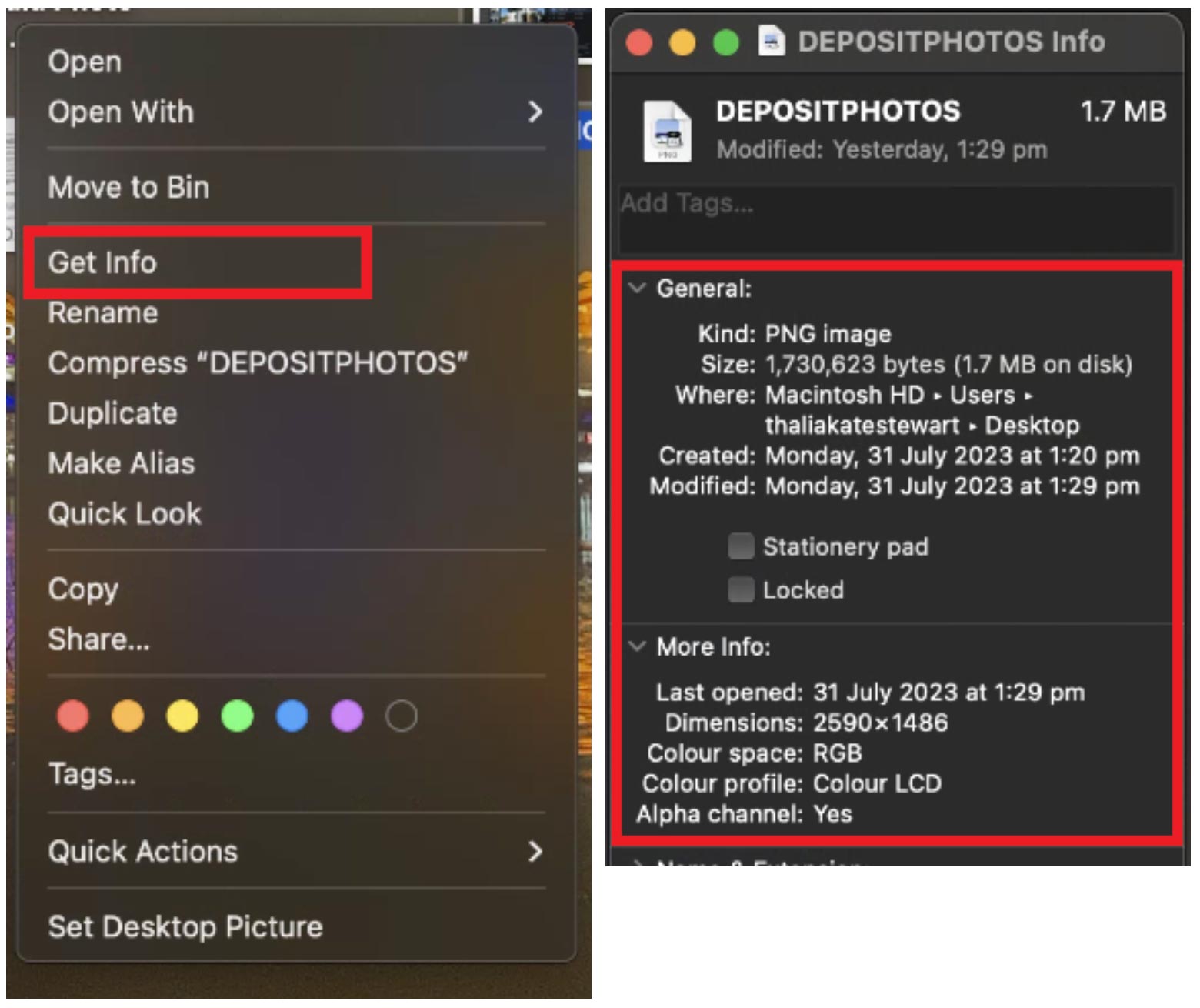
Choose a video > CTRL + Right Click > Get Info > Kind (file type) and Dimensions (size)

iPhone Instructions

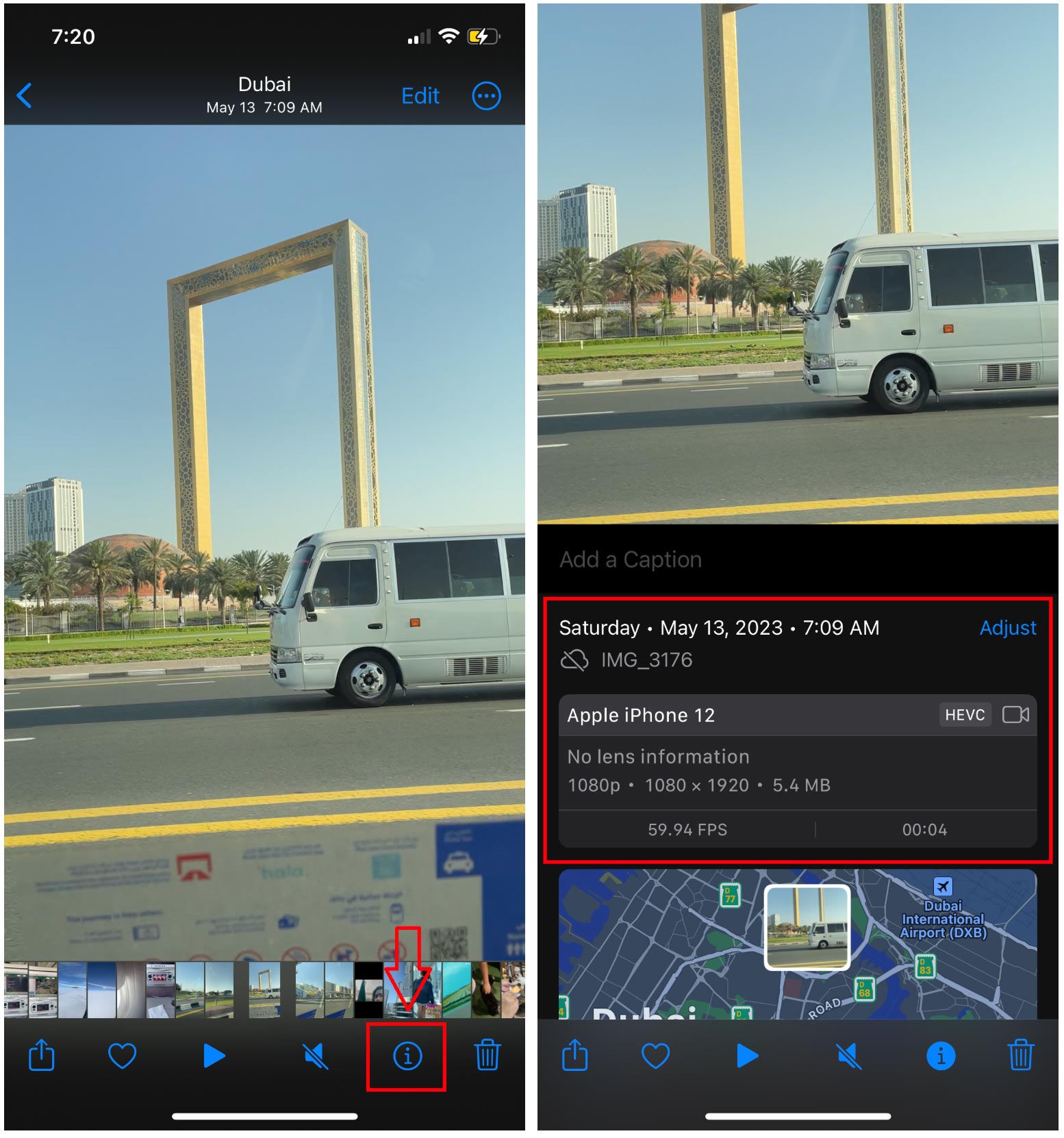
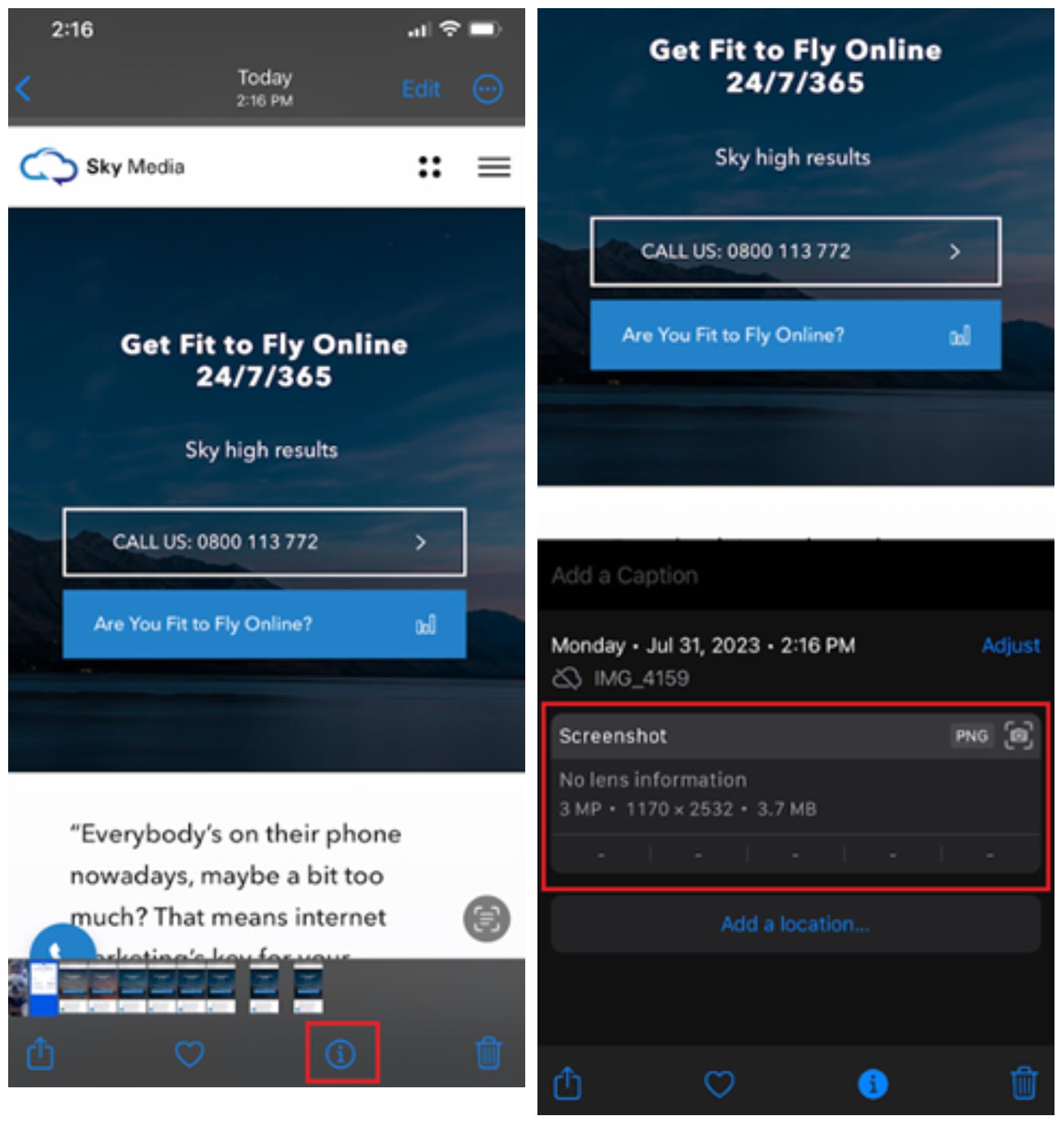
Choose a video > Click information icon (i) > Get Info > Kind (file type) and Dimensions (size). Simply pull up the video you’re interested in, click on it, then hit the little i for information button at the bottom of the screen and you’ll see the size and the file type. Easy.

Microsoft Desktop and Laptop Instructions

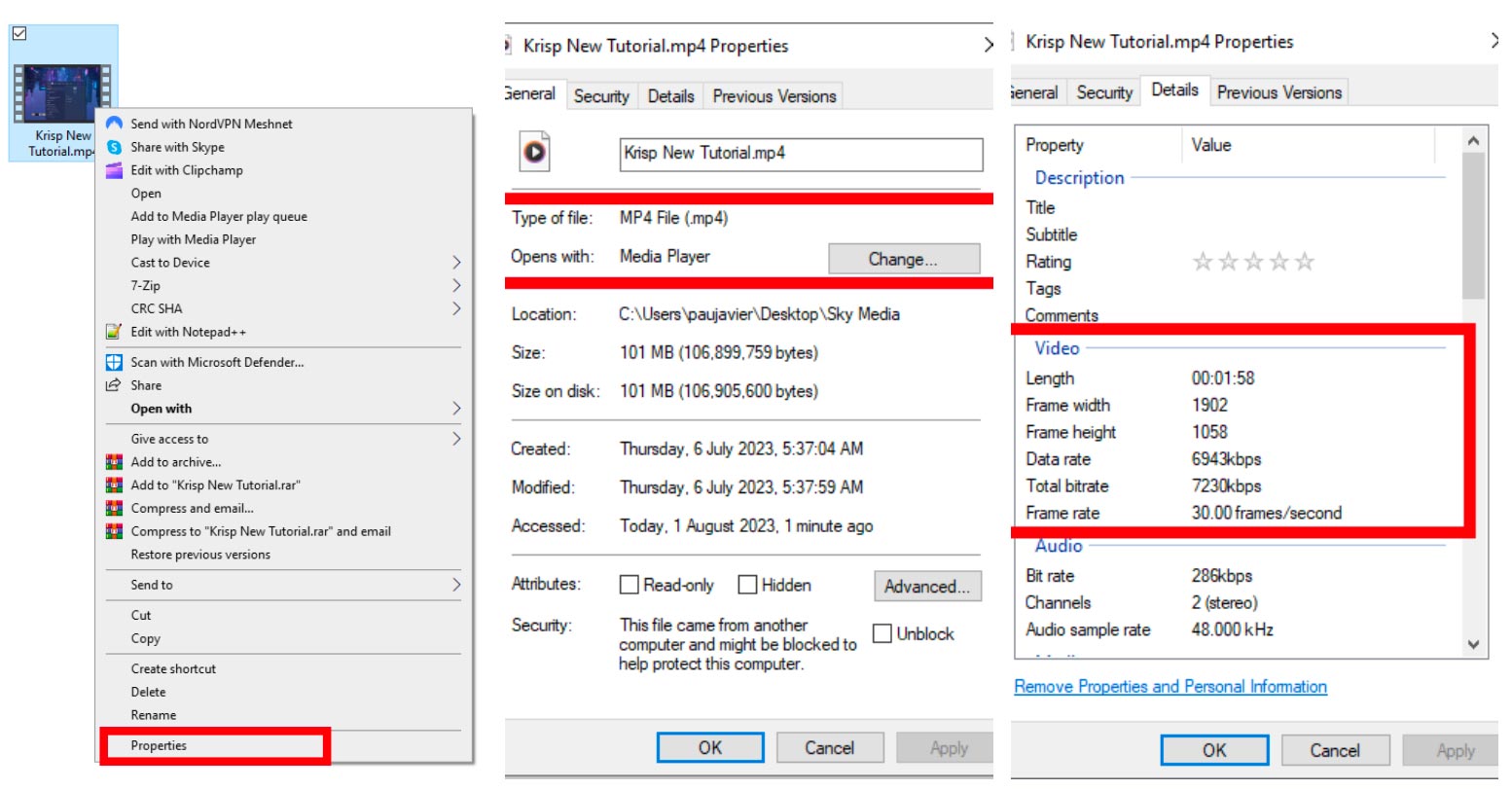
Choose a video > Right Click > Properties > Details > Kind (file type) and Dimensions (size).

Android Instructions

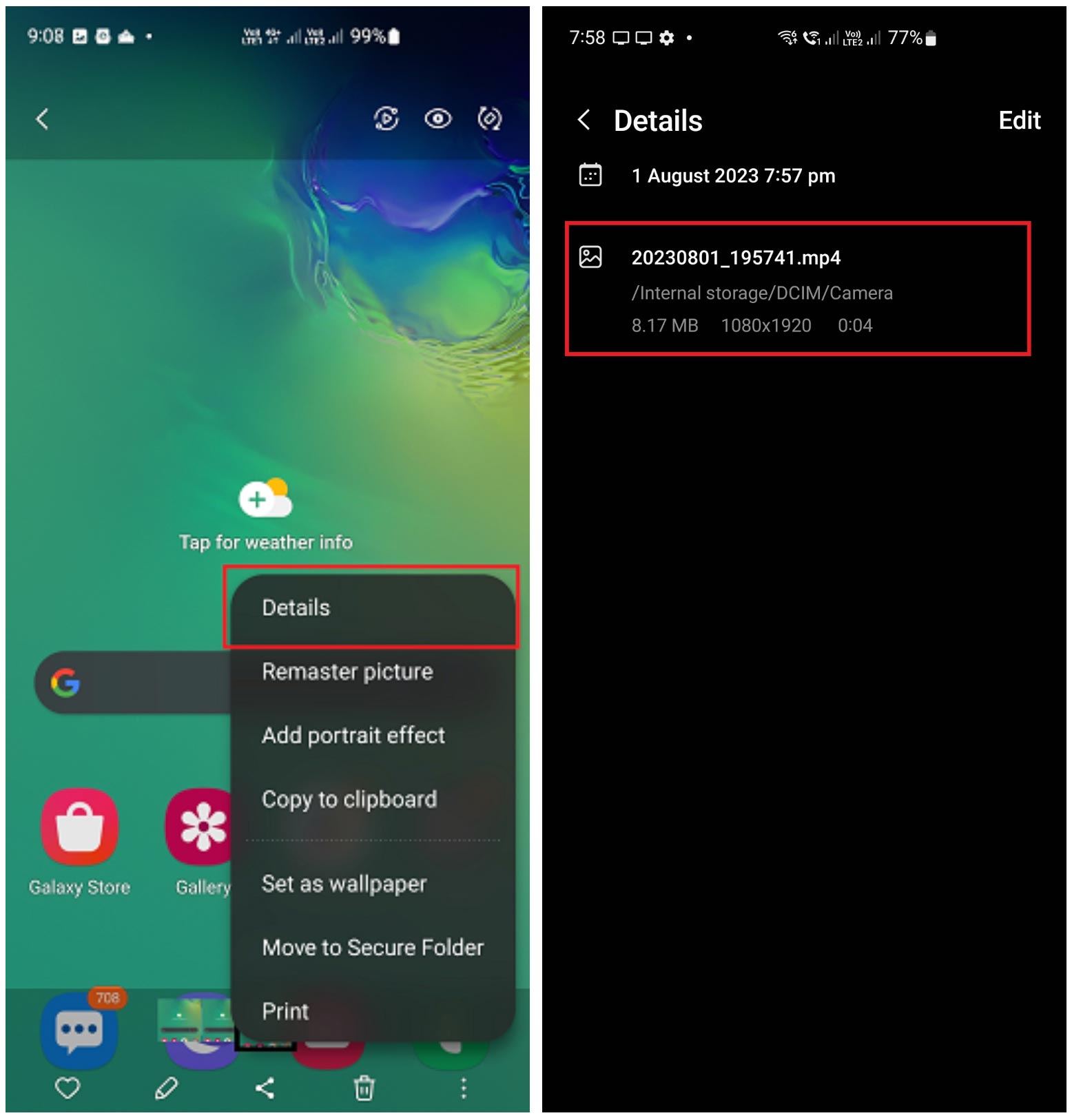
Open the video > more settings > then tap ‘Details’ to view video details.

How to Hire a Professional Videographer

Anyone can take a video, but a professional videographer knows how to take high-quality videos. Professional videographers are often specialists in one, or more of the following areas:

  • Product videography.
  • Property/real estate videography.
  • Commercial/industrial videography.
  • Landscape and/or aerial (drone) videography.
  • Food and beverage videography.
  • Event videography.
  • Fashion videography.
  • Action and sports videography.

If you’re interested in hiring a videographer, it’s wise to ask for examples of their previous work to ensure they’re able to deliver top-quality videos suitable for your business.

Looking to invest in professional videos? At Sky Media, we have access to professional videographers and drone operators starting at $400 + GST per hour, plus travel. Get in touch with our team to discuss.

How to Source Product Videos from Suppliers

If you’re an e-commerce store owner who sells products made by others, then it may be possible to source product videos from your suppliers? Many suppliers and manufacturers provide professional product videos to sellers for free because they know it’ll boost their sales too. If you’re able to source products from a supplier, then it’s best to check that those videos meet the standards outlined above.

Essentials for Product Videos

  • Product videos are best when they’re in the required video format MP4 with at least 1280x720px resolution.
  • Products sell best when the video is well lit.
  • Product videos should be muted, to have no sound, unless the product makes a sound, then that should be the only sound on the recording.
  • Product videos provided from multiple angles are more likely to sell online.
  • Products look best when placed in the centre of the video in front of a plain white background.

How to Select Professional Stock Videos

We can source a range of professional stock videos for as little as $50+GST per video. As an example, if you sell bathrooms, we can source stock videos of bathrooms. Sure, they’re not videos of what you’ve done, but they’re videos of what you do. In many cases, that’s enough to get your website live online.

Our web design and development team know how to select the right images for the right position on each website for a clean look and feel site wide. For this reason, sometimes it’s best to leave stock video sourcing to us, but if you’d like to select your own videos, here’s our top spot for high-quality stock videos:

Deposit Photos https://depositphotos.com/
If you find a video you like on Deposit Photos, be sure to save the Clip ID and send it to us via email, so we can source it for you at a discounted rate or as part of your package.

How to Submit Videos to Sky Media for Your Website

At Sky Media, you can submit your website-worthy videos via the following 3 ways:

  • Google Drive Folder https://www.google.com/drive/
  • Dropbox Folder https://www.dropbox.com/
  • Microsoft OneDrive https://www.microsoft.com/en-ww/microsoft-365/onedrive

Before submitting, please be sure to label your videos appropriately for easy identification e.g.

  • OfficeInside_HomePage.JPEG
  • OfficeOutside_ContactUsPage.JPEG
  • CompanyVehicles_AboutUsPage.JPEG
  • TeamAerial_AboutUsPage.JPEG
  • Bathrooms_Bathtub_ServicesPage.JPEG

With properly labelled videos, we’re able to save a lot of time and ensure all images get to the right place on your website. When you submit your videos to us, you’re confirming that all key decision-makers on your team have approved all the videos for use on the site.

By agreeing to Sky Media’s Limited Terms of Business, you agree that we may charge an additional fee for any time spent reorganising poorly labelled videos that are not fit for your website.

Google Drive Folder

https://www.google.com/drive/

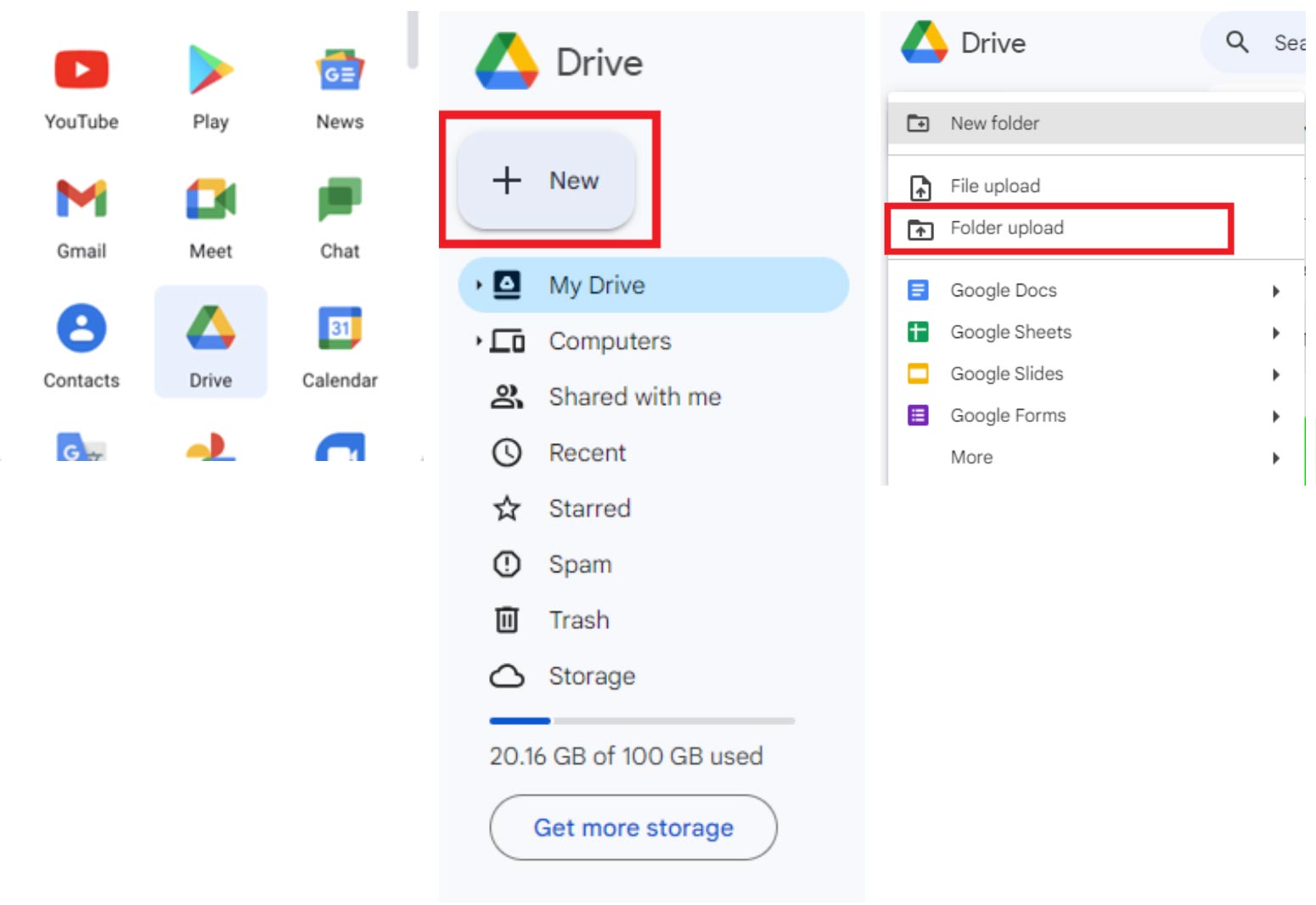
Google > Google Drive > + New > New Folder Upload *Here you can upload a folder from your desktop

Dropbox Folder

https://www.dropbox.com/

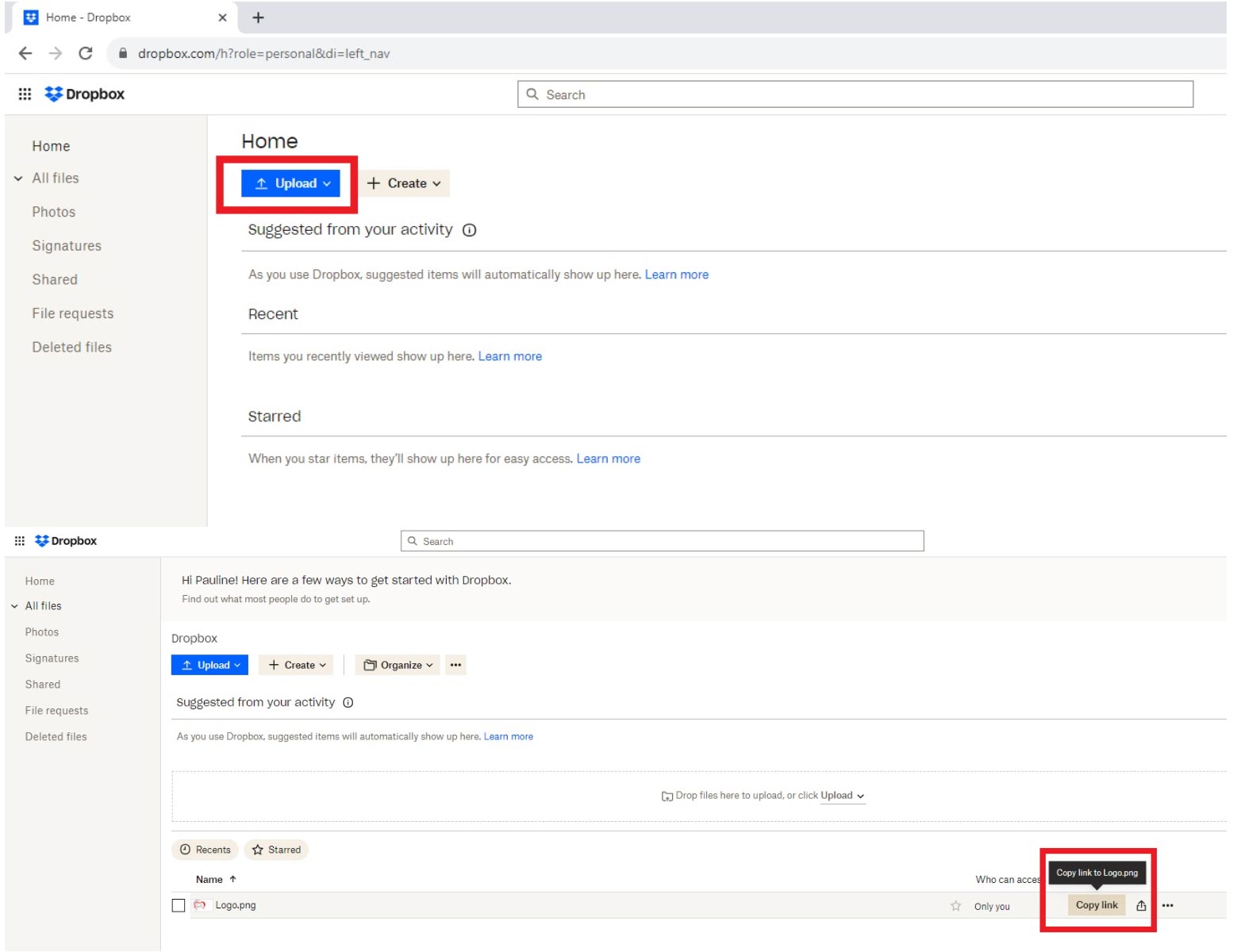
Dropbox > Upload Folder (from your device) > Copy link > Share with Sky Media

Microsoft OneDrive Folder

https://www.microsoft.com/en-ww/microsoft-365/onedrive

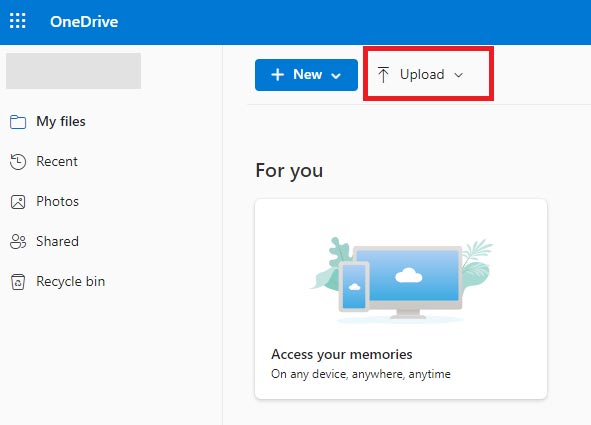
Click the ‘Upload’ button, then select the files/folders you want to upload to OneDrive.

Important: Be sure to add one of our team member’s email addresses to the folder with full permission to edit and then send us an email to be sure we’ve received your videos, as the system may not notify us automatically.

Now, you’re all set. We’re looking forward to creating an up-to-the-minute website that showcases your business in the best light online. Thank you for choosing Sky Media for your website’s design and development.

How to Get High-Quality Photos for Your Website

By Tips and Guides

Professional photos are a business investment, because high-quality website photos communicate the quality of a business’s products and services. Here you’ll find Sky Media’s helpful guidelines for identifying website-worthy photos for your site.

To get high-quality photos for your website, you have 5 different options. You could use 1 or all of these options to create a high-quality look across your website.

  • Utilise your best existing photos
  • Take some top-quality new photos
  • Hire a professional photographer
  • Ask suppliers/wholesalers for product photos
  • Use professional stock images from Deposit Photos

How to Take and Select High-Quality Photos

If you’re considering DIY photography (or using existing photos) it’s critical to consider clarity, balance, lighting, orientation, background, size, and file type, if you’re to achieve website-worthy photos.

Clarity
The image you’re considering must be 100% crystal clear. If the image is fuzzy, blurry, pixelated, or unclear in any way at all, it’s not website-worthy.

Balance
If the object of focus in the centre, or the image itself is not aligned with the photo’s outer frame, it’ll look wonky. Editing tools can adjust images to create balance (we charge extra for this), however it’s best if balance and focal points are considered before photos are taken.

Lighting
If images, products, people or spaces look dark, or hard to see, you’re not placing your offer in the best light – literally. D.I.Y lighting is best achieved outside on an overcast day.

Orientation
You’ll need to ensure photos are fit for purpose in terms of orientation. Most website photos are landscape, so that’s your best bet, but on rare occasions e.g staff photos, portrait orientation is suitable.

Background
The background of an image matters. It’s important that product images or staff photos have a clean clear uncluttered background that’s consistent. Attention to detail creates a high-quality look and feel.

Size
All photos need to be a minimum of 2400x1600px. When the size isn’t right, images may look blurry, pixelated or warped once they’re uploaded to your website. Find out how to check the size of a photo on Mac, iPhone, PC and Android below.

File Type
All photos need to be submitted as JPG, or PNG files. In most cases, your photos will already be JPG, JPEG, or PNG, but it pays to check. If they’re not the right file type, you can often use a file converter online to get the right file. Find out how to check the file type of a photo on Mac, iPhone, PC and Android below.

Quality Control Checklist for Website-Worthy Photos

  • Clarity – Crystal clear.
  • Balance – Centred and steady.
  • Lighting – Well lit.
  • Orientation – Landscape mostly, occasionally portrait.
  • Background – Clean and clear.
  • Size – 2400x1600px.
  • File type – JPG, JPEG, or PNG only.

If your selected photos tick all 7 boxes, then congratulations, it’s highly likely they’ve met Sky Media’s website-worthy quality control standards.

How to Check a Photo’s Size and File Type

All photos need to be a minimum of 2400x1600px. To check the size, or file type of any photo, follow the instructions for MacBook, iPhone, PC and Android below:

MacBook Instructions

Choose a photo > CTRL + Right Click > Get Info > Kind (file type) and Dimensions (size)

iPhone Instructions

Choose a photo > Click i > Get Info > Kind (file type) and Dimensions (size)Simply pull up the photo you’re interested in, click on it, then hit the little i for information button at the bottom of the screen and you’ll see the size and the file type, which is typically a PNG. Easy.

Microsoft Desktop and Laptop Instructions

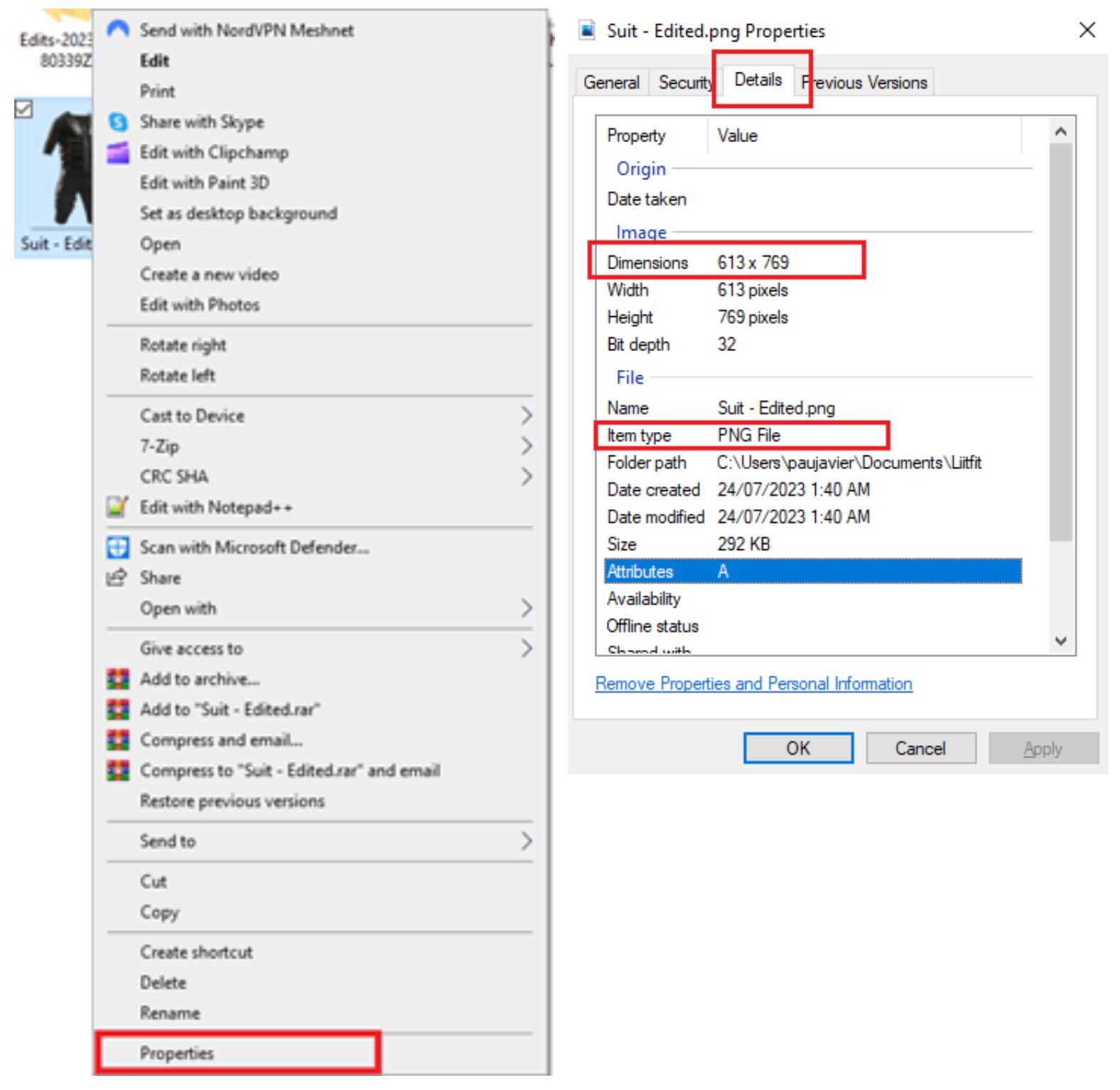
Choose a photo > Right Click > Properties > Details > Kind (file type) and Dimensions (size)

Android Instructions

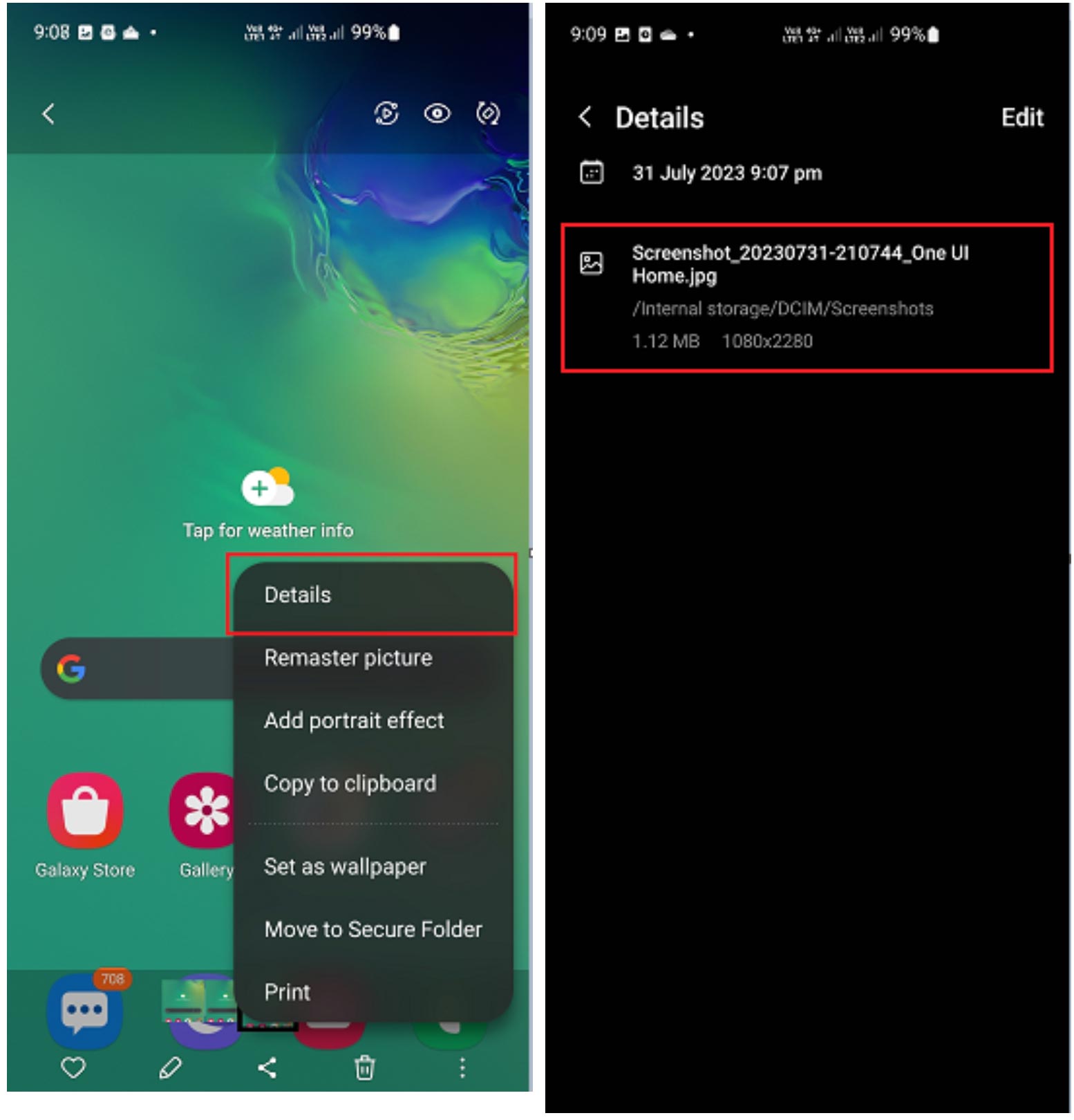
Open the image > more settings > then tap ‘Details’ to view image details

How to Take High-Quality Team Photos

Top-quality headshots or staff photos can be of great benefit to your business, because people feel more confident doing business with people they can see. All portraits and group photos must meet the photo essentials above, plus a couple of added points…

For team photos, it’s best to do them in house on the same day with the same background for consistency. If you’re asking team members to submit their own photo, then it’s wise to offer guidelines e.g

  • Plain white background
  • Good natural lighting with no shadows
  • Head and shoulders only
  • No sunglasses, or hats
  • Looking directly at the camera
  • Consider a team-wide dress code

Tip: It’s really important that people look directly at the camera and make sincere eye contact, because just like the real world, that’s what builds trust.

How to Hire a Professional Photographer

Anyone can take a photo, but a professional photographer knows how to take high-quality photos. Professional photographers are often specialists in one, or more of the following areas:

  • Portraiture and group photos
  • Product photography
  • Commercial/industrial photography
  • Food and beverage photography
  • Landscape and/or aerial photography
  • Event photography
  • Fashion photography
  • Action and sports photography
  • Property/real estate photography

If you’re interested in hiring a photographer, it’s wise to ask for examples of their previous work to ensure they’re able to deliver top-quality photos suitable for your business.

Looking to invest in professional photos? At Sky Media, we have access to professional photographers starting at $200 + GST per hour, plus travel. Get in touch with our team to discuss.

How to Source Product Photos from Suppliers

If you’re an e-commerce store owner who sells products made by others, then it may be possible to source product photos from your suppliers? Many suppliers and manufacturers provide professional product photos to sellers for free, because they know it’ll boost their sales too. If you’re able to source products from a supplier, then it’s best to check that those photos meet the standards outlined above.

Essentials for Product Photos

  • Product photos are best when they’re in a square format – 1500x1500px minimum.
  • Products sell best when the photo is well lit.
  • Products provided with shots from multiple angles are more likely to sell online.
  • Products look best when placed in the centre of the photo in front of a plain white background.

How to Select Professional Stock Photos

We can source a range of professional stock photos for as little as $20 + GST per photo. As an example, if you sell bathrooms, we can source stock photos of bathrooms. Sure, they’re not photos of what you’ve done, but they’re photos of what you do. In many cases, that’s enough to get your website live online.

Our web design and development team know how to select the right images for the right position on each website for a clean look and feel site wide. For this reason, sometimes it’s best to leave stock image sourcing to us, but if you’d like to select your own photos, here’s our top spot for high-quality stock photos:

Deposit Photos https://depositphotos.com/
If you find a photo you like on Deposit Photos, be sure to save the Image ID and send it to us via email, so we can source it for you at a discounted rate or as part of your package.

How to Submit Photos to Sky Media for Your Website

At Sky Media, you can submit your website-worthy photos via the following 3 ways:

  • Google Drive Folder https://www.google.com/drive/
  • Dropbox Folder https://www.dropbox.com/
  • Microsoft OneDrive https://www.microsoft.com/en-ww/microsoft-365/onedrive

Before submitting, please be sure to label your images appropriately for easy identification e.g

  • Headshot_CEO_Jacob_HomePage.JPEG
  • Office_Outside_ContactUsPage.JPEG
  • CompanyVehicles_AboutUsPage.JPEG
  • TeamPhoto_AboutUsPage.JPEG
  • Bathrooms_Bathtub_ServicesPage.JPEG

With properly labelled photos, we’re able to save a lot of time and ensure all images get to the right place on your website. When you submit your photos to us, you’re confirming that all key decision-makers on your team have approved all of the photos for use on the site.

By agreeing to Sky Media’s Limited Terms of Business, you agree that we may charge an additional fee for any time spent reorganising poorly labelled photos that are not fit for your website.

Google Drive Folder

https://www.google.com/drive/

Google > Google Drive > + New > New Folder Upload *Here you can upload a folder from your desktop

Dropbox Folder

https://www.dropbox.com/

Dropbox > Upload Folder (from your device) > Copy link > Share with Sky Media

Microsoft OneDrive Folder

https://www.microsoft.com/en-ww/microsoft-365/onedrive

Click the ‘Upload’ button, then select the files/folders you want to upload to OneDrive.

Important: Be sure to add one of our team member’s email addresses to the folder with full permission to edit and then send us an email to be sure we’ve received your photos, as the system may not notify us automatically.

Now, you’re all set. We’re looking forward to creating an up-to-the-minute website that showcases your business in the best light online. Thank you for choosing Sky Media for your website’s design and development.

Did You Know the First Impression of Your Home Page Counts?

By Web Design

Your Home Page Matters More than You Might Think… The Home Page of your website is one of the most visited pages on your site and therefore it’s one of the most important pages.

When people land on your site, the first page they’ll see, more often than not, is your Home Page. In a matter of seconds (around 3 seconds on average) your site visitors will decide if you have what they’re looking for, and if you’re the best business to deliver.

From a visitor’s perspective, a poor-quality website, might mean a poor-quality product? Mistakes in the web copy, could mean mistakes in the real world? Outdated design could mean outdated tools? A slow, or frustrating experience online, could mean poor customer service and wasted time in real life? On the flip side, a modern easy-to-use website suggests a modern hassle-free company, while flawless copy suggests a fine attention to detail, and finally, high-quality imagery, or design gives the impression of a high-quality product, or service. What is your current website communicating to the world?

The first priority of a high-quality website should always be to capture attention in less than 3 seconds, while the next priority is to hold attention. A well-designed website will impress visitors with attractive words and images, build a sense of trust in the viewer, and clearly communicate the benefits of the offer, and how it exists to meet their needs. This top-quality approach places a business in the best light, making it the obvious choice against a whole host of competition.

A competitive strategically designed website will ensure site visitors are inclined to take the desired action e.g requesting a quote, making a purchase or signing up for an event. We use well-placed easy-to-use calls to action (CTA’s) to ensure site visitors can easily enquire, or buy, as soon as they make up their mind that they’re on the right website.

Yes, it literally pays to have a well-designed website, so modern business owners would be well placed to think of it as an investment, or an asset, rather than a business expense. At the end of the day, when a website meets, or better-yet exceed the expectations of visitors, they’ll more than likely stay. If it fails, they’ll leave and go elsewhere at the click of a button – It’s really that simple. The quality and ease-of-use of a website is the competitive advantage online. Is your website fit to meet your potential client’s needs? If it’s not yet fit to fly, that’s Sky Media’s specialty.

4 Common Mistakes When Building a New Website

By Web Design

Designing and building a new website can be fun and exciting, however it’s important to keep the purpose of the website front and centre at all times. What’s the product, or service? Who’s the website for? What do they want and need? How’s this website designed to give it to them?

At times, websites look attractive, but they’re not actually fit for purpose. When a website’s clear about what it does, why it does it, and who it does it for, then it’ll be fit for purpose. In most cases, a website exists for site visitors, which means the whole experience from end-to-end needs to be designed, so it meets (and even exceeds) their wants and needs, while eliminating uncertainty and stress. So, what are the 4 most common mistakes made when building a new website?

Using a Non-Responsive Website Design

Did you know that more than 50% of website traffic comes from mobile phone searches? A non-responsive website is hard to see on a small screen, so many readers will simply hit the back button and look for another website that’s designed to be viewed on a phone. A modern mobile responsive design ensures your website’s easy to use on any mobile device, plus it ensures your site doesn’t get deprioritised by Google for being out of date.

Complicated Navigation

Can people find what they want quickly and easily? If website visitors get stuck, or they can’t find what they want, they’ll leave the site. Poor website navigation is likely to drive potential clients towards your competitor’s websites. Considering the user-experience (UX) is critical when designing and building a website that’s easy for customers to use. If your website’s difficult, or stressful to use, more than likely, people won’t choose you.

Difficulty Finding Contact Information

Can visitors find you when they need to? Is it easy to see your contact information? These details should be easily accessible in the header (at the top) of every page with full contact details on the footer (at the bottom of the page). In addition, a clear link to an up-to-date Contact Page in your site’s menu will make it simple for customers to reach you, or your team with ease.

Unclear or Non-Existent Calls-to-Action

What do you want people to do on your site? It’s critical that your website communicates with the reader. Prominent calls-to-action (CTA) buttons politely invite visitors to take action, whether it’s clicking through to another page, buying a product, or requesting a consultation/estimate. Whatever steps you want visitors to take, calls-to-action should appear on each page to remind them to do so.

At Sky Media, we keep the user-experience (UX) front of mind, by always considering what it’s like to be a site visitor on each website. Is it difficult, or easy? Complicated, or clear? Pleasurable, or stressful? What is the user seeing? Is it helpful? Is it useful? Are people getting what they need from the site? Are they taking the actions we want them to take? Our down-to-earth digital marketing team designs and builds websites that create a positive user-experience from beginning to end. If you’d like a website that’s fit to fly online, speak to us.

Is WordPress Actually ‘The World’s Best?’

By Web Design

Did you know the world boasts 1.88 billion websites? Every year that number grows. Which website platform’s used the most? If you guessed ‘WordPress,’ then you’d be right. Yes, WordPress accounts for 1/3 of all websites on the entire internet! Why is it the top-choice for leading websites around the world?

Ease of use is what helped WordPress beat other website building platforms like Drupal or Joomla to become the favourite choice of web developers everywhere. Adding new pages, images and videos, or utilising the built-in blog feature is a breeze and can be done as quickly as an email in G-Suite, or a post on FB (Facebook). While other well-known D.I.Y website building tools like Wix, or Squarespace might be easy to use too, they’re entry-level, and unfortunately the modern business essential SEO (Google search engine optimisation) tends to be their downfall.

Search Engine Optimisation (SEO)

Google Search Engine Optimisation (SEO) ensures a site is prioritised by Google. Which web platform does Google prefer? WordPress. Google Search Engine prioritisation is a leading reason why 1/3 of the internet selects WordPress, making it the world’s best. By having the world’s leading platform for SEO, your business is best-positioned to get top results on Google.

Mobile Responsive/Smartphone-Savvy

The WordPress (CMS) is a top choice, if you want your website to adjust its layout and size to the device it’s accessed by e.g laptop, desktop, phone, tablet. Mobile responsiveness provides your visitors with a seamless experience from beginning to end, no matter what kind of device they’re using. With more than 54% of internet users accessing websites on mobile devices, a lack of mobile compatibility could easily cut your site visits in half. At Sky Media, we know smart phones need smart websites, so we only design mobile-friendly WordPress websites.

Sky Media’s High-Speed Hosting for WordPress Websites
When it comes to launch day, 99% of our clients choose to host their Custom WordPress Website with us. Website hosting is like a digital parking space online for your website. You can host your website with a full range of providers, but the benefits of hosting with Sky Media include high-speed New Zealand-based hosting, full-site security, 24/7 New Zealand-based customer care, and on-going support (including complimentary WordPress updates) from the people who know your website from the front end to the back. Who could compete with that?

For the world’s best websites, look no further than WordPress. At Sky Media, all of our websites are built on WordPress, because we simply wouldn’t accept anything less. If you want a world-class website that’s fit to fly high online, look no further than Sky Media’s High-Flying WordPress Web Design and Development.

Do I Really Need a Website for My Business?

By Web Design

Is it really important to have a website if you’re a business owner, retailer, or service provider?

Having a website means customers can always find you – anytime, anywhere. Even outside of business hours, your website can continue to find and secure new customers for you. It offers web surfers convenience, as they’re able to access the information they need from the comfort of their own home, in their own time, with no added pressure to buy.

A well-designed website can generate new business, and make life easier for existing customers, while placing your business in the best light. A high-quality website can enable your business to shine, whether it’s well-established, or brand-new, small, medium, or large.

A clear and concise website provides a quick and easy way of communicating information between buyers and sellers. You can list your opening hours, contact information, show images of your location or products, and use contact forms to facilitate enquiries from potential customers, or generate feedback from existing ones. You can even upload promotional videos to engage your customers and sell your business in an effective and cost-efficient way. All of this progress can happen while you’re off the clock, because a well-designed website will keep working when you’re not.

In the past when a business shut their doors at 5.30 pm, that was the day done, but with a website your business can be active 24/7/365. From a customer’s point of view, it’s better for them if they don’t have to travel to get what they want. They can buy your products, or research your services without having to wait until your physical store is open. This level of ease means new and existing customers can take action and get what they want, as soon as they feel the need.

In today’s modern world, people don’t expect to have to wait for answers, r solutions. Nowadays, there’s an expectation that companies will have a website. People tend to be distrusting of any business that doesn’t have a website and a branded email address. These are useful tools to share key information about your business, while also generating trust and enhancing the public perception of your business.

A digital marketing study done in 2018 showed 84% of consumers believe a business with a website is more credible than a business listed in an online directory, or on social media. By having a professional website, you’re boosting the credibility of your business, which is critical for attracting new clientele.

Best utilising your website to gain and retain a customer is the ultimate goal and the result of successfully meeting their wants and needs every step of the way. By understanding your ideal audience and how your product or service could provide a benefit to their lives, you can attract new customers via targeted advertising and a positive user-experience on your website.

There are 4.8 billion people online every day, accounting for more than half of the world’s population and these figures increase every year. For the most part, internet users are either looking for information, sharing on social media or using e-commerce websites. Gone are the days of turning to the Yellow Pages, nowadays it’s all about Google and Facebook. If you’re not online, where are you? To potential customers the answer could be, ‘Nowhere to be found.’

How Do Google Ads Work?

By Google Ads

Google Ads is a pay per click (PPC) advertising solution that offers an extremely effective way of driving relevant qualified traffic to your website, when people are searching Google for the types of products, or services your business offers.

Maybe you plan to run a promotion, or perhaps you just need a quick injection of sales? A Google Ads Campaign is the fastest way to get your website listed on the 1st Page of Google for the Keywords of your choice e.g ‘Painter Blenheim,’ ‘Botox Christchurch,’ or ‘Car yards Auckland.’

Google Ad’s pay-per-click (PPC) setup is like a bidding system, where companies bid to have their ads shown to the relevant audience. Like all bidding systems, those with the highest bid win. As a result, each time your ad is clicked on, Google charges a small fee. Click fees range from $1 – $15 per click, depending on your industry and location.

Sky Media’s Google Experts will begin by creating a list of Keywords that are relevant to the products and services you want to promote and sell. Keyword examples for a builder in Nelson could be: ‘New Homes Nelson’, ‘New Builds Nelson’, ‘Builder Nelson’, ‘Commercial Builder Nelson.’

Our copywriters will create a short eye-catching Google Ad that will capture your ideal client’s attention immediately. We’ll then confirm your Google click budget, the locations you want to target, and the days of the week that suit you. $20 – $30 per day is a good start.

Once your campaign is live, Google will send the people who search for what you’ve got to your Google Ad. Visitors will find your ad and a link to your website up in the paid ad section at the top of Google’s 1st Page.

Once you’re on Google’s 1st Page, you’ll notice more clicks to your website and an increase enquiries. Get ready to answer the phone, or emails, or to witness an increase in sales.

Once your Google budget is used up for the day, your ad will be taken down and replaced by other businesses targeting the same market. Not to worry, you’ll reappear the next morning when your budget’s refreshed.
Our Google Technicians will optimise your campaign every day, so the cost per click (CPC) will become cheaper over time, which means you’ll receive more website traffic for less.

Sky Media’s down-to-earth team run 100% transparent Google Ad Campaigns, so you’ll see exactly how much of your budget is going to Google every day. Total budget transparency is a key point of difference with our campaigns.
If at any stage you need to discuss, or adjust your campaign, your dedicated Google Account Manager will be happy to assist.

The Difference Between Google Ads and SEO

Google Ads are rapid, they’re the fastest way to get your website on Google’s 1st Page (we’re talking a matter of days), but they’re PPC, which means you’ll pay for every click to your site. On the other hand, SEO (Search Engine Optimisation) takes 30 days to generate movement, and at least 90 days to generate results, so it’s comparatively slower. Still, once you reach that landing strip on Page 1, all of the clicks with SEO are free! So, which one will it be?

Well, it depends whether you want immediate clicks, or long-term clicks. What we can say is that it’s no surprise to us that all of our top-performing clients have opted for our Supercharged SEO and Google Ads Combo. Yes, that’s right, they did both! They chose immediate website visits and clicks with Google Ads, as well as consistent web traffic for the long-haul with SEO. As a result, they’ve all benefited from impressive growth.

If you’d like to have a free Discovery Discussion with one of our Google Experts, we can explore the potential benefits for your business. If you’re interested, we’ll identify your business goals, and suggest an affordable Google strategy that’s designed to get results. Just call 0800113772 to book your complimentary Discovery Discussion today.