Google My Business

How NZ Retailers Can Compete With Big Chains Online

How NZ Retailers Can Compete With the Big Chains Online

By SEO, Tips and Guides, Web Design

Bunnings. Harvey Norman. Mitre 10. The Warehouse. Farmers. These are businesses with enormous marketing budgets, national brand recognition, and hundreds of thousands of dollars invested in their digital presence.

How NZ Retailers Can Compete With Big Chains Online

Competing with them online can feel impossible, especially for an independent NZ retailer managing everything from one store or a small group of them. But here’s what those big names can’t do: they can’t have your local knowledge, your specialist expertise, your relationships with the community you serve, or your ability to pivot quickly and serve customers in ways a national chain simply isn’t built for.

The businesses that thrive alongside the big chains aren’t trying to beat them at their own game. They’re playing a different game entirely, one that independent retailers are actually set up to win.

The Playing Field Is More Level Than It Looks

It’s easy to assume that a bigger budget means better Google rankings. For some things, that’s true. But local search doesn’t work that way, and local search is where independent NZ retailers have a genuine structural advantage.

When someone in Napier searches “outdoor furniture store Napier” or “running shoes near me”, Google isn’t necessarily showing the biggest national retailer. It’s surfacing the most relevant local option. A well-optimised independent retailer with a strong Google Business Profile, local reviews, and a website that clearly signals its location and speciality can consistently outrank national chains for those high-intent local searches.

Harvey Norman’s national SEO budget doesn’t help them win a local search in your city if your profile and website are better tuned to that specific geography. That’s the fundamental opportunity.

Where Independent NZ Retailers Have the Edge

Before getting into the practical digital strategy, it’s worth naming the real advantages you have because your online strategy should be built around them, not in spite of them.

AdvantageBig chainIndependent NZ retailer
Local knowledgeGeneric, national-level contentKnows the local market, customers, and community
Personal serviceCall centres, chatbots, long wait timesReal people, fast responses, genuine relationships
Niche expertiseBroad product ranges, shallow knowledgeDeep expertise in a specific category
FlexibilityRigid pricing, slow to respond to trendsCan pivot fast, offer custom solutions
Community trustSeen as a corporate chainEmbedded in local community
Google local searchHard to rank locally as a national chainLocal stores naturally rank for nearby searches

Strategy 1: Win Local Search Before Anything Else

Local SEO is your highest-leverage starting point. Most independent retailers are significantly underinvesting here which means there’s low-hanging fruit available right now.

Your Google Business Profile

This is non-negotiable. Your GBP is what determines whether you appear in the local map pack, the three businesses shown at the top of local search results, above everything else.
For a local retailer, a well-maintained GBP should include:

Your correct business category — be specific (“Outdoor Furniture Store”, not just “Furniture Store”)

  • Every product category and service you offer listed individually
  • Real photos of your shopfront, interior, products, and team updated regularly
  • Opening hours kept accurate, including public holidays
  • A steady flow of Google reviews from real customers
  • Posts announcing new stock, promotions, or seasonal ranges

The big chains have GBPs too but they’re often managed centrally and inconsistently at the local level. An owner-operated store that actively maintains its profile has a real advantage here.

Location-specific pages on your website

Your website needs to clearly and repeatedly signal where you are and what you sell. This sounds obvious, but most small retailer websites are vague about both.

A page that says “quality homewares at great prices” tells Google almost nothing. A page that says “homeware store in Tauranga including kitchenware, linen, and décor for Tauranga homes” gives Google the signals it needs to rank you for local searches in that market.

Strategy 2: Use Google Shopping to Get Your Products in Front of Buyers

Google Shopping is the row of product images with prices that appears at the top of search results when someone searches for something to buy “cordless drill”, “queen duvet”, “kids mountain bike”.

This is a channel where independent retailers can genuinely compete with the big chains and in some cases, beat them, because Google Shopping surfaces products, not brands. A shopper searching for a specific product doesn’t necessarily see the biggest retailer first. They see the most relevant listing, at a competitive price, from a store Google trusts.

Getting set up

Google Shopping runs through Google Merchant Center, which connects your product catalogue to Google’s ad ecosystem. If your website is on Shopify, WooCommerce, or most major e-commerce platforms, the integration is straightforward and your products sync automatically and appear in Shopping results.

There are two ways to appear in Shopping results:

  • Free product listings.  Google introduced free Shopping listings in 2020, meaning your products can appear in the Shopping tab and sometimes in the main results without paying for ads. Getting your Merchant Center feed set up correctly and keeping it healthy is the foundation.
  • Google Shopping Ads. Paid listings that appear more prominently and more consistently. For retailers with products that have good margins and clear demand, Shopping Ads can deliver an excellent return because you only pay when someone clicks through to your product.

Where smaller retailers can win

Big chains often have messy, poorly optimised product feeds: thousands of products managed at scale, with generic titles and minimal detail. An independent retailer with 50-200 products who takes the time to write clear, specific product titles, accurate descriptions, and high-quality images will often outperform larger competitors in Shopping results.

An example of product title optimisation

The second title matches far more specific searches, signals local availability, and gives a buyer the information they need to click with confidence.

Generic title (big chain approach)

Garden Chair
Model GC44

Optimised title (independent retailer)

Outdoor Folding Garden Chair
Weatherproof Aluminium
NZ Stock.
Seat Height 45cm

Strategy 3: Build a Website That Converts Local Shoppers

A lot of independent retailer websites are effectively digital brochures. They show what the store sells, but they don’t actively work to turn browsers into buyers or visitors into in-store customers.

Your website needs to do three things well for local retail:

1. Make it easy to find and visit you

This sounds basic but it’s frequently done poorly. Your address, phone number, and opening hours should be immediately visible, not buried in a footer. Adding Google Map directions links helps as well. If you have a car park or are open during the weekends, say so.

2. Show your stock and specialisation clearly

Independent retailers often have a depth of range in their niche that chains can’t match. Lead with that. If you’re a hardware store that specialises in trade-quality tools, say so explicitly. If you’re a baby goods store that carries brands the big chains don’t stock, name them.

Specificity builds confidence and differentiates you from generic competitors.
Even if you don’t sell online, a well-organised product catalogue on your website with photos, descriptions, and pricing where possible lets customers research before they visit. And customers who research before visiting are far more likely to buy.

A real example: Donco Services, Christchurch

Donco Services is a Christchurch-based supplier and servicer of industrial equipment — water blasters, steam cleaners, diesel heaters, vacuum cleaners, generators, and small stationary engines — with over 30 years in the industry.

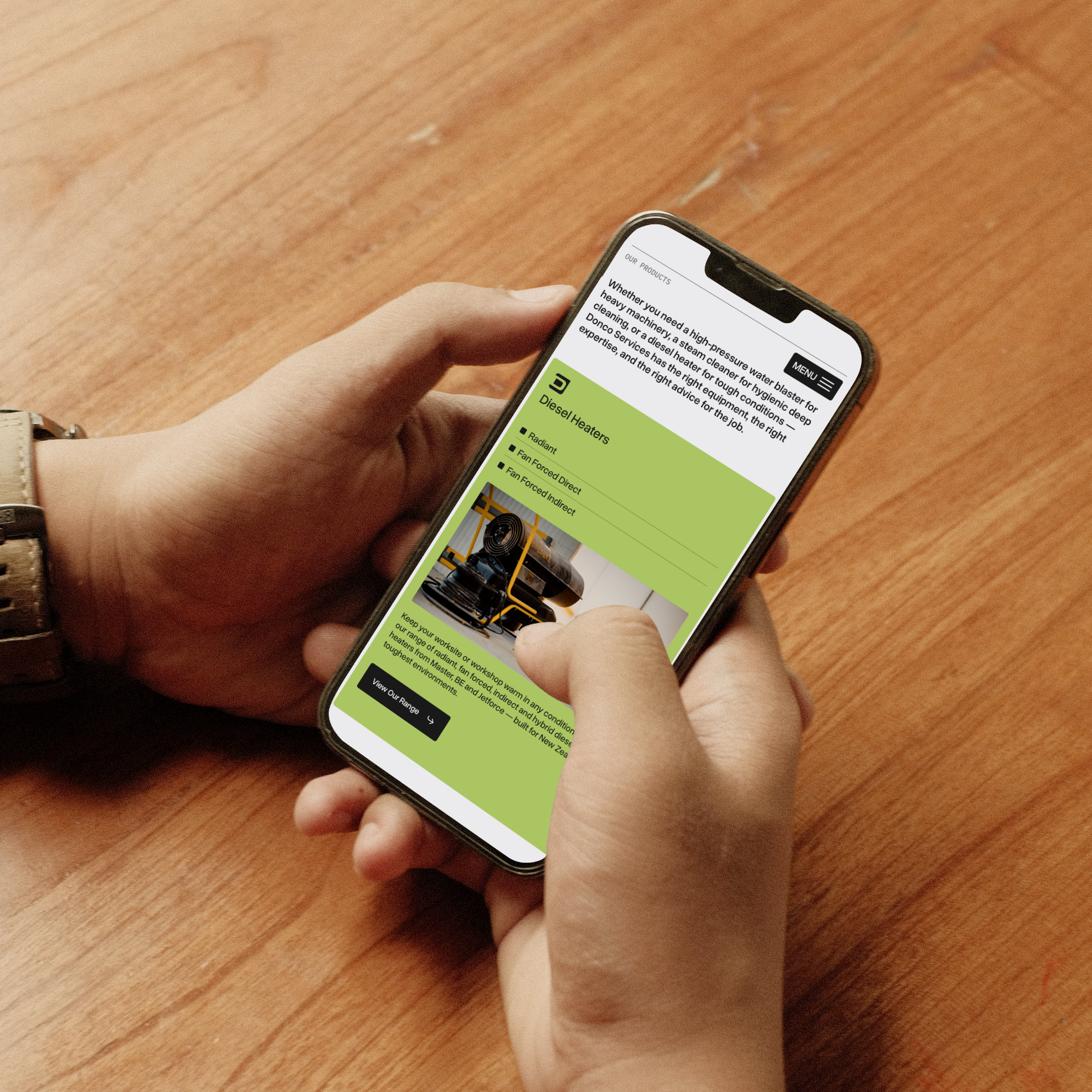
They don’t sell online. But their website does the pre-visit research job exceptionally well. Each product category is broken down in detail — waterblasters split into petrol, electric single phase, and electric three phase; diesel heaters separated into radiant, fan forced direct, and fan forced indirect — with clear descriptions, specifications, and guidance on what each option is suited for. A customer trying to figure out which water blaster is right for their operation can get most of the way to a decision before they’ve spoken to anyone.

That level of detail does several things at once: it builds confidence in Donco’s expertise, it saves time for both the customer and the sales team, and it signals to Google exactly what the business stocks and who it serves — helping Donco rank for specific, high-intent searches that a generic product page never would.

Sky Media built the Donco website on WordPress, designed around their product range and the way their customers actually research and buy. You can see it at donco.co.nz.
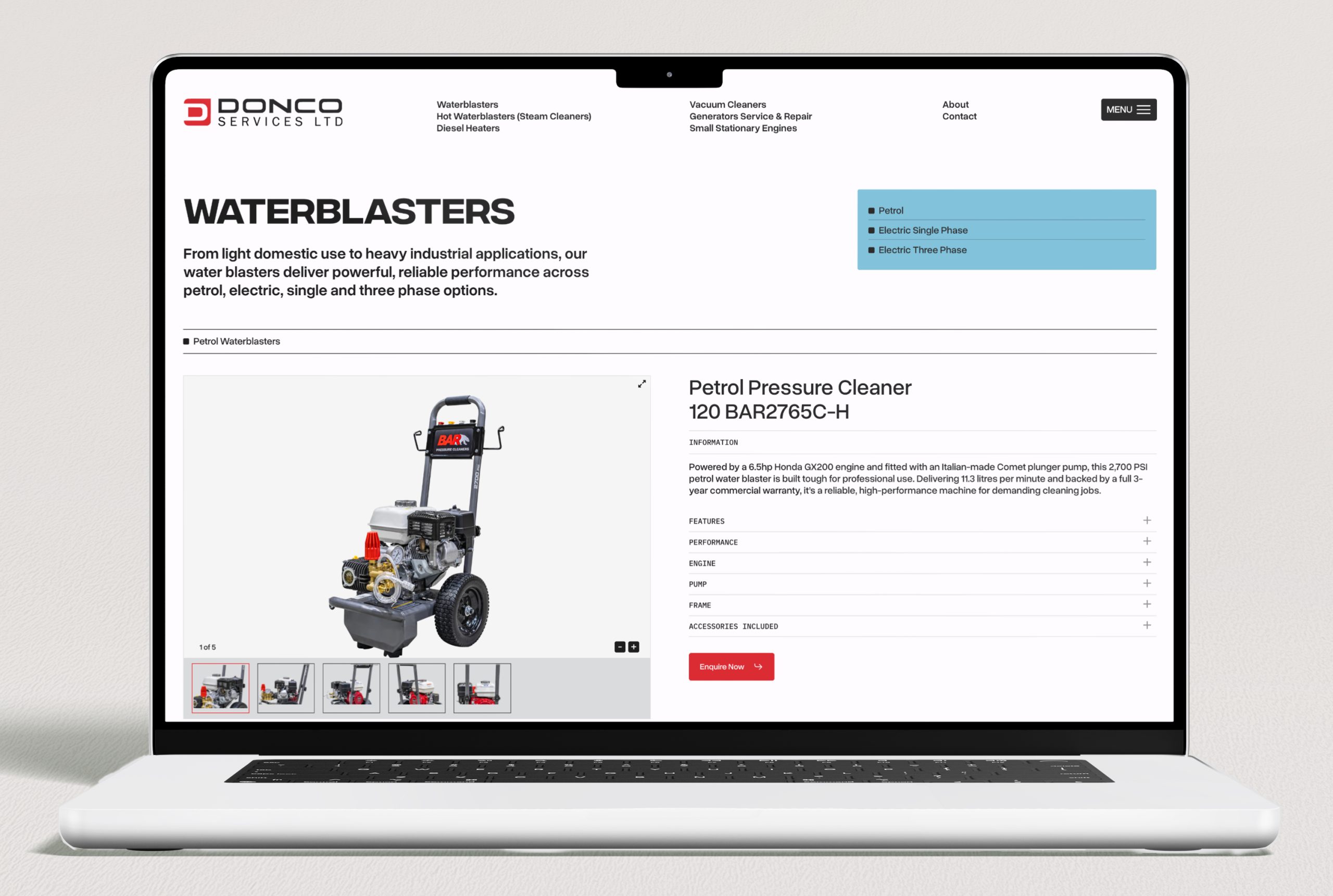
Donco Services WordPress website built by Sky Media, showing categorised industrial equipment catalogue with detailed product descriptions and specifications.

The Donco Services website built by Sky Media, a detailed product catalogue that helps customers research and self-qualify before visiting the Christchurch showroom.

3. Make it fast and easy on mobile

Most local shopping searches happen on a phone, often while someone is already out and about. If your website loads slowly, is hard to navigate on a small screen, or makes it difficult to find your phone number or address, you’re losing customers at the moment of highest intent.

A customer who searches “outdoor furniture store open now near me”, clicks your website, and immediately finds your address and phone number in a tap-to-call format will call you. The same customer who clicks your website and has to wait four seconds for it to load, then scroll through a full-screen homepage banner to find your contact details, will click back and try the next result.

Strategy 4: Use Reviews as a Competitive Weapon

Here’s something the big chains genuinely can’t replicate: authentic, personal, relationship-driven reviews from real local customers.

Bunnings has thousands of reviews but they’re national, generic, and largely about parking and wait times. An independent outdoor furniture store in Hamilton with 85 reviews that mention specific staff members by name, comment on the quality of advice they received, and describe what they bought and why. That review profile tells a completely different story, one that no chain can manufacture.

Reviews matter for three reasons in this context:

  • Local SEO rankings. Google’s local algorithm weights review volume and recency as a significant ranking signal and having more good reviews means better map pack placement.
  • Click-through rate. In a row of local search results, a business with 95 reviews and 4.8 stars will get more clicks than one with 12 reviews and 4.1 stars, even if both appear in the same position.
  • Conversion. Reviews that describe specific products, specific advice, and specific staff members are extraordinarily persuasive. They do the sales job before the customer has even walked in the door.

Build a system for collecting reviews consistently: ask every happy customer, send a direct link, and make it a part of the post-sale or post-visit routine. A steady stream of fresh reviews is one of the biggest advantages a local retailer has over a national chain.

Strategy 5: Create the Content Your Competitors Ignore

Large chains produce generic content at scale. They don’t have time to go deep on local topics, niche product knowledge, or the specific questions that your particular customers ask. That’s a gap you can fill and it builds SEO value over time.

A few examples of content that works well for independent NZ retailers:

  • Buying guides for your niche. “How to choose the right outdoor furniture for a NZ coastal property”, “The difference between entry-level and trade-grade power tools”, “What to look for when buying a kids bike for NZ terrain”. These attract research-phase buyers and position you as the expert.
  • Local-angle content. “Best plants for Canterbury gardens”, “Outdoor furniture built for NZ summers”, “Why NZ homes need [specific product]”. This content ranks for searches big chains simply won’t write about.
  • New arrivals and brand spotlights. Regular posts about new stock, new brands, or seasonal ranges keep your site fresh, give Google new content to index, and give customers a reason to come back.

You don’t need to publish constantly. Four to six well-written, genuinely useful posts per year will compound in value over time far more than a dozen thin pieces.

Strategy 6: Be Findable for “Near Me” and Same-Day Searches

One of the clearest advantages local retailers have over online-only big chains is physical presence, and Google increasingly rewards this for shoppers who want something now.

Searches like “outdoor chairs near me open now”, “power tools Christchurch same day”, and “baby clothes store open Saturday” are high-intent queries that independent retailers are uniquely positioned to win. The person searching isn’t looking for the cheapest price or the biggest range instead they want it today, locally.

To capture these searches:

  • Keep your Google Business Profile hours scrupulously accurate, including public holidays
  • Enable the “In-store pickup” and “Visit in store” attributes on your GBP if applicable
  • Use the Products section of your GBP to show what you carry as this feeds into Google’s local inventory-style results
  • If you have real-time inventory, platforms like Shopify can sync stock to Google Merchant Center, letting Google show whether a product is in-store right now

This last point is genuinely powerful. A local customer who can see that the specific item they want is in stock at a store two kilometres away will drive there before they’ll wait for delivery from an online retailer.

Putting It Together: Where to Start

If you’re an independent NZ retailer and this all feels like a lot, the priority order is straightforward:

  1. Get your Google Business Profile complete and actively maintained. This is your highest-leverage, lowest-cost starting point.
  2. Make sure your website loads fast on mobile, shows your location and hours immediately, and clearly describes your specialisation.
  3. Build a system for collecting Google reviews consistently.
  4. If you sell online or want to, set up Google Merchant Center and get your products into free Shopping listings.
  5. Consider Google Shopping Ads for your best-margin products once your feed is clean and optimised.
  6. Start producing local, niche content that the chains won’t write.

None of these require a massive budget but they require consistency and attention which independent retailers, by their nature, are better positioned to deliver than a national chain managing hundreds of locations.

Ready to Compete More Effectively Online?

Sky Media works with NZ retailers on the full picture: website design and development, local SEO, Google Shopping setup, and digital marketing strategy. Whether you’re starting from scratch or want to get more from what you’ve already built, we can help you figure out where the biggest opportunities are.

If you’d like a straight-talking assessment of where your current online presence is leaving opportunities on the table, get in touch.


How to deal with bad Google reviews

What to Do When Someone Leaves Your Business a Bad Google Review

By Digital Marketing, Tips and Guides

You’re checking your Google Business Profile and there it is — a one-star review. Maybe it’s detailed and angry. Maybe it’s vague and unfair. Maybe it’s from someone you genuinely can’t place.

Whatever the circumstances, the first thought is either fire back or pretend it isn’t there. Neither of those is the right move.

A bad review is not the end of the world, and in many cases, how you respond to a negative review actually matters more to prospective customers than the review itself. This guide walks through exactly what to do, step by step, including when you can get a review removed and when you can’t.

How to deal with bad Google reviews

First: Don’t React Immediately

The worst responses to negative reviews are written in the first five minutes when the sting is fresh and the temptation to defend yourself is strongest.

Before you write a single word, give yourself time to cool down. Read the review again the next morning with fresh eyes. Ask a trusted colleague to read it too.

This matters because your response isn’t just for the person who left the review. It’s for every future customer who reads it, and they will read it. Research consistently shows that prospective customers pay close attention to how businesses handle negative feedback. A calm, professional response to a bad review can actually increase trust. A defensive or aggressive one does the opposite.

Step 1: Understand What You’re Actually Dealing With

Not all negative reviews are the same, and your approach should depend on what kind you’re dealing with. There are broadly three types:

A genuine complaint from a real customer
The experience they describe happened. They felt let down. Whether the situation was entirely in your control or not, their frustration is real. This is the most common kind, and the most important to handle well.

An exaggerated or unfair review from a real customer
Something did happen, but the review significantly overstates it, leaves out important context, or characterises the situation in a way that feels unfair. These are frustrating because there’s a kernel of truth buried in something that reads as far worse than it was.

A fake or mistaken review
The reviewer describes an experience that never happened, names the wrong business, or appears to be left by a competitor. These are less common but they do happen, and Google has a process for flagging them.

Step 2: Respond Publicly and The Right Way

For genuine complaints and unfair reviews alike, a public response is almost always the right move. Silence reads as indifference. A good response demonstrates accountability, professionalism, and that there’s a real human behind the business.

Here’s what a strong response looks like:

  1. Acknowledge. Start by recognising the customer’s experience. Don’t argue about the facts in your opening line. “We’re sorry to hear your experience didn’t meet expectations” costs nothing and immediately sets a constructive tone.
  2. Take responsibility where it’s warranted.  If something genuinely went wrong on your end, own it. Customers respect honesty far more than deflection. You don’t need to air every detail publicly, but acknowledging fault where it exists disarms the review.
  3. Provide context, briefly. If there’s something important a reader wouldn’t know from the review alone such as an unusual circumstance, a policy that applies here, a miscommunication, you can mention it. Keep it short and non-confrontational.
  4. Offer to resolve it offline.  Invite the customer to continue the conversation directly. Include a name and contact method. This shows you’re serious about fixing things and moves the difficult conversation out of the public eye.
  5. Keep it short. Three to five sentences is usually enough. Long responses can feel defensive. Short ones feel confident.

Here’s an example of how that plays out in practice:

Hi [Name], thank you for taking the time to share your feedback. We’re sorry to hear the project didn’t meet the standard you expected — that’s not the experience we aim to deliver. We’d genuinely like to understand what happened and make it right. Please feel free to contact us directly at [email/phone] and we’ll prioritise getting this resolved.
— [Your name], [Business name]

Notice what that response does: it’s calm, it acknowledges the complaint without admitting specific fault, it offers a path forward, and it’s signed personally. It reads as trustworthy which is the goal.

What NOT to do

  • Don’t argue the facts point-by-point in your response. It looks defensive to everyone reading.
  • Don’t apologise excessively. One genuine acknowledgement is enough.
  • Don’t copy-paste the same generic response to every review. It reads as automated and impersonal.
  • Don’t name-call, challenge the reviewer’s honesty, or suggest they’re lying, even if they are.
  • Don’t offer refunds or compensation publicly. You can do that in a private conversation.

Step 3: Try to Resolve It Privately

Once you’ve posted your public response, reach out to the customer directly if you have their contact details. A genuine attempt to fix the problem, not just a token gesture, often leads to one of two outcomes: either the customer updates or removes their review, or the situation gets resolved and they feel heard, even if the review stays.

A personal phone call goes much further than an email. It signals that you take the situation seriously enough to have a real conversation, not just fire off a template.

What you’re not trying to do is pressure someone into removing a review. That’s both ineffective and counterproductive. What you are doing is giving a real customer a genuine chance to feel heard and have their problem solved. That’s just good business, and the review outcome is a side effect, not the goal.

Step 4: Know When (and How) to Flag a Review for Removal

Google will remove reviews but only in specific circumstances, and it’s not a quick process.
You can flag a review for removal if:

  • It is clearly fake. It describes an experience that never happened, from someone who was never a customer.
  • It is from a competitor or someone with a clear conflict of interest.
  • It contains hate speech, explicit threats, or discriminatory language.
  • It includes personal information (phone numbers, addresses).
  • It is spam or was posted multiple times.
  • It is for the wrong business. Sometimes people confuse similar business names.

To flag a review, go to your Google Business Profile, find the review, click the three dots next to it, and select “Report review”. You’ll be asked to select a violation category.

Important: Google does not remove reviews simply because they are negative, unfair, or even factually incorrect. A one-star review from a real customer who had a genuinely bad experience, even one you disagree with, will not be removed on those grounds alone.

If your flag is rejected and you believe the review violates Google’s policies, you can appeal through the Google Business Profile support team. This takes longer and isn’t always successful, but it’s available as an option.

Step 5: Bury It With Better Reviews

Here’s the honest truth: if you have 60 reviews averaging 4.7 stars and one angry one-star review, most people will barely notice it. In fact, a small number of negative reviews within an otherwise strong profile can actually increase credibility. They signal that your reviews are real, not manufactured.

The best long-term response to a bad review isn’t a clever reply. It’s an ongoing system for collecting positive ones.

A few simple things that work for NZ businesses:

  • Ask every happy customer directly the moment after a job well done, or the end of a positive service interaction.
  • Send a follow-up text or email with a direct link to your Google review page and make it one click.
    Ask customers to mention the specific service or location in their review. It helps your SEO and makes the review more useful to future readers.
  • Respond to positive reviews too. It shows you’re engaged and grateful, not just reactive when things go wrong.

A steady flow of genuine, recent reviews does more to protect your reputation than anything else. A bad review from three months ago looks very different when it’s surrounded by many positive ones from the last few weeks.

What If the Review Is Genuinely Unfair?

This is the hardest scenario, when you know the review is exaggerated, out of context, or simply not accurate, but it doesn’t meet Google’s removal criteria. The temptation is to say so publicly. Resist it.

A response that effectively says “this reviewer is wrong” rarely lands well, even when it’s true. Other readers don’t have the context to judge who’s right, and a business that publicly disputes customer accounts tends to look worse, not better.

Instead, use your public response to tell your side of the story without arguing. Something like:

We take all feedback seriously and we’re sorry this was your experience. Our standard process is [X], and we’d welcome the opportunity to discuss this further at [contact].
— [Your name], [Business name]

That response tells the next reader: this business has good processes, they’re open to conversation, and there may be more to this story than one person’s account. That’s the best you can do, and it’s often enough.

The Bigger Picture: Your Review Profile Is Part of Your Business

Your Google reviews are public-facing and permanent. They show up on your Google Business Profile, in Google Maps, in search results, and, increasingly, in AI-generated summaries that Google surfaces when people search for businesses like yours.

How you handle criticism is part of your brand. A business that responds professionally to a bad review tells potential customers: these people are accountable. They take their work seriously. If something goes wrong, they’ll deal with it like adults.

That’s a far more powerful signal than any marketing copy you write about yourself.
The businesses that manage their review profiles well, actively collecting positive reviews, responding promptly to every review good or bad, and handling complaints with professionalism consistently outperform those that don’t, both in Google rankings and in customer trust.

Quick Reference: Bad Review Response Checklist

  1. Wait before responding. Don’t write your reply in the heat of the moment.
  2. Identify the type: genuine complaint, unfair/exaggerated, or fake.
  3. Write a calm, brief public response: acknowledge, contextualise, offer to resolve offline.
  4. Don’t argue, don’t over-apologise, don’t copy-paste generic responses.
  5. Follow up privately to genuinely resolve the issue if possible.
  6. Flag for removal only if it violates Google’s policies, not just because it’s negative.
  7. Double down on collecting positive reviews to shift the overall picture.

Need Help Managing Your Google Reviews and Local SEO?

Your Google Business Profile, including how your reviews look and how consistently you respond to them, is one of the strongest signals Google uses for local search rankings. It’s also one of the first things a prospective customer sees.

Sky Media helps NZ businesses build and maintain the kind of online presence that earns trust before the first call. If you’d like a second set of eyes on your GBP, your review profile, or your overall local SEO, we offer a free audit.

Digital Marketing for Tradies: How NZ Builders, Plumbers & Electricians Get More Leads Online

By Digital Marketing, Tips and Guides

Word of mouth used to be enough. For a long time, it was. But for most NZ tradies today, referrals alone don’t fill the calendar, especially if you’re growing, branching into new areas, or trying to reduce the slow periods that come every year.

The tradies consistently winning new work are the ones who’ve figured out how to be visible online when someone picks up their phone and searches “electrician near me” or “builder Wellington quote”. That search happens hundreds of times a day across New Zealand, and right now, someone is getting that job, and it might not be you.

This guide is a plain-language breakdown of what actually works for tradies online

Why Digital Marketing Works Differently for Tradies

Tradies have a natural advantage in digital marketing that a lot of industries don’t: you serve a specific local area, and Google is built to reward that.

When someone searches for a tradie, they’re not browsing, they have a problem right now, and they need it fixed. That’s called high-intent search, and it’s the best kind of traffic you can get. These are people who are actively looking to hire, often with urgency.

The challenge is making sure you show up, and making sure that when you do, your online presence is good enough to earn the call over the other options on the page.

The Four Things That Drive Tradie Leads Online

You don’t need to do everything. But there are four areas where most tradie businesses see the biggest return:

1. Your Google Business Profile

If you only do one thing from this entire article, make it this: set up and optimise your Google Business Profile (GBP).

Your GBP is what appears in Google Maps and the map pack. The three businesses that show up at the top of local search results. It’s free, it’s visible, and for trades work, it’s often the first thing a potential customer sees.

A well-optimised GBP for a tradie should have:

  • Your correct trade category (e.g. “Plumber”, “Electrician”, “Builder” — be specific)
  • Your service area clearly defined
  • At least 10 real photos, for example your van, your team, completed jobs
  • A steady flow of Google reviews from happy customers
  • Your services listed individually (e.g. “Hot water cylinder replacement”, “Bathroom rewiring”, “Deck building”)
  • Regular posts and a quick-response habit for reviews and questions

The trades businesses that dominate local search in NZ aren’t doing anything complicated. They’ve just taken the time to fill out and maintain their GBP properly.

2. A Website That Works as a Sales Tool

A lot of tradie websites look like they were built ten years ago and haven’t been touched since. They load slowly, they’re impossible to navigate on a phone, and they give a potential customer no real reason to choose you over anyone else.

Your website is your digital shopfront. If someone clicks through from Google, whether that’s from your GBP, an ad, or an organic result, your website is where they decide whether to call you or hit the back button.

For tradies, the most important things a website needs to do are:

  • Load fast on mobile. Most people searching for trades are on their phone. If your site takes more than a few seconds to load, they’ll leave before they see anything.
  • Show your phone number immediately. It should be at the top of the page, clickable, and visible without scrolling. Don’t make people hunt for it.
  • List your services clearly. Each main service you offer should have its own page or section. This helps customers, and it helps Google understand what you do.
  • Include real photos. Before and after shots, completed jobs, your team at work. Real photos build more trust than anything else on the page.
  • Show social proof. Your Google rating, a few short testimonials, or logos of organisations you’re certified with (e.g. Master Electricians, Licensed Building Practitioners).
  • Have a clear call to action. Whether it’s a quote form or a phone number, make it obvious what you want them to do next.

A good tradie website doesn’t need to be complicated. It needs to be clear, fast, and trustworthy.

3. Google Ads (When You Want Leads Now)

SEO and your Google Business Profile take time to build momentum. Google Ads can fill the gap.

For tradies, Google Ads work particularly well because you can target people who are actively searching for your specific service in your area right now. When someone searches “emergency plumber Auckland” at 8pm on a Tuesday, a well-set-up Google Ad puts you in front of that person at exactly the right moment.

A few things that matter for tradie Google Ads:

  • Search ads only. For most tradies, search ads (text ads that appear above organic results) are the right format. You’re reaching people with immediate intent.
  • Target your actual service area. Don’t pay for clicks from people outside the area you work in. Set your targeting to cover your real coverage zone.
  • Send traffic to a dedicated page. Not your homepage but a page that matches exactly what the ad promised. If your ad says “Registered Electrician Auckland — Free Quote”, the page should open with those words.
  • Track your calls. Google Ads can track which calls came from which ads. Without this, you’re flying blind on what’s working.

Done right, Google Ads can deliver a consistent flow of qualified leads with a measurable cost per enquiry. Done wrong, they burn through budget fast with nothing to show for it which is why getting the setup right matters.

4. Reviews Are Your Most Powerful Marketing Asset

Think about the last time you hired a tradie you’d never used before. Chances are you checked their reviews first.

Your potential customers do exactly the same thing. Reviews are the single most persuasive element of your online presence, more than your website copy, more than your ads, more than your social media.

For tradies, the goal is a steady, ongoing stream of genuine reviews — not a one-off burst.

Here’s what works:

  • After every completed job, ask the customer directly: “Would you mind leaving us a quick Google review? It really helps us out.”
  • Follow up with a text or email that includes a direct link to your Google review page, make it one tap, not a process.
  • Ask customers to mention the specific job and location in their review (e.g. “bathroom renovation in Papakura”); these details help your local SEO.
  • Respond to every review, good and bad. It shows professionalism and signals to Google that you’re active.

A builder with 60 solid reviews will consistently win more work than one with 5, even if the quality of work is identical. Reviews are trust at scale.

Here’s an example from one of our clients — Tasman Sparkies, a Nelson-based electrical business. Their website is built to convert visitors into calls.

A conversion-focused homepage Sky Media designed for Tasman Sparkies, showing clear services infomation, location, and a prominent call-to-action.

The social proof section of the Tasman Sparkies website, displaying Google reviews to build trust with potential customers.

What About Facebook and Instagram?

Social media comes up a lot in these conversations, so it’s worth addressing directly.

For tradies, social media can work, particularly for brand awareness and showcasing your work. Before and after photos on Facebook or Instagram can do well, especially in local community groups.

But for most trades businesses, social media is a secondary channel. The reason: people don’t usually scroll Facebook when their hot water is broken or they need a new circuit board. They go to Google.

If you have the time and enjoy it, posting your work on social is worthwhile. But if you’re choosing where to invest your energy first, Google (your GBP, your website, and Ads) will almost always deliver a better return for trades businesses.

A Realistic Starting Point

If you’re not sure where to begin, here’s a practical order:

  • Step 1: Claim and optimise your Google Business Profile. It’s free and often the fastest win.
  • Step 2: Make sure your website is up to date and has clear information, call to action and phone number.
  • Step 3: Start asking every happy customer for a Google review and make it a habit.
  • Step 4: Once your profile and website are solid, consider Google Ads to accelerate leads in specific services or areas.

You don’t need to do all of this overnight. Each step compounds on the next, for example: a better GBP leads to more calls, more calls lead to more reviews, more reviews improve your ranking, and a well-built website converts more of those visitors into jobs.

Quick-Reference: Tradie Digital Marketing Checklist

Google Business Profile claimed, complete, and active

  • Service area and categories set correctly
  • At least 10 real photos uploaded
  • Consistent flow of Google reviews being collected
  • All reviews replied to
  • Website is up to date
  • Phone number visible and tappable at the top of every page
  • Each main service has its own page or section
  • Real job photos on the website
  • Google Ads considered once foundation is in place
  • Website and GBP details consistent (name, address, phone)

The One Mistake Most Tradies Make Online

The most common mistake we see is treating online presence as a set-and-forget thing.

A website built three years ago that hasn’t been touched. A Google Business Profile claimed but never updated. A handful of reviews from 2022. No recent photos.

Google pays attention to freshness and activity and so do customers. A profile or website that looks dormant signals uncertainty — is this business still operating? Are they any good? Do they actually work in my area?

The tradies getting the most leads online are the ones treating their digital presence like a tool that needs to be maintained, not a box they ticked once.

Need Help Getting More Work Through Your Website and Google?

Sky Media works with NZ trade businesses on everything from website design to Google Ads management and local SEO, building the kind of online presence that consistently fills the calendar.

Whether you’re starting from scratch or want to improve what you’ve already got, we can help you figure out where the biggest opportunities are and what to do about them. Talk to Sky Media about Tradie Marketing.

How to Write a Google Review Without a Gmail Email in 2025

By Tips and Guides

Google reviews are a great way to let others know about the quality of a business’s products, or services, while supporting the growth of Kiwi businesses. You may be surprised to find out you don’t even need a Gmail account to leave a review, you can use whatever email you like.

Step 1: Search for the Business

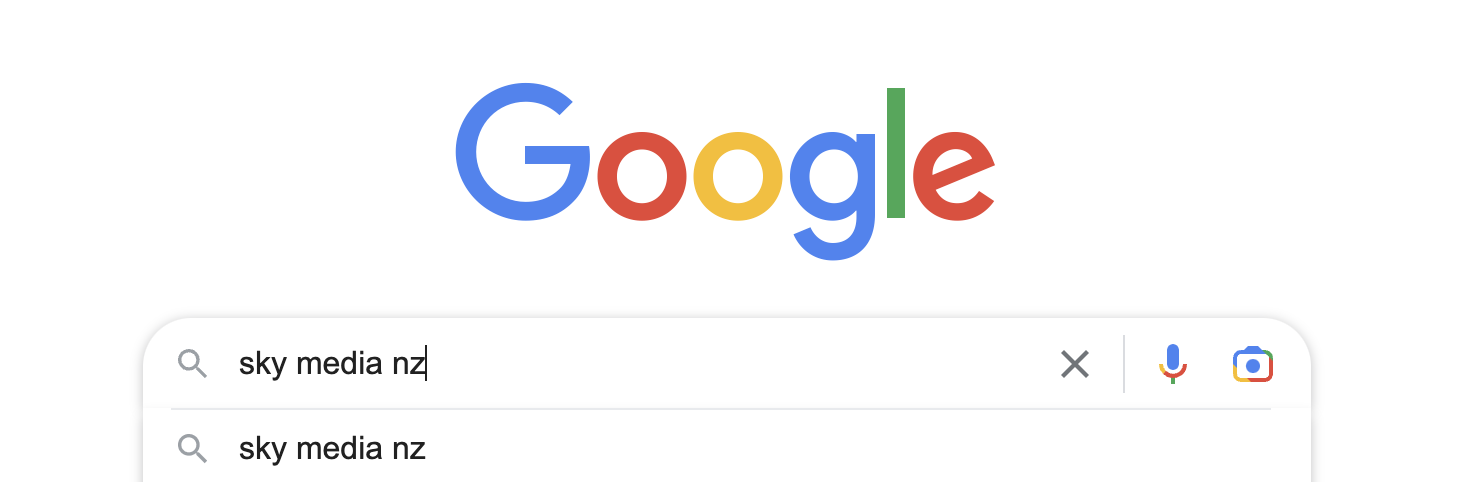
Find the business you want to review on Google using keywords e.g. ‘Sky Media Timaru’.

Step 2: Click the ‘Write a Review’ button

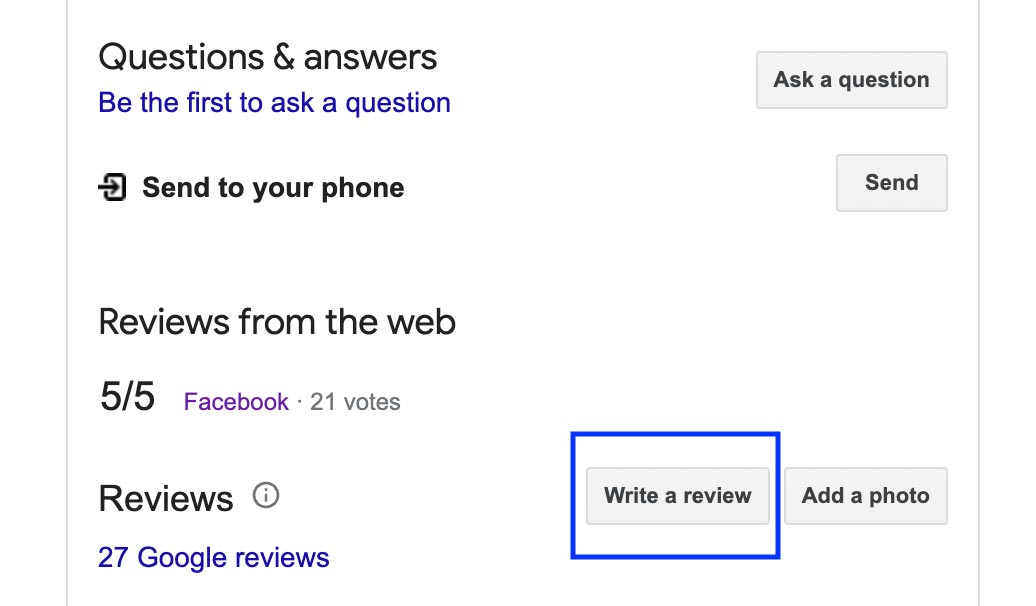
On the right of your screen, scroll down to the Google Reviews section and click on the ‘Write a Review’ button to open the review page.

Step 3: Sign In

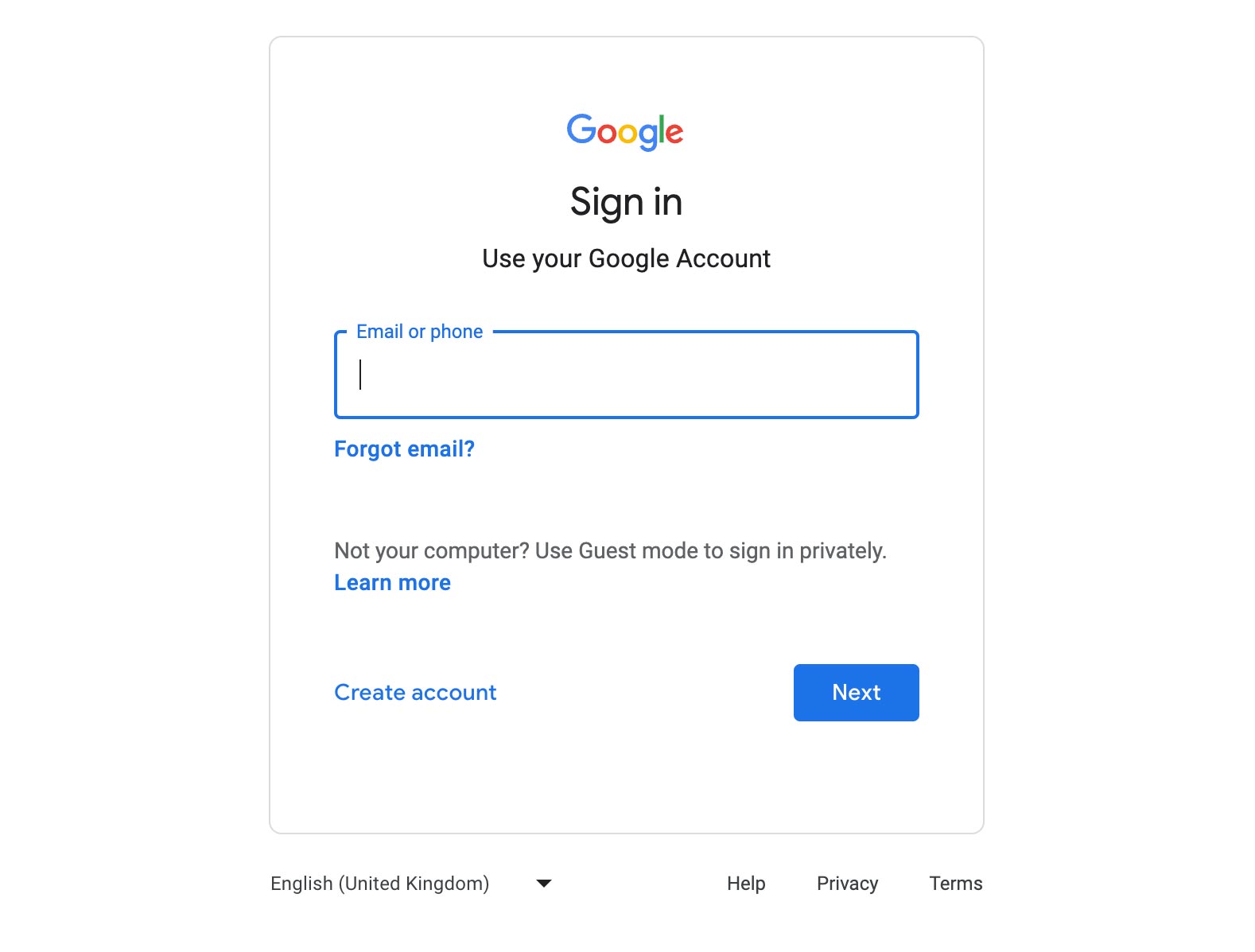
You may be prompted to sign in to your Google account, but, if you don’t have a Gmail account, you can still leave a review by clicking on the ‘Sign in’ button and selecting the ‘Create account’ option.

Step 4: Create a Google Account

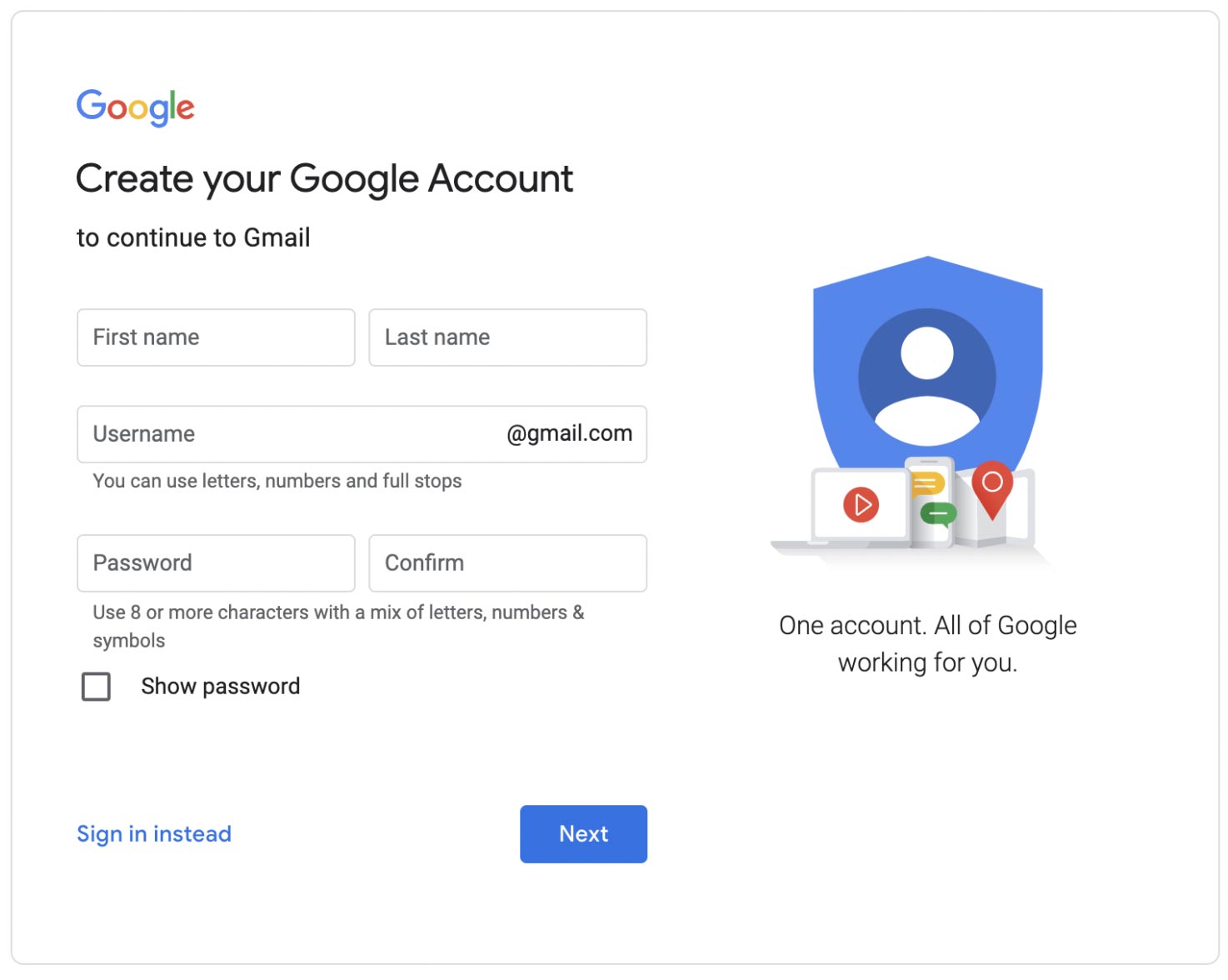
To leave a review, you’ll need to click ‘Create Account,’ then click ‘For My Personal Use,’ then click ‘Next.’

Step 5: Add Your Details

Simply provide your first name and date of birth, then click ‘Next.’ You’ll be offered to select Gmail emails, but instead select ‘Use Your Existing Email.’

Step 6: Google Verification

Google will send a verification code to your chosen email address. Simply enter the verification code and finally, enter your phone number so Google can send a verification to your phone number. If your phone number doesn’t work, it may already be attached to a Google account, so try an alternative number.

Step 7: Write Your Review

Once you’re verified, you can return to the business’s Google page to leave your review. Scroll down past the Google My Business Profile on the right of your screen and click on the ‘Write a Review’ button. Now it’s time to give the business your rating on a scale of 1 to 5 stars and write your review. Once you’ve finished, just click the ‘Post’ button to publish and your review will go live online.

Leaving a Google review without a Gmail account is doable. By following the simple steps above, you can share your experiences, help others, and support Kiwi businesses to grow.

How to Write a Google Review with a Gmail Email in 2025

By Tips and Guides

How to Write a Google Review with a Gmail Email in 2025

Google reviews are a great way to let people know about the quality of a business’s products, or services, while supporting the growth of Kiwi businesses. If you already have a Gmail account, it’s super easy. Here’s how to leave a Google review with a Gmail email:

Step 1: Search for the Business

Find the business you want to review on Google using keywords e.g. ‘Sky Media Timaru’.

Step 2: Click the ‘Write a Review’ button

On the right of your screen, scroll down to the Google Reviews section and click on the ‘Write a Review’ button to open the review page.

Step 3: Login Required

Please note, if you’re not already logged into your Google account in your browser then you may be prompted to sign in to your Google account. If so, please do. If you don’t have a Gmail, head over to our other blog post to find out how to write a review without a Gmail email.

Step 4: Write Your Review

Now it’s time to give the business your rating on a scale of 1 to 5 stars and write your review. Easy. Once you’ve finished, just click the ‘Post’ button to publish and your review will go live online.

As you can see, leaving a Google review is easy when you have a Gmail email. By following the quick steps above, you can share your experiences, help others, and support Kiwi businesses to grow.